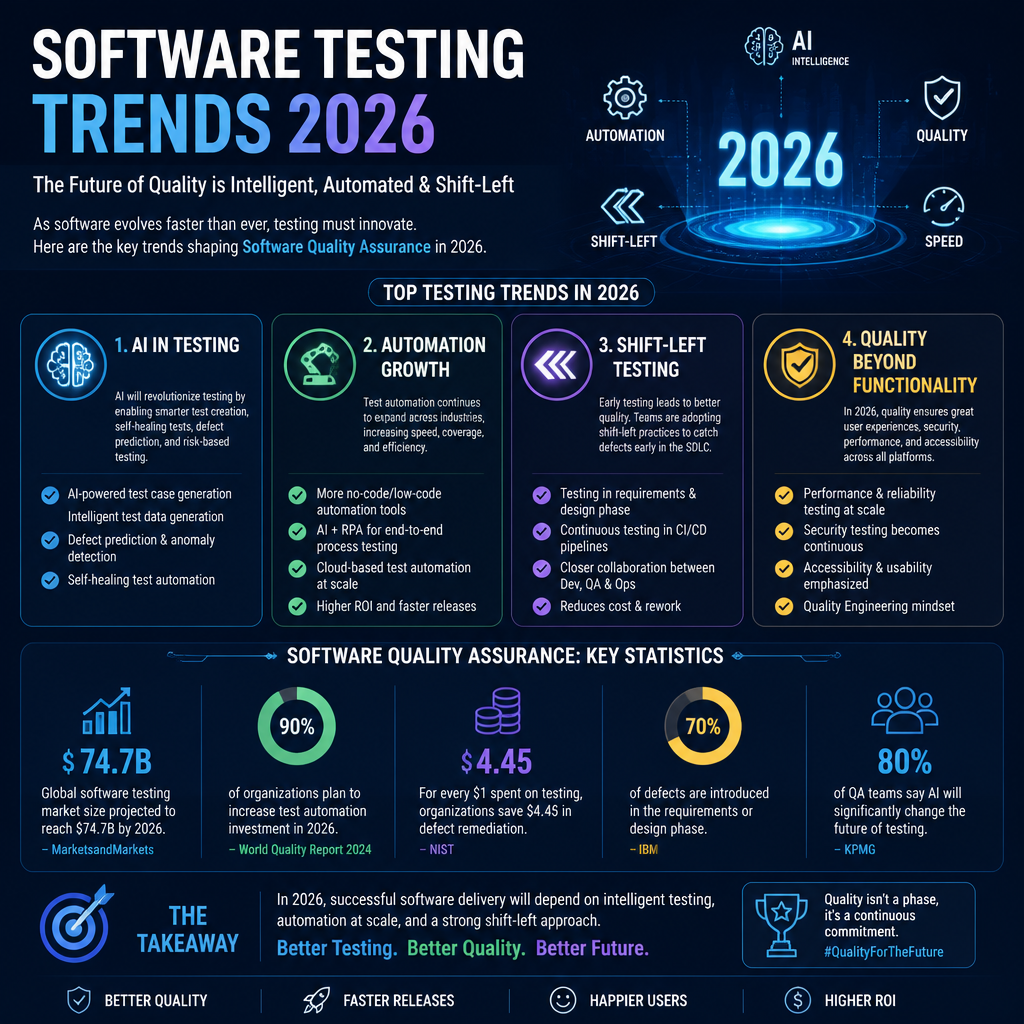
Explore the future of software testing in 2026, highlighting key trends, best practices, and the evolving role of QA teams in the tech landscape.
Understanding Testing in Software Development
Testing isn’t a ceremony. It’s a control system.
In software development, testing is the process we use to reduce uncertainty: does the app behave the way we think it does, under the conditions that actually matter? Yes, you’ll find bugs. But the deeper goal is confidence—confidence that your changes didn’t break the boring parts, and that the scary parts (payments, auth, data integrity, security) are behaving.
When someone asks, “What do you mean by testing?” I usually answer with a slightly annoying follow-up: testing for what? Correctness? Performance? Security? Accessibility? Regression? A demo that won’t embarrass us? Those are different targets, and they demand different tactics.
Here’s the definition I’ve used with teams that needed clarity, not philosophy:
What is the Definition of Testing?
Testing is the act of evaluating a system (or a piece of it) against expectations—requirements, acceptance criteria, contracts, and user workflows—so we can detect defects and decide whether it’s safe to release.
In practice, that means you’re constantly balancing three things:
- Speed: fast feedback so developers don’t context-switch themselves into oblivion.
- Signal: results you can trust (low flake, low noise).
- Coverage of risk: not “100% tested,” but “the stuff that can hurt us is watched closely.”
A mistake I still see in mature orgs: they measure testing by quantity (test cases, code coverage %) instead of outcomes (escaped defects, incident rate, time-to-detect, time-to-fix). Code coverage can be useful, but it’s also easy to game. I’ve seen 90%+ unit coverage on a service that still fell over in production because nobody tested the real failure mode: a third-party API returning partial data and timing out.
A real release week example
A few years back, I was supporting a team shipping a checkout rewrite. We had unit tests, a healthy suite of API tests, and a slick UI automation pack. It all looked “green.”
Then a customer in a different region hit a tax calculation path we didn’t exercise in staging. The bug wasn’t complicated—rounding differences plus a missing currency conversion guard—but it triggered payment failures.
What would’ve caught it?
- A small set of risk-based tests aimed at “money edges” (currency, rounding, retries, taxes).
- Contract tests against the tax service (including timeouts and partial responses).
- Synthetic monitoring in production to validate checkout flows every few minutes.
That’s where testing is going in 2026: fewer “big bang test phases,” more targeted coverage around real risk, plus production feedback loops.
Automation is now the baseline
Organizations aren’t debating whether to automate anymore—they’re debating what not to automate.
A report highlighted that around 72% of organizations now utilize test automation, reflecting a substantial shift toward efficiency in modern testing practices (KiwiQA). I believe that number because I’ve watched the hiring shift: teams expect you to understand CI, test pyramids, mocking strategies, and at least one automation stack. Manual testing isn’t gone, but it’s being repositioned—more exploratory, more scenario-focused, less “click the same thing every sprint.”
A step-by-step approach I’d actually use
If you’re trying to improve testing maturity going into 2026, here’s a sequence that works without boiling the ocean:
- Stabilize CI signal first: quarantine flaky tests, remove sleeps, fix environment drift. If “red” doesn’t mean “real,” the whole system collapses.
- Lock in unit and API coverage for critical paths: auth, payments, permissions, data writes.
- Add a thin UI layer: a small number of end-to-end tests for “happy path” and one or two nasty edge flows. Don’t build a thousand UI tests and call it strategy.
- Add contract tests for dependencies (internal services, key vendors).
- Instrument production: logging, metrics, traces, and synthetic checks. Production is part of your test strategy whether you admit it or not.
Common mistake: teams start at step 3 because UI automation “looks like testing.” It also breaks constantly, runs slowly, and fails for reasons unrelated to your code. UI tests are useful, but only after you’ve earned them.
Testing in Different Contexts
Testing changes shape depending on how you ship, what you’re building, and how much money is on the line. “Best practice” is often just “what worked for a different team with different constraints.”
In 2026 you’ll see stronger specialization by context:
- SaaS teams leaning into CI/CD, observability, feature flags, and rapid rollback.
- Regulated teams (health, finance) doubling down on traceability, evidence, and audit-friendly workflows.
- AI product teams creating new testing layers for model behavior, drift, and safety.
Testing in Agile Development
In Agile, testing can’t be a gate at the end because there isn’t a clean “end.” Requirements evolve. Scope shifts mid-sprint. Work gets split, merged, and re-cut.
The only sane move is continuous testing and a “shift-left” mindset—test earlier, closer to where the code is written.
What that looks like when it’s working:
- Developers run unit tests locally and in pre-merge checks.
- QA/test engineers help shape acceptance criteria before implementation.
- “Done” includes tests, not just code.
- Bugs get found within hours, not weeks.
A tiny habit that changes everything: three amigos (product + dev + QA) reviewing a story together. Not a one-hour meeting. Fifteen minutes. Clarify edge cases early: retries, permissions, localization, data migration, accessibility. That’s “testing,” too—just upstream.
A sprint-level breakdown (practical, not perfect)
Here’s how I’d structure testing inside a two-week sprint:
- Day 1–2: story shaping
- QA asks: “What’s the riskiest thing here?”
- Define acceptance criteria with examples (inputs/outputs).
- Dev starts implementation
- Unit tests created alongside code.
- API tests added for core endpoints.
- Mid-sprint: review test gaps
- Identify missing negative cases (invalid states, permission boundaries).
- Pre-merge: CI checks
- Fast tests run first; slower suites run on merge.
- End of sprint: exploratory pass
- QA runs targeted exploratory testing around the riskiest workflows.
- Findings turn into automation candidates only if stable and valuable.
Common mistake: teams “shift left” by dumping more work on developers without support—no time, no tooling, no guidance. That isn’t shift-left; that’s just moving the pain.
AI-Driven Testing
AI in testing is real now—but it’s not magic, and it doesn’t fix a messy system.
AI-driven tools can help with:
- Generating test ideas from user stories, logs, and existing test suites.
- Maintaining brittle tests (self-healing locators, smarter waits).
- Prioritizing which tests to run based on code changes.
- Analyzing failures and clustering flaky vs real defects.
Companies like Google and Microsoft are already leveraging AI technologies to manage and optimize their testing processes (DigitalDefynd). That matches what I’m seeing in the wild: AI is getting adopted first where it reduces boring toil—test maintenance, triage, and surfacing “what changed” context.
Where AI helps (and where it lies)
I’ll be blunt: AI can produce convincing nonsense.
- It’ll generate tests that compile but don’t assert anything meaningful.
- It’ll suggest edge cases that sound plausible but don’t exist in your domain.
- It can mask poor architecture by “papering over” flakiness instead of fixing root causes.
If you use AI for testing in 2026, treat it like a junior engineer with unlimited confidence:
- Constrain it: feed it your domain rules, schemas, contracts, and real incident examples.
- Demand assertions: every test needs a clear oracle—what proves the behavior is correct?
- Review outputs: especially around security, money, and permissions.
- Measure impact: did it reduce cycle time or escaped defects? If not, it’s theater.
A common failure mode I’ve seen: a team auto-generates hundreds of UI tests with an AI tool, celebrates “coverage,” then spends the next month fighting a flaky suite that blocks releases. The better path is boring: generate a small set of high-value tests, stabilize them, then expand.
The Significance of Testing Terminology
Terminology sounds academic until you’re in a release war room and everyone is using the same word to mean different things.
I’ve watched teams lose days because of sloppy language:
- “It’s tested” meant “I ran it once on my laptop.”
- “It’s covered” meant “unit tests hit the lines, but not the behavior.”
- “QA signed off” meant “QA didn’t have time to verify the edge cases.”
If you want fewer arguments and faster shipping in 2026, get crisp on definitions.
Key Terminology in Software Testing
-
Shift-Left Testing: Moving testing earlier in the lifecycle (planning, design, development). The payoff is cheaper fixes and faster feedback. The trap is pretending it’s a slogan instead of resourcing it.
-
Continuous Testing: Tests run as part of the CI/CD pipeline, giving rapid feedback across unit, integration, and sometimes end-to-end checks. The goal isn’t “run everything always.” It’s “run the right things automatically, at the right time.”
-
Risk-Based Testing: Prioritizing tests based on impact and likelihood of failure. This is how mature teams survive complexity—by focusing on what can actually hurt the business.
The terms I force teams to define
If I’m onboarding to a new org, I ask for plain-English definitions of these five items:
- Done: Does it include tests? Documentation? Monitoring? Rollback plan?
- Regression: Which workflows are non-negotiable every release?
- Severity vs priority: Who decides, and how fast do we respond?
- Flaky: What failure rate triggers quarantine or removal?
- Acceptance criteria: Are they examples a tester can execute, or vague wishes?
This sounds picky, but it prevents the “silent mismatch” that causes escapes.
Importance of Software Quality Assurance
As companies keep pushing digital transformation, software quality assurance becomes less of a department and more of a system. QA is how you keep speed from turning into chaos.
With increasing complexity in software systems, effective QA methodologies are essential to ensure reliable and secure products (KJR). The way I frame it to leadership: QA isn’t a cost center—it’s how you avoid paying for the same bug three times (development, support, reputation).
A quick “terminology saved us” story
On one team, we had constant fights about whether a release was “blocked.” Product thought blocked meant “no new features.” Engineering thought blocked meant “CI is red.” QA thought blocked meant “known critical bug.”
We fixed it with a simple release rubric:
- Blocked: customer data loss, payment failure, auth bypass, or security issue.
- Deferable: cosmetic issues, rare UI glitches with a workaround.
- Needs decision: anything in between, reviewed by a specific person (not a committee).
Incidents dropped, not because we wrote more tests, but because we stopped arguing in circles.
Conclusion
In 2026, the teams who win at software testing won’t be the ones with the biggest test suite. They’ll be the ones with the cleanest feedback loops and the least self-inflicted noise.
My stance is pretty boring (on purpose): stabilize your CI signal, automate what’s stable and high-value, test risks instead of chasing coverage metrics, and use AI carefully—mostly to reduce toil, not to outsource judgment.
If you want a concrete next step this week: pick one critical workflow (login, checkout, permission change, data export) and map it end-to-end. Write down the top five ways it can fail, then make sure you have at least one strong automated check for each failure mode—unit/API/contract/synthetic, whatever fits. That exercise exposes gaps fast, and it keeps the conversation grounded in reality.
Keep your testing language sharp, your pipelines honest, and your “green builds” meaningful. The rest is just tooling.
Latest Software Testing Statistics (2026 Edition)
Software Testing Trends 2026: The Ultimate QA Guide
Leave a Reply