Discover the top 10 SEO plugins for WordPress in 2026 to boost your website’s search engine optimization. Get insights on the best tools for your needs!
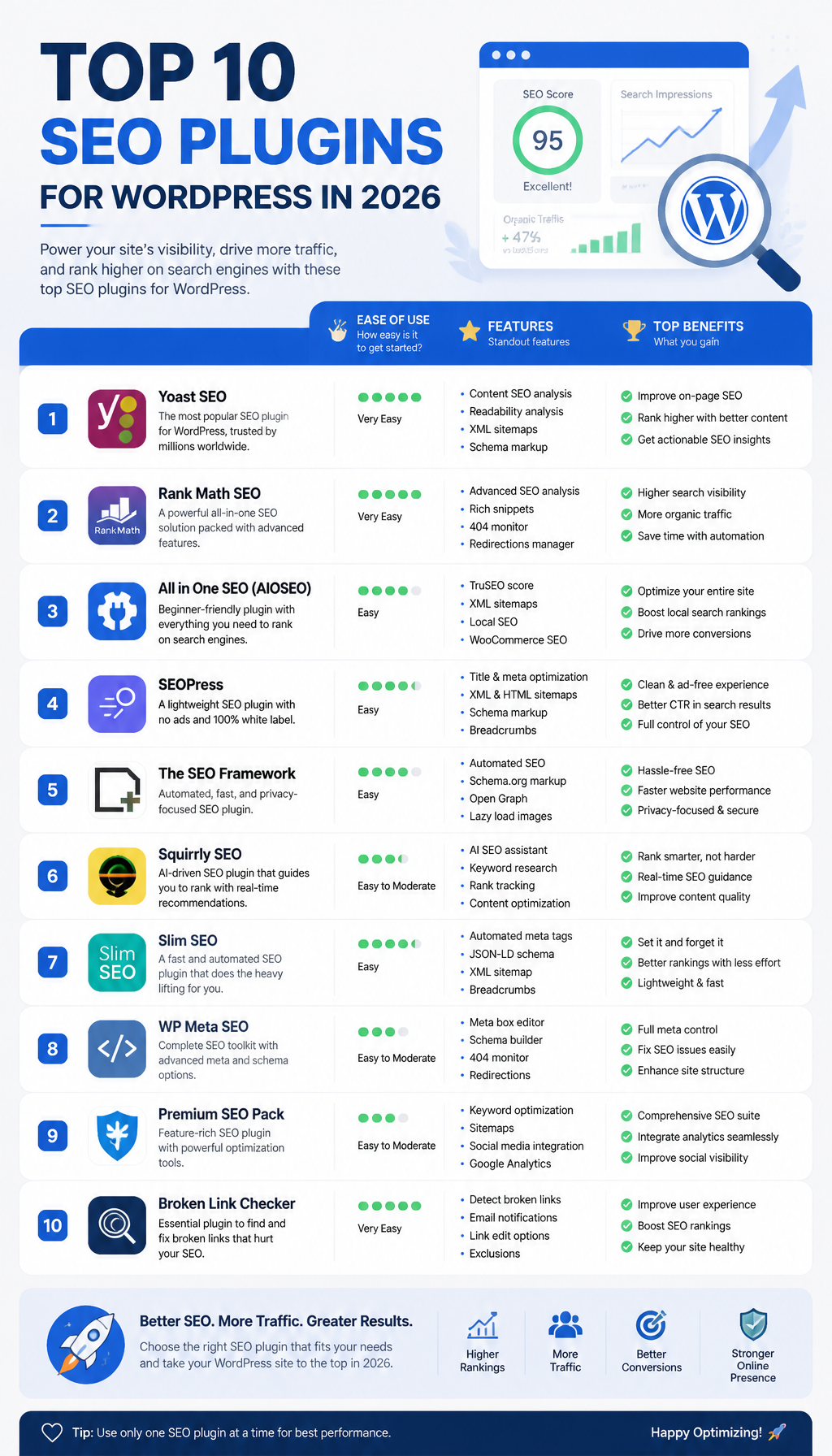
Discover the Top 10 SEO Plugins for WordPress in 2026
When it comes to WordPress SEO, the “best” plugin is the one you’ll keep configured correctly six months from now. These are the 10 I see used most successfully in 2026—across blogs, small business sites, and stores.
1. Yoast SEO
Yoast SEO remains a popular choice among WordPress users due to its comprehensive features and user-friendly interface. It allows you to optimize your content for targeted keywords, manage meta descriptions, and generate XML sitemaps effortlessly. Its built-in readability analysis provides real-time feedback, helping writers improve their content quality, which is increasingly important in today’s SEO landscape where user experience is prioritized.
One thing Yoast still does well: it nudges non-SEO people into decent habits. If you’ve ever tried to get a team of writers to consistently use one H1, write a sane meta description, and avoid publishing “Untitled Draft” pages (yes, I’ve seen it), Yoast’s checks catch a lot of that before it leaks into production.
That said, Yoast can feel heavy if you enable every bell and whistle. So, if you’re chasing performance, I’d keep the feature set tight—sitemaps, titles/metas, basic schema—and turn off anything you don’t actively use. Fewer moving parts means fewer surprises after updates.
Key Features:
- Real-time content analysis and readability scores
- Automatic XML sitemap generation
- Easy integration with social media
- Premium features for advanced SEO tasks
You can learn more about Yoast SEO here.
2. Rank Math
Emerging as a strong competitor, Rank Math offers advanced SEO features within a single plugin. It supports multiple keyword targeting and provides detailed insights into your website’s performance. With its user-friendly setup wizard, Rank Math makes it easy for beginners to configure essential settings. AI integration further enhances its functionality, allowing for accurate keyword suggestions and content optimization.
Rank Math is the plugin I reach for when I know the site will need more “SEO knobs” later—schema variations, granular controls, and lots of little toggles. Because you get so much in one plugin, you can avoid stacking three separate add-ons that all want to inject their own schema (and then you’re debugging why Google sees conflicting markup).
Still, it’s easy to over-configure. I’ve watched site owners turn on every module on day one, then wonder why the admin feels sluggish and the UI is cluttered. Start with the setup wizard, enable only what matches your roadmap (local, Woo, schema), then revisit in a month when you have real data from Search Console.
Key Features:
- Supports up to 5 focus keywords
- Built-in SEO audit tool
- Rich snippets support
n- Integration with Google Schema Markup
For more information, check out Rank Math’s features here.
3. All in One SEO Pack (AIOSEO)
AIOSEO offers a robust alternative for those looking for an all-in-one solution. It features an easy-to-use interface with advanced options for experienced users. AIOSEO enables users to leverage various SEO techniques, including social media integration and performance analytics, which are crucial for monitoring your site’s search engine visibility.
AIOSEO tends to work well for business sites where you want predictable defaults, a guided setup, and fewer “SEO philosophy” arguments inside the team. It’s also friendly when you’re handing a site off to a client later—settings are discoverable, and you don’t need a week of training just to change how titles render.
One practical win: when you’re doing a content refresh project, the combination of audits + metadata controls helps you move fast without breaking structure. I’ve used it on sites with hundreds of legacy pages where the main job was cleaning titles, improving descriptions, and tightening index/noindex rules so thin pages stop soaking up crawl budget.
Key Features:
- Comprehensive SEO audit tools
- Support for local SEO
- Advanced schema support
- WooCommerce support for e-commerce sites
Discover AIOSEO here.
4. SEOPress
SEOPress is an ad-free SEO plugin loved for its simplicity and effectiveness. It provides users with powerful features that rival premium plugins without the cost. The plugin includes content analysis, social media optimization, and Google Analytics integration, making it a great choice for budget-conscious site owners.
I’m biased toward tools that stay out of your way, and SEOPress usually does. No constant upsells, no loud UI, just the settings you need. That matters more than people think, because SEO is already a long game—if your plugin annoys you, you’ll avoid using it, and then you’re back to publishing pages with missing metadata.
A real-world note: SEOPress is also handy when you’re trying to keep admin clean for non-technical editors. Fewer distractions means fewer accidental changes. If you’ve ever had someone toggle “Discourage search engines” (yep) you’ll appreciate calm interfaces.
Key Features:
- No ads
- Unlimited keywords
- Google Analytics integration
- Built-in content analysis
Learn more about SEOPress here.
5. The SEO Framework
This lightweight plugin, The SEO Framework, is designed for users who want a straightforward SEO tool without unnecessary complexity. Its use of AI helps automate SEO tasks, ensuring that your website remains optimized as you make changes. This makes it a solid option for those looking to keep their site lean and fast.
If your top priority is speed and stability, this one belongs on your shortlist. The SEO Framework is for people who don’t want an “SEO suite,” they want sane technical SEO defaults that don’t bloat the site. So, if you’re already handling keyword research and content strategy elsewhere, a lightweight plugin is often the right call.
I’ve seen it shine on sites that run a lot of other heavy plugins (page builders, LMS, membership). In those stacks, every extra dashboard widget and analysis panel adds friction. Keeping SEO boring and automatic is sometimes the smartest move.
Key Features:
- Automatic SEO settings based on your content
- Local SEO support
- Performance-focused design
- Excellent support for developers
Find out more about The SEO Framework here.
6. Squirrly SEO
Ideal for content marketers and bloggers, Squirrly SEO is built to assist users in creating SEO-friendly content. It uses its own AI to suggest keywords and provide relevant insights, making it easier for users to optimize their articles without extensive SEO knowledge.
Squirrly is most useful when you’re publishing frequently and want coaching inside the editor. Think: small teams, solo bloggers, or marketing folks who don’t live in Ahrefs/SEMrush all day. Because it’s guidance-heavy, it can replace a chunk of “I guess this is fine?” uncertainty.
But you still have to apply judgment. AI suggestions can push you toward safe, generic phrasing, and that’s how content starts to sound the same across the internet. I’ve had better results treating its recommendations like guardrails—fix the obvious issues (missing H2s, weak intro, no internal links), then write like a human.
Key Features:
- Real-time SEO assistance
- Content reports and suggestions
- Keyword research tools
- Integration with Google Search Console
Explore Squirrly SEO here.
7. SmartCrawl
SmartCrawl is a robust plugin that offers essential SEO features while focusing on performance. It comes with a built-in feature set that simplifies tasks like creating sitemaps and optimizing your content for search engines. Its intuitive interface makes it easy to handle SEO tasks regularly.
SmartCrawl is a good fit if you want solid fundamentals without the feeling that you’re piloting a spaceship. It covers the recurring chores—sitemaps, basic on-page checks, redirects—so you can keep momentum during site iterations.
I especially like having 404 monitoring + redirection in the same orbit as SEO settings, because content teams break URLs constantly. A common scenario: someone updates a slug “to be clearer,” then backlinks and internal links start bleeding. Catching that quickly prevents slow ranking decay that’s annoying to diagnose later.
Key Features:
- Automated SEO suggestions
- Speed optimization features
- Comprehensive sitemap generation
- 404 monitoring and redirection tools
You can learn more about SmartCrawl here.
8. WP Meta SEO
For those specifically looking for metadata management, WP Meta SEO excels. It allows users to batch edit meta information, making it a time-saving tool for larger websites. The plugin also includes tools for tracking SEO metrics, ensuring that users can monitor their optimization efforts easily.
Bulk editing is the real story here. When you inherit a site with 300 posts where half the titles are duplicated and the meta descriptions are either blank or auto-generated junk, bulk tools save days. I’ve done the slow manual approach before; it’s miserable, and it’s also how you end up with inconsistent conventions.
WP Meta SEO makes it easier to implement a rule like: “Product pages get this title pattern, blog posts get that one, and category pages are noindex.” Then, as you audit Search Console, you can tighten the pieces that actually matter instead of playing whack-a-mole in individual editors.
Key Features:
- Manage metadata in bulk
- SEO analysis tools
- Integration with Google Analytics
- Internal linking suggestions
Find out more about WP Meta SEO here.
9. Premium SEO Pack
The Premium SEO Pack combines various SEO features into a comprehensive package. It’s suitable for both beginners and advanced users, offering tools for link management, performance audits, and social media integration. This plugin is ideal for those looking to manage SEO across multiple platforms.
Premium SEO Pack is for the “I need a toolbox” crowd. If you’re running multiple properties, or you’re doing ongoing audits for clients, having link tools and analysis sitting right in WordPress can speed up routine checks.
The tradeoff is complexity. More modules means more settings, and more settings means more chances to configure something twice (or worse, conflict with caching/minification plugins). So, if you go this route, document what you turn on and why. Future-you will thank you when you’re troubleshooting after a theme change.
Key Features:
- Complete link management tools
- Unique SEO audit techniques
- Social media analysis
- Customizable features to enhance user experience
Explore the Premium SEO Pack further here.
10. SEO Ultimate
Finally, SEO Ultimate rounds out our list by providing a mix of features that cover on-page SEO and content optimization. It’s particularly beneficial for users who want to gain insights into their SEO performance without needing a deep knowledge of SEO principles.
SEO Ultimate can be a practical choice when you want straightforward controls without committing to a bigger ecosystem. For smaller sites, that’s often enough—clean titles, canonicalization, and basic snippet enhancements.
One caution, though: whichever plugin you pick, avoid running two SEO plugins at the same time “just to test.” I’ve seen sites output double canonicals, messy schema, and conflicting robots directives because someone forgot to fully disable the old one. So, if you migrate, do it deliberately: export settings if possible, switch, then crawl a handful of key pages to confirm what’s being output.
Key Features:
- SEO analysis and suggestions
- Title tag management
- Canonicalization tools
- Ability to create rich snippets
You can check out SEO Ultimate here.
These ten plugins represent the best tools available for search engine optimization in WordPress in 2026. Each offers unique features suited for different needs, ensuring that you can find the right fit for your website. But don’t overthink the list—pick one primary SEO plugin, configure it cleanly, and then measure results in Search Console over the next 30–60 days.
If you’re stuck choosing, here’s my opinionated filter: content-heavy site with multiple authors usually benefits from stronger on-page guidance (Yoast, Squirrly). A performance-sensitive build with a complex plugin stack tends to do better with lighter, quieter tooling (The SEO Framework, SEOPress). For schema-heavy businesses and WooCommerce, I lean toward feature-rich suites (Rank Math, AIOSEO), because duct-taping schema plugins later gets messy fast.
For more insights on the essential tools for WordPress users this year, consider checking out our guides on Best SEO Tools for WordPress in 2026 and Top WordPress CMS Integrations for 2026.
Also, don’t ignore the unsexy part: security and SEO are tied together. If your site gets hacked and starts serving spam pages, rankings can crater overnight, and cleanup takes forever. Pair your SEO setup with a solid security baseline—start here: Best WordPress Security Plugins for 2026.
Pick your plugin, set your defaults (titles, index rules, schema), and publish one genuinely better page this week. That’s the move.
Leave a Reply