Category: AI

  • How Wiki LLM is Transforming Information Access

    Discover how Wiki LLM enhances information access and workflow for researchers and developers. Learn more about its applications and benefits.

    How Wiki LLM is Transforming Information Access

    Explore the innovative ways Wiki LLM is reshaping how developers, data scientists, and researchers access and interact with information.

    Wiki LLM uses language models to make information more accessible, connected, and easier to maintain.

    In practice, I think of it as “chat on top of a wiki,” but with teeth: it’s opinionated about where knowledge lives (files), how it’s linked (structure), and how answers are justified (sources you can inspect). That last part—show me what you used—is the difference between a helpful assistant and a confident liar.

    How Nextly approaches this: when we help teams ship knowledge-heavy internal tooling, we push for source-visible answers first (paths, snippets, commit history), then add polish like chat UI. It keeps trust high, and it keeps maintenance costs from exploding six months later.

    Why Wiki LLM Matters

    Wiki LLM addresses scattered notes, weak retrieval, and difficult knowledge handoffs. It supports research, education, training, and engineering workflows by connecting conversational access with durable documents.

    The real problem: “knowledge debt”

    Most teams don’t have a documentation problem—they have a continuity problem. People join, people leave, and “how we decided” disappears faster than “what we built.” So, because the context vanishes, the same debates get re-litigated.

    A Wiki LLM helps because it makes retrieval feel like asking a colleague, but it still pulls from the same underlying pages your org can edit, review, and version.

    A quick example I’ve seen play out

    A data scientist runs an experiment, gets a weird result, and leaves a note like “maybe leakage??” in a notebook. Two months later, someone else sees the chart, panics, and reruns the whole pipeline. That rerun costs a day, sometimes a week.

    With a Wiki LLM workflow, you can ask: “Why did we flag leakage risk in Experiment 14?” and get an answer that points to the exact note, plus the relevant commit that changed the split logic. You don’t just get an explanation—you get the trail.

    What it’s not solving (so you don’t expect miracles)

    It won’t fix a total lack of documentation. It also won’t make messy writing “clean” without someone doing the work. What it can do is make the existing mess searchable in a way that feels natural, then nudge you toward better structure over time.

    Understanding Wiki LLM

    At beginner level, wiki LLM is a tool that makes information easier to find. At intermediate level, the LLM Wiki Karpathy pattern adds conventions for Markdown files, links, prompts, and review.

    Beginner view: better-than-keyword search

    If you’re new to this, think of Wiki LLM as a layer that lets you ask questions in plain language: “Where did we document the onboarding steps for the API?” or “What assumptions did we make about rate limits?”

    Keyword search tends to fail when you don’t know the exact vocabulary used in the docs. Natural language queries help bridge that gap, because the system can map your phrasing to the relevant pages.

    Intermediate view: the Karpathy-style “LLM wiki” pattern

    The “Karpathy pattern” people mention is basically a set of conventions that keep the system sane:

    • Markdown-first notes so content stays portable.
    • Links between files so context isn’t trapped in one page.
    • Prompts and templates to standardize common pages (experiment writeups, postmortems, decisions).
    • Review gates so the model doesn’t silently rewrite your knowledge base.

    That’s the part that usually gets skipped in hypey demos. The demo shows a chatbot. The value comes from the boring conventions behind it.

    Common mistake: treating it like a one-time import

    I’ve seen teams dump 10,000 pages into a vector DB and declare victory. Then the content drifts, nobody knows what’s current, and the answers start contradicting each other. Wiki LLM works better when it’s tied to a living doc workflow—small edits, frequent reviews, clear owners.

    Language Model and Interface

    The language model interprets queries and synthesizes context. The interface may be a chat panel, command line, editor plugin, or web application, but source visibility remains the key trust feature.

    What the language model should do

    The model’s job is to:

    1. Interpret what you’re asking (even if you ask it poorly).
    2. Pull in relevant context from your knowledge base.
    3. Summarize it without hiding the receipts.

    So yes, it can synthesize. But it should also say, “I used these notes, these files, these sections.” If you can’t inspect that, you’re stuck trusting vibes.

    Interface choices: where teams get it wrong

    I like chat for exploration, but I don’t love chat as the only interface. Chat threads disappear into the void.

    Editor plugins and command-line tools often win for developers because they keep you close to the source. Meanwhile, a web UI tends to work for researchers and analysts who live in docs all day.

    Non-negotiable: source visibility

    If you take one thing from this section, make it this: an answer without traceable sources is just a story. It might be correct. It might also be confidently wrong.

    Show file paths. Show snippets. Show dates or versions when you can. Then the human can make the call.

    The Wiki LLM Implementation

    A practical workflow moves from user input to retrieval, processing, and presentation. Separate evidence gathering from synthesis, expose source paths, and require human approval for durable edits.

    A practical, shippable pipeline

    Here’s the workflow I’ve shipped variants of (and debugged at 2 a.m.):

    1. User asks a question. Keep the raw question; it’s useful for telemetry later.
    2. Query rewriting. Turn “what was that thing about caching?” into a few targeted searches.
    3. Retrieval. Pull candidate pages/snippets (wiki pages, Markdown notes, ADRs, READMEs).
    4. Evidence selection. Drop low-signal chunks; keep the 5–15 that actually answer the question.
    5. Synthesis. Generate an answer and a list of cited sources.
    6. Presentation. Render the answer with expandable citations and “open this file” actions.

    That separation—evidence first, then synthesis—reduces hallucinations in a way you can feel.

    Durable edits: make them explicit

    Letting the model directly rewrite your docs is how you end up with polished nonsense.

    A safer pattern is: the model proposes an edit, but a human approves it like a pull request. Treat documentation changes like code changes when they matter.

    Another common mistake: mixing private and public sources

    If your retrieval layer can grab anything, it will. That becomes a compliance nightmare fast.

    Decide up front what content is allowed. Then enforce it in retrieval, not in a “please behave” system prompt.

    A Modern Librarian

    Wiki LLM resembles a modern librarian: it helps locate related material and organize a research path, but it does not replace source judgment.

    Why the librarian analogy actually works

    A good librarian doesn’t “invent” facts. They:

    • ask clarifying questions,
    • find credible sources,
    • suggest adjacent material you didn’t know existed,
    • and help you build a reading trail.

    That’s what a well-designed Wiki LLM experience feels like when it’s working.

    A moment this helps in real life

    Say you’re doing literature review plus internal research. You ask: “What prior work supports our assumption about X?”

    A librarian-style system will pull internal notes, then point to the external citations you already saved. It won’t pretend it knows the truth—it will show you what you’ve collected and how it connects.

    Where humans still win

    Humans decide which sources are credible, which experiments were flawed, and which interpretations are sloppy. The system can speed you up, but it can’t be your epistemology.

    Misconceptions About Wiki LLM

    Wiki LLM does not replace search engines, eliminate RAG, or guarantee accuracy. It is a structured knowledge workflow that benefits from retrieval, citations, and review.

    “So it replaces Google?”

    No. Search engines are optimized for the open web. A Wiki LLM is optimized for your corpus—your notes, your docs, your decisions.

    Use both. I do.

    “So it eliminates RAG?”

    Also no. Whether you call it RAG or “retrieval,” you still need a way to fetch relevant sources.

    The misconception comes from demos that hide the retrieval step. But retrieval is the backbone; chat is just the face.

    “It guarantees correct answers”

    It doesn’t. It can still misunderstand the question, pull stale docs, or overgeneralize.

    That’s why the review loop matters. I’d rather ship a system that says “I’m not sure—here are the top three sources” than one that always produces a smooth paragraph.

    Applications for Researchers

    Education, research and development, data science, and software engineering can all benefit from connected notes, source-aware synthesis, and searchable project memory.

    R&D and lab work: faster context recovery

    The biggest win is “getting back into the experiment.” If you’ve ever returned to a project after two weeks and felt lost, you know the pain.

    With Wiki LLM, you can ask for a recap: “What did we learn last sprint, and what’s still unproven?” Then you can click through to the raw notes and decide what’s actionable.

    Education and training: less cargo-culting

    Training docs often become scripts people follow without understanding. A conversational layer lets a learner ask “why do we do it this way?” and see the rationale plus the original policy.

    That’s how you reduce cargo-cult behavior—people stop memorizing steps and start understanding constraints.

    Software engineering: project memory that survives churn

    For engineers, the killer use case is decision tracking:

    • Why did we pick this library?
    • Why is this endpoint shaped this way?
    • What tradeoff did we accept?

    If your Wiki LLM can answer those and cite the ADR or PR, onboarding goes from weeks to days.

    Related Concepts and Summary

    Natural language processing supports query interpretation, while artificial intelligence provides the broader field. Wiki LLM applies both to organized information access.

    Where this sits in the bigger landscape

    Natural language processing (NLP) is the set of techniques that help the system understand your query. Artificial intelligence is the umbrella term people use for the whole space.

    Wiki LLM, as a pattern, sits at the intersection of:

    • knowledge management (wikis, docs, notes),
    • retrieval (search, embeddings, indexing),
    • and generation (summaries, drafts, question answering).

    The point that matters

    If you treat this as “AI that answers questions,” you’ll be disappointed.

    If you treat it as a discipline—durable notes, consistent structure, source-aware answers—you can build something that compounds over time.

    A Practical Takeaway

    Wiki LLM turns structured notes into a conversational research surface. Its value depends on durable files, clear prompts, source visibility, and human review.

    A simple starting checklist

    If you want to try this without boiling the ocean, do this for one project:

    1. Put core docs in Markdown (or at least a format you can export).
    2. Create 3–5 page templates: experiments, decisions, onboarding, glossary.
    3. Add links between pages intentionally (not just tags).
    4. Require citations in every answer, even if it’s annoying at first.
    5. Set a review habit: 15 minutes weekly to clean up the highest-traffic pages.

    What I’d avoid on day one

    Don’t start by trying to “make it chat with everything.” That’s how you get noisy retrieval, unclear permissions, and answers nobody trusts.

    Start narrow, earn trust, then expand the corpus.

    FAQs

    What is wiki LLM?

    Wiki LLM is a platform that uses language models to enhance how users access and organize information.

    Is LLM wiki better than RAG?

    LLM Wiki offers more structured and contextualized information access compared to traditional Retrieval-Augmented Generation (RAG) methods.

    What does LLM stand for?

    LLM stands for Large Language Model, which is used in processing the information in Wiki LLM.

    How to use LLM wiki?

    Users can input queries or prompts into the LLM Wiki interface and receive curated information in return.


  • AI and Patient Care: What to Expect in 2026

    AI in healthcare is sliding out of conference demos and into routine clinical work. By 2026, you’ll see it doing unglamorous jobs—flagging a possible finding, drafting a visit summary, sorting referrals, or watching remote vitals—while humans keep the responsibility.

    I’m Editorial Staff, an Author who’s spent 12 years studying and explaining healthcare technology for clinical, academic, and policy audiences. I’ve also watched “promising” tools faceplant because they looked great in a pilot, then added three extra screens and eight extra clicks for nurses.

    So, for 2026, I’m not asking whether an AI sounds smart. I’m asking whether a care team can use it safely on a busy Tuesday, and whether it actually improves things like turnaround time, missed follow-up, medication safety, and access.

    This explainer separates what’s already happening from what’s still speculation. We’ll walk through AI in healthcare examples, the research questions that matter, the AI in healthcare pros and cons, and the thorny “what jobs will AI replace in healthcare” discussion. My stance stays the same: AI should earn its keep by removing friction without weakening the human relationship at the center of care.

    Explore the evolving role of AI in healthcare and its implications for future patient care.

    Put simply, this looks at how AI may reshape patient care by 2026. It won’t show up as one magic, all-purpose brain. Instead, expect lots of small, narrow systems tucked into imaging, documentation, triage, scheduling, research, and monitoring.

    Why AI Matters in Care

    Healthcare keeps generating more data than a person can responsibly review in a normal shift, so AI tries to close that gap. Still, a model only sorts and suggests; a clinician (or care team) has to decide what it means and what to do next.

    Why the Setting Matters

    Better care isn’t only “find disease earlier.” It’s also less duplicate charting, fewer missed follow-ups, and faster routing to the right service. I’ve seen tools that save eight minutes per encounter beat “genius” predictors that nobody trusts—because time is the real constraint.

    One clinic setup I’ve watched work: language software drafts the note, but the physician verifies every clinically meaningful detail before signing. Another example is remote care using a rules-based alert to spot worsening symptoms. Those are small moves, yet they can reshape workload if you actually track false alerts, response time, and whether performance is equitable across patient groups.

    Three Levels of Understanding

    Beginner: What AI Does

    AI learns patterns from examples. In healthcare, those examples can be images, labs, med histories, clinician notes, and device readings. What comes out is usually a prediction, classification, summary, or recommendation—not accountability.

    Common AI in healthcare examples include image prioritization, speech-to-text documentation, symptom intake, appointment routing, and remote monitoring. Early deployments are safest when a human checkpoint is built in on purpose: a radiologist reviews flagged scans, a nurse assesses an alert, and a student learns to interrogate the output instead of treating it like an answer key.

    Intermediate: What Sits Underneath

    Machine learning needs (1) representative data, (2) a tightly defined task, and (3) a plan to test performance after go-live. That last part gets skipped more than people admit. A model can look great in development and then wobble when the scanner changes, the patient mix shifts, or documentation habits evolve.

    If you’re reading AI in healthcare scholarly articles or reviewing an AI in healthcare research paper, don’t stop at accuracy. Check the population, the comparator, whether there’s external validation, and what the clinical endpoint really was. A model can predict risk “well” while doing nothing to improve treatment decisions.

    Advanced: Roles and Accountability

    Once you’re past the basics, governance becomes the hard part. Who signs off on the tool? Who monitors drift? Who explains an AI-driven alert to a patient when it’s wrong—or when it’s right but scary?

    I’m pretty blunt here: deployment should feel more like medication stewardship than “installing software.” Start with one clinical problem, test locally, document the limits, and pause the tool when harm signals show up. It’s slower at first, but it’s still quicker than trying to rebuild trust after a preventable failure.

    AI Applications in Healthcare

    AI already touches multiple points along the care pathway. Diagnostic models can scan MRI images or pathology slides and highlight areas for review. Predictive systems can flag patients at risk of deterioration. Natural-language tools can structure free-text notes, while scheduling systems try to match demand to the staff you actually have.

    From Signal to Decision

    Most production workflows look roughly like this:

    1. Data flows in from an electronic health record, image archive, device, or patient message.
    2. The model converts those inputs into features or internal representations.
    3. A prediction, score, summary, or alert lands in a clinical interface.
    4. A trained professional checks context and picks an action.
    5. The organization records outcomes and monitors errors.

    Step 5 is the difference between a clinical system and a shiny demo. In 2021, I reviewed a pilot that bragged about fast note generation, yet nobody measured correction time. Clinicians ended up spending longer fixing medication names than they’d spent typing the original notes. The uncomfortable truth: you can “save time” in one spot and quietly burn it somewhere else.

    Personalized medicine is similar. An AI system might combine history, genetics, labs, and prior response to suggest options. Even then, the recommendation has to survive real-life constraints—contraindications, patient preference, cost, and access. Data can narrow the menu. It doesn’t choose the meal.

    How Responsible Evaluation Works

    If you want to evaluate AI without getting hypnotized by metrics, a three-step approach holds up well.

    Identify Applications

    Map the workflow: diagnostics, treatment support, monitoring, documentation, and access. Then get concrete—name the user, the decision, the input data, and the plausible harms. If the team can’t answer “what action happens after this alert?”, the project isn’t ready.

    Research the Literature

    Search the scholarly record with a sharp question, not a vague vibe. Look for external validation, prospective testing, subgroup results, and workflow impacts that were actually measured. A paper that only reports area under the curve answers a technical question, not the patient-care question.

    Evaluate Pros and Cons

    Tradeoffs show up fast when you compare the right things: time saved versus alert burden, sensitivity versus missed cases, and convenience versus privacy risk. Don’t forget boring operations either—procurement, training, appeal routes, and downtime procedures.

    In 2024, I helped students critique a model that looked accurate until they asked who would respond overnight. That single “okay, but who’s on the hook at 2 a.m.?” question changed their evaluation more than any graph.

    A GPS for Clinical Judgment

    I often describe AI in healthcare as a GPS for doctors. A GPS reads traffic and suggests a route, but it doesn’t know the driver is panicking, can’t afford parking, or needs a family member present.

    Likewise, AI can chew through more signals than a busy clinician can scan. The provider still chooses the route—and owns the outcome. Also like a GPS, AI can confidently send you down a closed road if the map is stale. That’s why clinical AI needs local checks, visible uncertainty, and a human who can override it without getting punished.

    Common Misconceptions

    “AI Will Replace Professionals”

    People mix up automating tasks with replacing responsibility. AI can draft, sort, flag, and forecast. Meanwhile clinicians still interpret context, explain risk, obtain consent, and take responsibility for action.

    “AI Is Always Unreliable”

    Healthy scepticism is fine; blanket dismissal isn’t analysis. Whether a system is useful depends on the task, the data, the setting, and the user. A narrow image triage tool can be solid in one workflow, while a broad chatbot fails hard in another. Test the actual use case you plan to deploy.

    Clinical Scenarios

    Take MRI review. An algorithm might flag a suspicious region for earlier attention, but the radiologist still evaluates image quality, clinical history, and alternative explanations. The win is prioritization and focus, not automatic diagnosis.

    Personalized medicine plays out the same way in practice. A system can compare treatment patterns across patient data, then present options for review. Still, clinicians have to judge interactions, patient values, affordability, and whether follow-up is realistic.

    For tech teams, that means explanation and override features aren’t “nice to have”—they’re table stakes. For policymakers, it means demanding evidence that the tool improves care, not just that it produces a plausible score.

    Telemedicine and Big Data

    Telemedicine lives or dies on intake, routing, and follow-up. AI can help with virtual assistants, symptom collection, and automated scheduling, but escalation rules must stay brutally clear. A patient with chest pain can’t get lost in a conversational flow.

    Big data is the fuel for many models, yet volume isn’t quality. Duplicated records, missing values, coding shifts, and unequal access can skew results quickly. Because of that, good data governance isn’t just a technical nicety—it supports real performance and public trust.

    What 2026 Should Mean

    By 2026, patient care should feel more assisted, more measured, and more aware of workflow reality. The best systems will stick to narrow tasks while professionals keep authority over diagnosis, treatment, explanation, and compassion.

    A practical standard still works: define the problem, test locally, monitor outcomes, and keep a human accountable. If you want concrete illustrations, start with these AI in healthcare examples and then sanity-check the tradeoffs in the AI in healthcare pros and cons. That’s how you get useful automation without confusing prediction with care.

    Frequently Asked Questions

    How Is AI Being Used in Healthcare Now?

    AI is currently utilized in diagnostics, treatment recommendations, and patient monitoring. It also supports documentation, scheduling, image prioritization, and research analysis when organizations provide suitable oversight.

    What Jobs Will AI Replace in Healthcare?

    AI may replace administrative and data entry roles, but it will also create new opportunities in tech and data analysis. Many existing roles will change instead, adding model review, data governance, workflow design, and patient communication.

    What Are 10 Common Applications of Artificial Intelligence in Healthcare?

    Common applications include radiology imaging, predictive analytics, personal health assistants, and scheduling automation. Other examples include clinical documentation, remote monitoring, pathology support, medication safety checks, referral routing, and research analysis.

    Is AI Actually Improving Healthcare?

    Yes, AI is consistently leading to better diagnoses, streamlined processes, and improved patient outcomes. The result depends on local validation, careful workflow design, and ongoing monitoring rather than the model alone.

    What Are the Pros of Using AI in Healthcare?

    Pros include increased efficiency, enhanced accuracy, and reduced costs in patient care. AI can also help clinicians find relevant information, prioritize work, and tailor support when human review remains part of the process.

    What Are the Cons of AI in Healthcare?

    Cons include potential job displacement, ethical issues around data privacy, and the requirement for rigorous testing before deployment. Other cons AI discussions should include bias, alert fatigue, cybersecurity, unclear accountability, and unequal access.

  • Understanding Anthropic: Key Developments in 2026

    Understanding Anthropic: Key Developments in 2026

    Explore the latest developments at Anthropic in 2026, including their technological advancements, IPO plans, and market impact.

    Understanding Anthropic: Key Developments in 2026

    Anthropic’s influence in the AI landscape has grown sharply in 2026, and not just because people like trying new models. The company has kept rolling out practical updates that make Claude feel less like a toy and more like a coworker you can actually hand work to.

    One standout development is the continued evolution of Claude as a context-aware assistant. In January 2026, Claude Cowork debuted, extending AI programming and task support beyond developers to knowledge workers—analysts, PMs, marketers, support leads—basically anyone living in docs, tickets, and chat threads. That shift matters because “AI for everyone” only works when the interface matches how teams already work.

    The introduction of Claude Tag is another example of Anthropic pushing into real collaboration. Because it integrates with Slack and uses full channel context to decide when to jump in, it reduces the annoying “butt-in” behavior that kills adoption. Anthropic claims it makes Claude roughly 30% more effective at understanding surrounding context, which is the difference between “helpful” and “please stop spamming my channel.” I’ve seen teams abandon assistants fast when they feel noisy, so this design choice is a big deal.

    From my own work, I’ve watched companies win back hours a week once they stop treating AI like a magic box and start treating it like a workflow component. For example, a comms team can tag Claude to draft a first pass, then tighten tone and accuracy in-house—faster, but still controlled. As we move through 2026, the economic impact of tools like Claude is getting easier to argue internally, especially with framing like the Anthropic Economic Index report.

    How Anthropic Differs from ChatGPT

    People keep asking how Claude differs from ChatGPT, and the honest answer is: the gap shows up most when you’re deploying at scale.

    Anthropic focuses heavily on AI safety and ethical principles, aiming for systems that are powerful but also interpretable and steerable. That usually translates into models that behave more predictably when you give them boundaries (“don’t invent numbers,” “cite uncertainty,” “stay in policy”). ChatGPT, by contrast, has generally been positioned first as a broad conversational engine—excellent at talking, sometimes uneven when you force it into strict operational constraints.

    That said, safety emphasis isn’t free. In practice, stricter steering can feel more conservative, and some users read that as “less creative.” But if you’re wiring an assistant into customer support macros or internal policy Q&A, conservative beats chaotic. I’m biased toward boring reliability because I’ve had to clean up after AI-generated nonsense made it into a public-facing asset.

    Understanding Anthropic and Its Impacts

    Anthropic’s story in 2026 isn’t only technical; it’s also financial and strategic. The IPO chatter is part of why the company keeps showing up in investor conversations right next to the biggest names in the space.

    IPO timing and valuation talk

    In 2026, Anthropic is preparing for an initial public offering (IPO), and people are treating it like a potential landmark listing. The company has reportedly filed for its IPO as early as June 2026, and predictions suggest it could achieve a valuation surpassing that of SpaceX—one of those “if this happens, it changes the whole scoreboard” moments.

    According to a report from Finance Yahoo, the potential valuation could exceed $1 trillion as investor interest keeps climbing during the AI boom. If you’ve ever sat in an earnings call Q&A, you know how quickly a number like that rewires expectations for every adjacent company.

    Investors watching the anthropic stock page (and the broader AI basket) are trying to position for upside without getting caught holding hype. Revenues are projected to jump from roughly $9 billion the prior year to an estimated $65 billion in mid-2026. Those are wild numbers, and if they’re even directionally right, they explain the frenzy.

    Who Exactly Owns Anthropic?

    Anthropic remains privately owned, and it’s been fueled by large venture capital commitments from well-known firms. The latest funding round was expected to raise about $50 billion, adding to its existing capital and helping fund rapid expansion.

    Ownership matters because it shapes everything: board pressure, risk tolerance, timeline to profitability, even how aggressive the company gets on partnerships. I’ve seen late-stage private companies optimize for the next round instead of the customer, and it usually leaks into product decisions.

    As Dylan McConnell, I think it’s worth tracking who holds meaningful stakes and what their incentives are, especially if you’re trying to anticipate lockups, liquidity events, or governance changes after a public listing.

    Market Reaction and Future Predictions

    Markets are reacting in real time to AI adoption, and Anthropic’s rise—paired with its safety posture—adds a specific kind of competitive pressure to the space. It’s not just “can you build a model?” anymore. It’s “can you ship something enterprises trust, and can you keep it consistent across messy real-world inputs?”

    Competition and valuation pressure

    The speculation around Anthropic’s IPO reflects broader investor sentiment about what AI companies should be worth. According to a recent article from Bloomberg, a potential IPO could trigger a reevaluation of AI stock valuations across the industry, shifting how companies get priced based on technical advantage and market share.

    That reevaluation cuts both ways. If the public markets decide “AI revenue isn’t as sticky as SaaS,” multiples compress fast. On the other hand, if Claude keeps proving it can live inside real workflows (Slack, docs, ticketing, code review), then the market may reward that with premium valuations.

    One practical tell I watch: how quickly a tool becomes default behavior. When teams stop saying “let’s try Claude” and start saying “tag Claude on this,” you’re past experimentation and into habit. That’s when adoption becomes hard to unwind.

    Final Thoughts

    Anthropic’s developments in 2026 are worth paying attention to because they sit at the intersection of product reality and market momentum. Claude’s workplace push—Claude Cowork, Slack-native context features, and the general “less demo, more daily use” direction—suggests the company is fighting for durable adoption, not just headlines.

    If you’re investing, you’ll want to separate three things: technical quality, distribution, and governance. If you’re a tech professional, the smarter move is usually small pilots with clear success metrics (time saved, error rates, user satisfaction) before you roll it out org-wide.

    Either way, keep your eyes on what ships and how teams actually use it. That’s the part that lasts.


    FAQs

    • Q: How is Anthropic different from ChatGPT?
      A: Anthropic focuses more on AI safety and steerability, while ChatGPT is largely centered around broad conversational AI capabilities.
    • Q: Why is Trump against Anthropic?
      A: Trump has expressed concerns about the implications of AI technology on jobs and society.
    • Q: What exactly does ‘anthropic’ mean?
      A: ‘Anthropic’ refers to a human-centered approach—in this case, building AI with strong attention to how it impacts people.
    • Q: Who is Anthropic owned by?
      A: Anthropic is privately owned, with significant investments from major venture capital firms.
    • Q: What are the latest updates on Anthropic Claude?
      A: Claude continues to roll out workplace-focused features, including deeper context handling and integrations.
    • Q: Is Anthropic planning to go public?
      A: There’s active speculation about an IPO and reporting about timing, but no final, officially confirmed date has been announced yet.
  • Understanding AI Agents in 2026

    Understanding AI Agents in 2026

    Discover what AI agents are, how they function, and their real-world applications in 2026. Learn about their types, examples, and free options.

    What is an AI Agent?

    AI agents are software systems that can perform tasks autonomously on behalf of users or other systems. Essentially, an AI agent analyzes data, makes decisions based on that analysis, and executes actions to achieve specific goals. Think of AI agents as digital assistants that operate independently, often across multiple platforms and systems, to fulfill user requirements effectively.

    What Exactly Does an AI Agent Do?

    An AI agent typically performs several functions, including:

    • Data Analysis: It processes large volumes of data to identify patterns, trends, and insights that inform decision-making.
    • Task Automation: Many AI agents are created to automate routine tasks, which can range from answering customer inquiries to managing emails and scheduling appointments.
    • Interaction: These agents often interface with users through chatbots or voice assistants, providing a seamless user experience while facilitating interactions with technology.
    • Learning: Modern AI agents can improve over time through machine learning, adapting their responses based on past interactions and outcomes.

    Where people get tripped up is the “agent loop.” In practice, a decent agent runs something like: (1) read context → (2) plan → (3) use tools → (4) verify → (5) log + ask for help when uncertain. Because of that loop, it’s not just generating text; it’s coordinating work.

    In many ways, AI agents act similarly to employees; they can take on burdensome tasks, allowing human workers to focus on more complex, strategic initiatives. In my work, I’ve seen teams cut first-response time in support simply by letting an agent do the boring triage—tag the ticket, pull the order details, draft a reply—then hand off to a human for anything weird.

    Common mistake: letting the agent “send” on day one. Draft-first is safer, since you can spot bad assumptions before they become customer-facing.

    Types of AI Agents

    1. Reactive Agents: These agents reply based on the current state of the environment. They do not have memory, meaning they do not store past information.
    2. Deliberative Agents: These agents possess a model of the world and use that model to make decisions, which involves planning and reasoning.
    3. Learning Agents: Such agents improve their performance by learning from their past experiences. An excellent example is how recommendation systems evolve by analyzing user feedback.

    4. Multi-Agent Systems: These consist of multiple agents that collaborate to solve problems that a single agent may find too complex or multifaceted.

    The diversity in AI agents allows organizations to select the type that best fits their specific needs and use cases.

    If you’re choosing for a real product, I’d simplify it like this: reactive agents are fine for “if X then Y,” deliberative agents help when steps matter (refund workflows, approvals), learning agents pay off when you have feedback loops, and multi-agent setups are for when one model can’t reliably juggle everything.

    One tradeoff: more autonomy usually means harder debugging. So, if you can get away with a narrower agent that only touches two systems, you’ll sleep better.

    Is ChatGPT an AI Agent?

    Yes, ChatGPT can be categorized as an AI agent. It interacts with users through natural language processing, enabling it to engage in conversations and respond to inquiries. Programs like ChatGPT can operate in various domains, from customer support to content creation, showcasing the versatility of AI agents in addressing diverse challenges.

    Still, the label depends on how you deploy it. If ChatGPT only chats, it’s closer to an assistant. Once you connect it to tools (ticketing, calendars, repos) and let it take actions, then you’re firmly in “agent” territory.

    Examples of AI Agents

    Various industries are leveraging AI agents to enhance operational efficiency and improve user experiences. Here are a few notable examples:

    AI Agent Microsoft

    Microsoft’s AI agent, Copilot, integrates directly into productivity applications like Word and Excel. Its main purpose is to assist users by generating content, performing calculations, and automating repetitive tasks within the software. For instance, Copilot uses patterns from existing documents to draft emails or create reports, saving users a substantial amount of time.

    I’ve watched a finance lead use it to turn a messy spreadsheet into a readable narrative for leadership. The win wasn’t “better writing,” it was speed—because the agent handled the first ugly draft, then the human fixed the few risky parts (numbers, claims, tone).

    AI Agent Google

    Google Assistant is another leading example of an AI agent. It utilizes natural language understanding to manage various tasks such as setting reminders, playing music, or even controlling smart home devices. With its ability to integrate across multiple Google services, it can provide users with a seamless experience.

    The underrated bit here is orchestration. When an assistant can chain actions—set reminder, send a message, update a list—you start to see what “agent-like” behavior feels like, even if each step is simple.

    AI Agent Copilot

    GitHub Copilot is an AI coding assistant that suggests code snippets in real-time as developers work. It helps streamline coding tasks by allowing users to write software more quickly and accurately, leveraging vast amounts of code data from various repositories to provide relevant suggestions.

    One real pattern I see: developers use it as a second brain for boilerplate, then they manually review anything touching auth, payments, or data deletion. That’s the healthy line. The teams that blindly accept suggestions tend to ship subtle bugs—off-by-one loops, wrong API params, or “helpful” code that ignores edge cases.

    These examples illustrate the numerous ways AI agents can be utilized across different platforms and industries, significantly improving productivity and user experience.

    Free AI Agents

    For those looking to explore AI solutions without incurring costs, numerous free AI agents are available today. Here are some notable options:

    Free AI Options

    1. Wit.ai: A natural language processing platform that allows developers to build conversational agents.
    2. Dialogflow: A Google Cloud service enabling users to create chatbots and conversational interfaces for various applications.
    3. Rasa: An open-source framework for building contextual AI assistants. Highly popular among developers, Rasa allows for significant customization and flexibility.
    4. Nextly: While not free, Nextly offers a robust framework built on Next.js that allows you to define content seamlessly, integrating functionalities like role-based access control and a media library for those who need more than just basic automation.

    If you’re testing these, don’t start by building “a general agent.” Pick one workflow that annoys you weekly.

    Here’s a simple step-by-step I’ve used with small teams:

    1) Write a one-sentence goal (ex: “triage inbound support emails into 5 buckets”).
    2) Define what the agent can access (mailbox read-only first, then escalate).
    3) Create 10–20 real examples and label the right outcome.
    4) Run it in shadow mode for a week (it suggests, humans act).
    5) Only then allow limited actions, with logging and a kill switch.

    The mistake I see most: people evaluate “agent quality” on one perfect demo. So, make sure you test the messy stuff—angry customers, missing info, and requests that require policy judgment.

    Conclusion

    AI agents are integral to shaping the future of technology and business operations in 2026. From automating mundane tasks to enhancing user interactions across platforms, their capabilities are broad and growing. Understanding what an AI agent does, the various types available, and the options for integration enables organizations to harness this technology effectively.

    What I’d actually do next (especially if you’re rolling this out at work): start with a narrow agent that drafts and routes, not one that executes irreversible actions. For example, one ops team I worked with began by letting an agent classify invoices, extract fields, and pre-fill the accounting entry—then a human clicked “approve.” After two weeks, errors dropped because the checks became consistent, and the human reviewer only handled the weird edge cases.

    As you implement agents, measure boring metrics: time-to-first-response, handoff rate to humans, and “oops” incidents per week. If those aren’t improving, you don’t need a fancier model—you need tighter scope, better tools, or clearer rules.

    FAQs

    • Q: What exactly does an AI agent do?
      A: An AI agent performs tasks autonomously by applying artificial intelligence to analyze data and automate processes. In real deployments, it usually follows a loop—read context, plan steps, use tools, and then either complete the task or ask a human when confidence is low.

    • Q: Is ChatGPT an AI agent?
      A: Yes, ChatGPT is a form of an AI agent designed to engage in natural language conversations. If you connect it to tools (like a helpdesk, calendar, or database) and let it take actions, it behaves much more like a true agent rather than a chat-only assistant.

    • Q: How much do AI agents cost?
      A: Costs for AI agents vary widely, ranging from free tools to expensive enterprise solutions. In practice, budget for more than model fees—logging, evaluation, human review time, and integrations often cost more than you expect, especially once you move past a prototype.

    • Q: Is there a free AI agent?
      A: Yes, there are free AI agents available, including various chatbots and personal assistants. That said, “free” usually means you’ll pay in setup time: you still need to define intents, create test cases, and set guardrails so it doesn’t confidently do the wrong thing.

  • Top 10 Content Writing Tools to Boost Your Writing in 2026

    Top 10 Content Writing Tools to Boost Your Writing in 2026

    Discover the top 10 content writing tools for 2026, including AI and free options to enhance your writing.

    Top Content Writing Tools

    Good tools won’t make you a good writer, but they will keep you consistent—and consistency is what pays. The list below isn’t “the only way.” It’s what I’ve seen work when you’re publishing weekly (or daily) and still trying to sound like a human.

    1. Grammarly

    Grammarly is the quickest “second set of eyes” you can bolt onto your workflow. I mostly use it for three things: catching the dumb typos I stop seeing after pass #3, tightening clarity, and keeping tone from drifting (especially when I’ve stitched notes from a client call into a draft).

    Where Grammarly earns its keep

    If you write a lot of web content, you’ll notice a pattern: you over-explain, then you apologize, then you bury the point. Grammarly’s clarity nudges help you trim that. It’s not always right, but it’s a solid signal.

    One practical move: run Grammarly after you’ve done your own edit. If you run it too early, you’ll waste time polishing sentences you’re going to delete anyway.

    Common mistake

    People accept every suggestion. Don’t. Grammarly can flatten voice fast—especially if you write in a punchy or slightly opinionated style. I treat it like a sharp intern: helpful, not the boss.

    2. Jasper

    Jasper is one of the better-known AI content writing tools for getting a draft moving when the page is blank. I don’t use it to “publish straight from AI.” I use it to generate options—angles, outlines, intros, and alternative phrasing—then I rewrite hard.

    How I use Jasper without sounding robotic

    Here’s a simple loop that’s worked for me:

    1. Give Jasper context: audience, offer, and what you don’t want to say.
    2. Ask for 3–5 outlines (not a full article). Pick the best skeleton.
    3. Generate section-by-section, not one mega prompt.
    4. Rewrite the first 20% manually so the voice is yours.
    5. Add proof: numbers, examples, screenshots, steps.

    That “section-by-section” part matters, because long outputs tend to drift. The model starts confident, then it gets vague.

    Tradeoff

    Jasper is great for speed, but it can quietly invent details if you don’t constrain it. So if you’re writing anything sensitive (health, finance, legal), you need a stricter process.

    3. Surfer SEO

    Surfer SEO is for when you want to rank and you’d rather not guess what Google seems to reward. It compares top-ranking pages and gives you a content and keyword map you can actually follow.

    When Surfer is worth opening

    If I’m writing a page that needs to compete—“best X,” “X vs Y,” anything transactional—I’ll use Surfer. For a personal essay or a newsletter-style post, I usually skip it.

    Surfer is especially useful for:

    • spotting subtopics you forgot
    • building section order that matches search intent
    • avoiding thin content that looks “nice” but can’t rank

    Common mistake

    Writers chase Surfer’s score like it’s a game. That’s backwards. Use it to cover the topic, then write for humans. If you stuff every suggested term into awkward sentences, you’ll tank readability and conversions.

    4. Writesonic

    Writesonic is another AI writing assistant that’s strong on templates—ads, product descriptions, email variants, and short-form stuff where you need a lot of angles quickly.

    Best use case: variation on purpose

    If you’ve ever had to write 15 ad headlines that aren’t cringe, you’ll appreciate this category of tool. I’ll generate a batch, pick 3 that have a real hook, then rewrite each to match the brand.

    One nice move: use Writesonic to create two extremes (ultra-direct vs story-driven), then meet in the middle with your final version.

    Common mistake

    People rely on templates as a crutch. Templates can speed you up, but they can also make your copy look like everyone else’s. If you’re in a crowded niche, sameness is expensive.

    5. Hemingway Editor

    Hemingway Editor is what I open when I want my writing to stop trying so hard. It highlights long sentences, passive voice, and messy phrasing.

    My “Hemingway pass” method

    I’ll do one pass focused on:

    • breaking up long sentences (but not all of them)
    • swapping vague verbs (“do,” “make,” “get”) for real ones
    • deleting filler openers like “In order to”

    Then I stop. If you keep chasing a perfect readability score, you’ll end up writing like a user manual.

    Common mistake

    Writers delete every adverb because Hemingway shouts at them. Sometimes the adverb is the voice. Keep the ones that earn their spot.

    6. Copy.ai

    Copy.ai is built around copywriting outputs—ads, social posts, cold outreach, landing page sections. If you do client work, it’s useful for ideation and iteration.

    Where it’s genuinely helpful

    I like Copy.ai for:

    • hooks (especially when you’re tired)
    • benefit bullets that don’t sound like buzzwords
    • quick rewrites for different audiences

    A small trick: paste in a competitor’s style (not their content) and ask for “same tone, new angle.” You’ll still rewrite, but you’ll get unstuck fast.

    Tradeoff

    It’s easy to overproduce. You can generate 50 options and still avoid choosing one. Set a limit: 10 outputs, pick 2, rewrite 1.

    7. Sudowrite

    Sudowrite is aimed at fiction writers—story brainstorming, character development, scene rewrites. If you write narrative content (even brand storytelling), it can be surprisingly useful.

    Real use beyond “writing novels”

    I’ve seen people use Sudowrite to punch up:

    • case study narrative flow
    • founder stories
    • onboarding sequences that read like a mini-journey

    It’s not just “make it fancy.” It’s “help me find the next beat in the scene.”

    Common mistake

    Letting the tool drive the plot. If you don’t know your character’s goal (or your brand’s point), you’ll get pretty text that goes nowhere.

    8. MarketMuse

    MarketMuse is more strategy-heavy. It analyzes your content library and helps you decide what to build next, what to refresh, and what topics you’re missing.

    When MarketMuse shines

    If you manage more than a handful of pages—or you’re trying to build topical authority—MarketMuse can help you stop publishing random posts that don’t connect.

    I’ve used tools like this to:

    • identify “orphan” posts that never get internal links
    • plan clusters so each new post supports a main page
    • prioritize updates that can lift multiple pages at once

    Tradeoff

    It can feel heavy if you’re just writing one-off posts. Strategy tools pay off when you have volume and you’re willing to refresh old content.

    9. Frase

    Frase blends SEO research with content creation. It’s useful when you want to understand what questions people ask, what competitors cover, and how to structure your article.

    My quick Frase workflow

    1. Enter the keyword and scan the SERP-based outline.
    2. Pull 8–12 audience questions.
    3. Group those questions into 3–5 sections.
    4. Write the answer you’d give on a call—then polish.

    That approach keeps the piece grounded. Otherwise, you end up writing “content about content,” which looks fine but doesn’t help anyone.

    Common mistake

    Writers copy competitor headings too literally. Use them as a map, not a script.

    10. Canva

    Canva isn’t a writing tool, but it’s part of publishing now. A good visual can double the usefulness of a post—especially for social sharing and skimmability.

    Practical ways to pair Canva with writing

    I’ll use Canva for:

    • featured images that match the article’s promise
    • simple diagrams (process, framework, checklist)
    • content upgrades like a one-page summary

    A real scenario: I once watched a solid SEO post flop on social because it had no visuals. We added a single “workflow graphic” in Canva and republished. Shares went up, and time-on-page improved because people stopped bouncing.

    Common mistake

    Overdesigning. If the graphic takes longer than the article, you’re doing it backwards. Ship something clear, not fancy.

    Best Free Content Writing Tools

    Free tools can absolutely carry you—at least until you’re publishing at a pace where your time becomes the expensive part. If you’re a student, a new freelancer, or a founder writing your own marketing, this section is the starter kit I’d actually recommend.

    1. Google Docs

    Google Docs is still the best “default” writing tool because collaboration is painless. Comments, suggestions, version history—done.

    Step-by-step: a clean Docs workflow

    If you’re working with an editor or client, do this:

    1. Create a Doc with a simple naming pattern: Client - Topic - YYYY-MM-DD.
    2. Put the brief at the top: audience, goal, CTA, examples to mimic.
    3. Draft fast, no formatting beyond H2/H3.
    4. Switch to Suggesting mode for edits.
    5. Resolve comments as you apply changes (don’t leave a comment graveyard).

    This keeps the doc from turning into a confusing chat thread.

    Common mistake

    People write the final version first. In Docs, outline first, then draft, then edit. You’ll publish faster and argue less with yourself.

    2. Grammarly Free Version

    The free Grammarly gives you basic grammar and spelling checks, which is enough for a lot of writers.

    How to get value without paying

    Use it like a last pass, right before publishing. If you use it mid-draft, you’ll interrupt your flow and start “editing in circles.”

    Also, don’t forget the obvious: Grammarly won’t fix a weak point. If your intro doesn’t match the title, the grammar can be perfect and the post will still fail.

    3. Evernote

    Evernote is a solid idea bank. I like it for capturing messy thoughts that don’t belong in a polished outline yet.

    A simple system that stays usable

    • One notebook for Ideas
    • One notebook for Draft parts (intros, hooks, bullets)
    • Tags for the stage: seed, outline, drafted

    That’s it. If you build a 40-tag taxonomy, you’ll abandon it.

    Persona anecdote

    I worked with a freelancer who kept “ideas” in five places—WhatsApp, Notes app, email drafts, sticky notes, and browser bookmarks. We moved everything into Evernote for two weeks. She didn’t magically become a better writer, but she stopped losing good hooks. Her output jumped because she wasn’t re-inventing every topic.

    4. Hemingway Editor (Free Version)

    The free online Hemingway Editor is still one of the cleanest ways to check readability.

    What I look for inside Hemingway

    • sentences highlighted in red: split or rewrite
    • too many “hard to read” paragraphs: simplify structure
    • passive voice flags: fix the ones that hide responsibility

    Then I close it. Hemingway is a scalpel, not a lifestyle.

    5. Canva Free Version

    Canva’s free tier is enough for most blog visuals and social graphics.

    Step-by-step: turn one post into 3 assets

    Let’s say you publish a 2,000-word guide. In Canva, create:

    1. A hero image with the post title.
    2. A checklist graphic (5–7 bullets pulled from the article).
    3. One quote card with your spiciest line.

    Now you’ve got the post plus a mini distribution kit.

    Common mistake

    People design 12 graphics before the article is done. Write first. Design after the message is clear.

    Conclusion

    Choosing content writing tools isn’t about collecting apps. It’s about removing friction from the exact parts of writing that slow you down—blank-page panic, messy editing, SEO uncertainty, or publishing assets.

    If you want a simple “do this next” setup, here’s what I’d pick for most writers:

    • Draft + collaborate: Google Docs
    • Tighten clarity: Grammarly or Hemingway (or both, but at different stages)
    • SEO structure: Surfer SEO or Frase (pick one)
    • AI ideation: Jasper, Writesonic, or Copy.ai (again, pick one)
    • Visuals: Canva

    That “pick one” advice is opinionated on purpose. I’ve watched teams drown in tools and still ship late because nobody agreed on a workflow.

    A real example: what changed when we simplified

    On one Revnix content sprint, we had a writer bouncing between three AI tools, two SEO tools, and a notes app. Output looked busy, but deadlines slipped because every paragraph got re-generated twice.

    We cut the stack to: Docs → Frase for outline/questions → one AI tool for hooks → Grammarly at the end. The result was less “clever” mid-draft, but the final posts were tighter, and publishing became predictable again.

    FAQs

    • Q: Which tool is best for content writing?
      A: It depends on your bottleneck. If errors slow you down, start with Grammarly. If structure and rankings matter most, use Surfer SEO or Frase.

    • Q: What are the 5 most popular AI tools?
      A: Jasper, Copy.ai, Writesonic, Sudowrite, and Rytr get mentioned a lot, although popularity changes fast.

    • Q: Is AI Content Writer free?
      A: Many tools offer free trials or limited tiers, but the useful features usually sit behind a subscription.

    • Q: Which app pays for content writing?
      A: Platforms like Medium and Vocal can pay writers based on readership, but the payout depends on performance.

    • Q: Can I use content writing tools for SEO?
      A: Yes. Surfer SEO, Frase, and MarketMuse are built for that, and AI writers can help draft—if you edit responsibly.

    • Q: Are there any free AI tools for content writing?
      A: Some tools have limited free tiers, and you can get a long way with free editing + Docs while you build consistency.

    If you do one thing after reading this, don’t buy a tool yet—pick a workflow and run it for 10 drafts. Tools only help when the process is stable.

    My Journey in Writing Tools

    I’m Mobeen Abdullah, founder of Revnix, and my relationship with writing tools has been… messy. Not because the tools are bad, but because it’s easy to confuse “new tool energy” with real progress.

    Early on, I tried to solve everything with software. I’d find a shiny AI writer, generate a full blog post, feel productive, and then spend two hours fixing the parts that didn’t make sense. It was like ordering fast food and then cooking a meal to make it healthy.

    What finally clicked for me

    I stopped asking, “What’s the best tool?” and started asking, “Where do I lose time?” My answer wasn’t “writing.” It was:

    • staring at the outline too long
    • rewriting intros endlessly
    • second-guessing SEO coverage
    • polishing paragraphs that should’ve been deleted

    So I built a boring pipeline.

    The pipeline I actually run (and why)

    Here’s the step-by-step workflow I recommend to most writers I work with:

    1. Collect raw ideas (Evernote or a simple Docs file). No formatting.
    2. Outline using questions (Frase is good here). If you can’t outline, you can’t write.
    3. Draft fast in Docs. Ugly draft is fine—movement matters.
    4. Use AI for specific tasks: hooks, examples, alternative headings. Never “write the whole thing.”
    5. Edit for clarity (Hemingway), then correctness (Grammarly).
    6. Optimize for SEO last (Surfer or MarketMuse). At this stage, you’re adjusting, not rebuilding.
    7. Create 1–2 Canva visuals to support skimming and sharing.

    That order matters because it protects the draft. If you optimize too early, you’ll keep redoing the same work.

    A mistake I see constantly (and I’ve done it too)

    People plug an outline into an AI tool, get a clean-looking article, and skip the “prove it” step. The post reads fine, but it doesn’t have lived-in details—no numbers, no steps, no edge cases, no voice. It won’t earn trust, and it won’t convert.

    When I want to sanity-check my tool choices, I look at what experienced SEO teams use and why. For example, I’ll compare notes with guides like 12 Best SEO Content Writing Tools We Use at AIOSEO to see which tools show up in real publishing workflows, not just tool roundups.

    I also keep an eye on evolving AI tool lists like Best AI Tools for Content Writers in 2026, mainly to spot what’s new—then I test cautiously, because hype and reality rarely match.

    If you’re building your own stack, steal my bias: fewer tools, clearer stages, more publishing. The draft you ship beats the perfect draft you keep “improving.”

  • What Makes Machine Learning Different in 2026?

    What Makes Machine Learning Different in 2026?

    Explore the evolution and future of machine learning in 2026, including trends and practical examples for beginners and professionals.

    The Evolution of Machine Learning by 2026

    Machine learning (ML), a subset of artificial intelligence (AI), has evolved less in “what it is” and more in how it gets built and deployed. The core idea is unchanged: systems learn from data to make decisions or predictions. But by 2026, the ecosystem around that idea—tooling, evaluation habits, and expectations—has matured fast.

    If you want a crisp grounding before the nuance, IBM’s overview is still a solid reference: What is Machine Learning?. Databricks also frames the modern workflow well because it reflects how many teams actually build this stuff today: What is Machine Learning? How It Works, Types and Use Cases | Databricks Blog.

    In practice, ML in 2026 looks more like an engineering discipline than a science fair. You version datasets, you track experiments, you watch drift, and you care about unit economics (latency, GPU time, inference spend). And because models now touch regulated or high-stakes workflows, teams treat evaluation like a first-class artifact, not an afterthought.

    What is Machine Learning in Simple Terms?

    Machine learning is a branch of AI where systems learn from data to make decisions or predictions. Algorithms ingest training data, adjust internal parameters to reduce error, and then generalize to new inputs.

    Here’s the “simple but honest” version I use when I explain ML to non-technical teammates:

    1. You collect examples (inputs + the outcome you care about).
    2. You clean and label them (usually the most painful part).
    3. You train a model to map input → output.
    4. You test it on data it hasn’t seen so you don’t fool yourself.
    5. You deploy it with monitoring, because reality changes.

    The 2026 twist is step 5. Drift is the norm now—customer behavior changes, attackers adapt, medical protocols update, markets shift. So, if you don’t plan for re-training and evaluation cycles, you’ll ship something that degrades quietly.

    What’s the Difference Between AI and ML?

    AI is the broad umbrella: systems that perform tasks we associate with “intelligence.” ML is one major approach under that umbrella: it learns patterns from data rather than following only hand-coded rules.

    That distinction matters because people still buy “AI” when they really need one of these:

    • Rules + automation (fast to ship, easy to audit, brittle at edges).
    • Classic ML (great for scoring, ranking, forecasting, classification).
    • Deep learning (best when you have tons of data and messy inputs like images, audio, text).

    Self-driving cars and chatbots are ML-heavy, sure, but they’re also systems: sensors, retrieval, safety filters, UI/UX, and a bunch of glue code. Confusing “AI = model” is how teams end up with a clever prototype that can’t survive production.

    Understanding Machine Learning

    Machine learning turns raw data into decisions. The part people underestimate is all the work wrapped around the model—especially data quality, evaluation, and feedback loops.

    If you’ve ever watched an ML project stall, it usually wasn’t because gradient descent failed. It was because the data didn’t match the business question, labels were inconsistent, or nobody agreed on what “good” means.

    Machine Learning Definition and Examples

    Machine learning allows computers to learn from data. Common techniques include supervised learning, unsupervised learning, and reinforcement learning, and each one fits different realities.

    A few examples that show what ML looks like in 2026:

    • Healthcare: Predictive models that forecast patient outcomes based on historical data, improving treatment strategies and patient care (Uvik Software). What’s changed is the workflow: hospitals don’t just ask “is the model accurate?” They ask “does it reduce readmissions without introducing bias, and can clinicians override it?”
    • Finance: Automated trading and risk systems that score patterns in real time. However, modern teams spend serious effort on monitoring because market regimes change and yesterday’s signal becomes today’s noise.
    • Retail: Recommendation systems that personalize shopping by predicting consumer preferences based on past behavior. Meanwhile, privacy constraints and consent tracking increasingly shape what data you can even use.

    A real scenario I’ve seen: a team built a strong churn predictor, then watched performance crater after a pricing change. Nothing “broke” technically. The data distribution shifted, and the model kept acting confident anyway. In 2026, the difference is that more teams expect this, so they build drift checks and retraining triggers from day one.

    If you want a broader survey of where the field is heading, this list is a decent jumping-off point: Machine Learning Statistics for 2026: The Ultimate List. I don’t treat lists like gospel, but they’re useful for pressure-testing assumptions about adoption and investment.

    Exploring the Different Types of Machine Learning

    The “types” of machine learning aren’t academic categories—they’re decision tools. Pick the wrong type and you’ll waste months.

    The big 2026 pattern: many teams combine approaches. They’ll use supervised learning for scoring, deep learning for perception or text, and then rules for guardrails. That hybrid is often more reliable than betting everything on a single giant model.

    What is Deep Learning?

    Deep learning is a subset of machine learning that uses neural networks with multiple layers to analyze data. It shines when inputs are high-dimensional and messy—images, audio, free-form text, video.

    IBM’s explainer is clear and practical: deep learning.

    What’s “different” in 2026 is how deep learning gets applied:

    • Better defaults, faster iteration. Frameworks and pretrained models cut time-to-first-result dramatically.
    • Higher expectations. Stakeholders assume the system can explain itself, behave safely, and fail gracefully.
    • Cost becomes a feature. Training and inference can get expensive, so architecture choices get judged like cloud spend.

    Step-by-step, here’s how I’d sanity-check a deep learning use case before committing:

    1. Confirm the input is truly unstructured. If a spreadsheet model works, use that.
    2. Inventory your labels. If you can’t define “correct,” deep learning won’t save you.
    3. Start with a pretrained baseline and measure it.
    4. Define unacceptable errors (false negatives in medicine, false positives in fraud, etc.).
    5. Set a budget for latency and cost per prediction, then design around it.

    Common mistake: teams chase a fancy architecture while ignoring labeling quality. I’ve watched a medical imaging POC spend weeks tuning the network, only to discover two radiologists labeled the same condition differently. Once they aligned definitions, accuracy jumped—no new model required.

    Comparing Machine Learning and Artificial Intelligence

    People still use “AI” and “ML” interchangeably, but the difference matters when you’re scoping work. AI can include symbolic reasoning, planning, rule-based systems, and human-in-the-loop workflows. ML is the learning-from-data piece.

    In 2026, the practical distinction shows up in ownership: ML systems need ongoing care. If nobody owns the feedback loop, performance decays, and the business loses trust.

    Is ChatGPT AI or Machine Learning?

    ChatGPT is AI, and it’s built using machine learning—specifically advanced ML techniques trained on large datasets to generate text responses (Coursera).

    The more useful question for builders is: what role does a ChatGPT-like model play inside a product? In many shipped systems, it’s one component among others:

    • Retrieval (pull correct docs)
    • Generation (draft response)
    • Guardrails (block unsafe output)
    • Review/feedback (human edits become training signals)

    Without those pieces, teams end up with a bot that sounds confident while making things up. That’s not a “model problem” as much as a system design problem.

    Is Machine Learning Difficult?

    It can be, but the difficulty is uneven. Getting a toy model working is easier than ever. Shipping a reliable ML feature is where people struggle.

    The hard parts usually look like this:

    • Data wrangling: missing values, shifting definitions, weird edge cases.
    • Evaluation: picking metrics that match the real-world cost of mistakes.
    • Deployment: latency, scaling, rollbacks, and monitoring.

    If you’re learning, I’d focus on one complete loop—data → model → evaluation → deployment—before you dive into exotic algorithms. You’ll learn faster, and you’ll also build intuition for what breaks.

    Conclusion

    Machine learning in 2026 isn’t magic—it’s infrastructure. The leap forward is that more teams treat ML like a product surface that needs monitoring, governance, and iteration, not a one-time research deliverable.

    Here’s a concrete example I’ve seen play out: a mid-sized e-commerce company added an ML model to flag “high-risk” orders for manual review. Week one looked amazing—chargebacks dropped. Then the ops team started drowning because the model’s threshold was tuned for accuracy, not workload. So, they added a simple step-by-step process: (1) set a daily review capacity target, (2) tune the threshold to hit that volume, (3) sample the auto-approved orders weekly to catch false negatives, and (4) retrain monthly or when drift alerts fire. Performance stayed strong, and the humans stopped hating the system.

    If you take one next step after reading this, make it this: pick a real problem you care about, define what “good” means with a metric and a constraint (cost, time, risk), then build the smallest ML loop you can actually maintain.

    FAQs

    • Q: What is machine learning in simple terms?
      A: Machine learning is a branch of AI where systems learn from data to make decisions or predictions.

    • Q: What’s the difference between AI and ML?
      A: AI is the broader concept of machines executing tasks intelligently, while ML specifically involves algorithms that learn from data.

    • Q: Is ChatGPT AI or machine learning?
      A: ChatGPT is a product of machine learning trained on a large dataset to generate conversational responses.

    • Q: Is machine learning difficult?
      A: Machine learning can be complex due to the need for a solid foundation in statistics and programming.

    What is Machine Learning?
    What is Machine Learning? How It Works, Types and Use Cases | Databricks Blog
    Machine Learning Statistics for 2026: The Ultimate List

  • Top Applications of Wiki LLMs

    Top Applications of Wiki LLMs

    Discover the top 5 applications of Wiki LLMs and how they transform knowledge management. Learn from Mobeen Abdullah, AI expert.

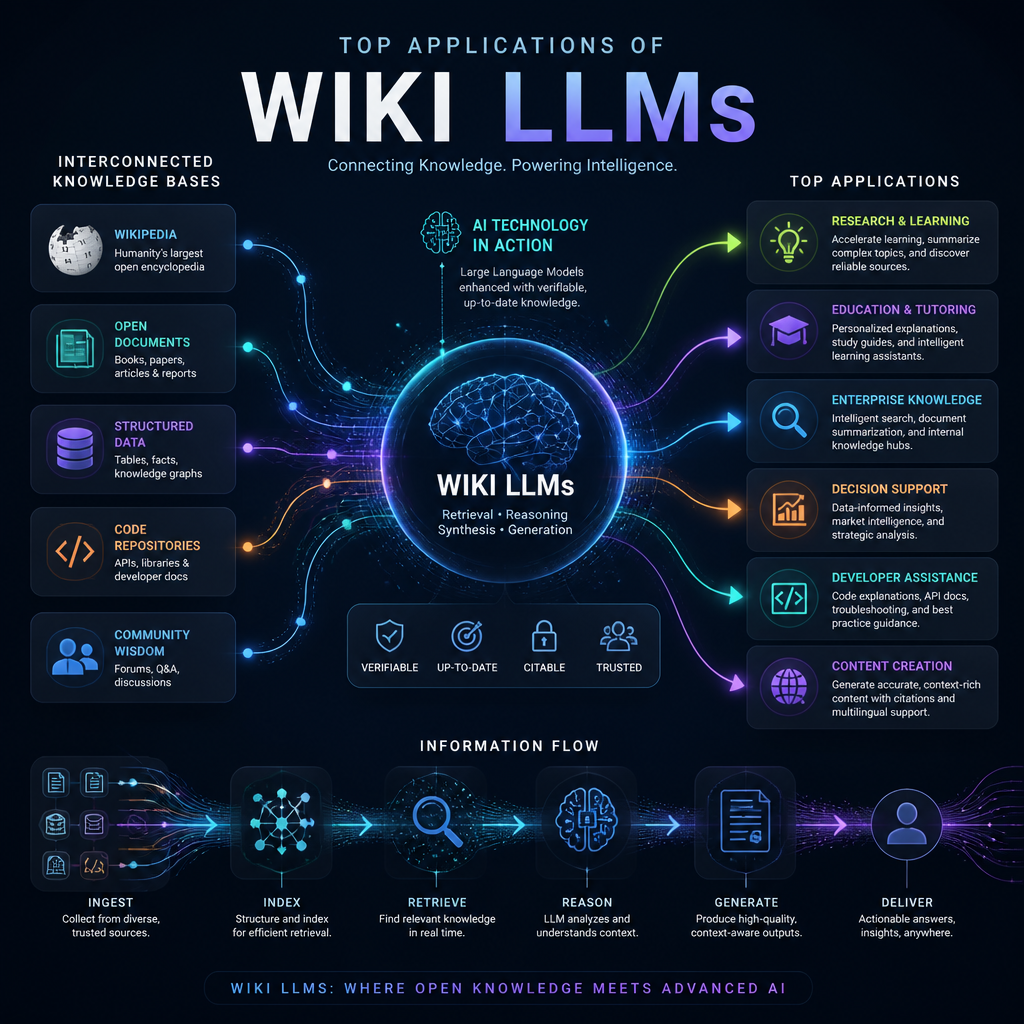
    Featured image for Top 5 Applications of Wiki LLMs You Need to Know About

    Understanding LLM Wiki and Its Applications

    An LLM Wiki (a framing that got a lot of attention via Andrej Karpathy) blends large language models with structured, editable knowledge. The point isn’t “chat over PDFs.” It’s creating a repository that improves over time — pages get refined, links between concepts get clearer, and gaps become obvious.

    A good mental model: RAG retrieves. A wiki accumulates. An LLM Wiki tries to do both, but with the wiki being the long-term memory you keep grooming.

    One practical application I’ve seen work well is taking thousands of scattered notes, docs, and research snippets and turning them into a navigable knowledge graph. The patterns in the Karpathy LLM Wiki are useful because they force you to think in “pages and connections,” not “search results.” In one real project, the first win wasn’t accuracy — it was discoverability. People stopped asking the same question in Slack because the answer lived on a stable page that kept getting better.

    If you want to get your hands dirty, the LLM Wiki GitHub repo is a solid starting point. I like it because it’s not pretending this is magic. You still need ingestion rules, review loops, and some discipline around what gets written back to the wiki.

    LLM Wiki vs RAG: Key Differences

    RAG is great when your source documents are already high quality and relatively stable. You embed text, retrieve top-k chunks, and generate an answer. That’s a clean pipeline, and it ships fast.

    But RAG can get weird as your corpus grows. Chunking breaks context, duplicates creep in, and different docs contradict each other. Then you’re stuck: do you “fix” the source docs, or just hope retrieval picks the right chunk? I’ve watched teams quietly add prompt band-aids for months because it’s cheaper than cleaning a messy knowledge base.

    LLM Wikis take the opposite stance: consolidate the knowledge into fewer, better artifacts. Instead of answering from a random pile of excerpts, you build canonical pages (“How auth works here,” “Pricing rules,” “Experiment methodology”) and keep tightening them.

    The tradeoff is obvious, though. Someone has to own those pages. In practice, I’ve had success with a lightweight workflow: the model drafts updates, a human reviewer approves them, and the wiki logs what changed. Without that loop, you’ll end up with confident-sounding nonsense that looks official.

    Educational settings are where this feels almost unfair. A student doesn’t need ten disconnected paragraphs from ten documents; they need one coherent explanation, plus links out to deeper pages. That coherence is exactly what a wiki structure enforces.

    Understanding the Meaning of LLM

    LLM stands for Large Language Model — a model trained to predict and generate text based on patterns in huge datasets. That sounds abstract, but the practical point is simple: it can summarize, rewrite, connect ideas, and answer questions in a way that feels conversational.

    Still, an LLM doesn’t “know” your organization’s truth by default. It knows language patterns. So, if you don’t anchor it to a governed knowledge base (documents, wiki pages, citations, review history), you get answers that may sound right while being subtly wrong.

    In other words: the LLM is the fluent interface. The wiki is the memory you can audit.

    As we get deeper into Wiki LLMs, that split matters. Every time I’ve seen these systems succeed, the team treated knowledge like software: versioned, reviewed, and maintained.

    Practical Applications of LLM Wikis

    1. Educational Resources: LLM Wikis let educators assemble material into a structured learning map instead of a folder dump. The nice part is the navigation: prerequisites can be explicit (“read this first”), and examples can be attached to the concept page that needs them.

    A simple scenario: a student working through linear algebra gets stuck on eigenvectors. In a normal LMS, they bounce between lecture slides, a textbook chapter, and maybe a forum post. In an LLM Wiki, the eigenvector page can include the definition, an intuition section, two worked examples, and links back to prerequisites (matrices, determinants). Because the content is centralized, you fix it once — everyone benefits.

    1. Corporate Knowledge Management: Enterprises lose time to tribal knowledge. I’m talking about onboarding docs that don’t match reality, runbooks that assume one specific environment, and “ask Jane” processes that don’t survive a vacation.

    With an LLM Wiki, you capture that institutional knowledge into canonical pages. Then you wire your support or internal assistant to answer from those pages. The big win isn’t just productivity; it’s consistency. When the answer changes (new pricing rule, new escalation path), you update one page instead of hoping every doc and slide deck gets updated too.

    1. Research Projects: Research is brutal on knowledge systems because everything changes weekly. Hypotheses evolve, definitions shift, and related work piles up fast.

    A wiki structure helps because it encourages stable “concept pages” and “paper pages.” I’ve seen teams use it to keep a living bibliography where each paper gets: a one-paragraph summary, key claims, weaknesses, and how it connects to the project. Then, when someone says “why are we not using method X?”, the answer is already linked and documented — not trapped in one person’s head.

    1. Developer Tools: For developers, LLM Wikis can become the “how we build software here” brain. Not just API docs, but the messy stuff: deployment quirks, common incident patterns, migration gotchas, and why a past decision was made.

    One mistake I’ve personally seen: a team auto-generated wiki pages from code comments and called it “documentation.” It looked impressive, yet it didn’t help anyone debug a production issue at 2 a.m. The fix was to treat the wiki like a runbook-first system: pages centered on workflows (deploy, rollback, rotate secrets), each with checks, commands, and failure modes. Then the LLM helped by proposing updates after incidents, while engineers approved the final wording.

    1. Content Generation: Writers and content teams can use an LLM Wiki as a source-of-truth for voice, product claims, and approved messaging — basically a guardrail against accidental contradictions.

    The practical flow is straightforward: keep pages for brand voice, product features, pricing, and “do not claim” rules. When you draft a new post, the model pulls from that curated wiki, not from whatever it remembers. That reduces rework. It also avoids the awkward situation where two different blog posts describe the same feature in two different ways.

    In my experience, the teams that get the most value don’t try to automate everything. They automate the boring parts (drafting, summarizing, linking) and keep humans in the loop for judgment calls.

    My Experience With This

    As the founder and CEO of Revnix, I’ve built cloud-native and AI systems where knowledge sprawl quietly becomes a tax on every team. When we introduced wiki-style LLM workflows, the early wins were surprisingly unglamorous: fewer repeated questions, faster onboarding, and less time spent hunting for “the latest doc.”

    One rollout lesson I’d emphasize: start with a narrow scope. Pick one area with frequent questions (onboarding, support troubleshooting, incident response), build 20–40 high-quality pages, and enforce ownership. After that, expand.

    If you skip ownership, the wiki becomes a graveyard. If you skip review, it becomes a rumor mill. But when you get those two right, you end up with something rare — a knowledge base that actually keeps up with the business.

    Conclusion

    Wiki LLMs aren’t a novelty. They’re a practical answer to a real problem: knowledge keeps changing, while most documentation systems assume it won’t.

    Across education, corporate knowledge management, research, developer documentation, and content workflows, the pattern is the same. Use the LLM to help you write and connect concepts, then use the wiki structure to make those concepts durable and auditable.

    If you’re considering adopting one, don’t start by asking “what model should we use?” Start by asking “who will own the pages, and how will updates get approved?” Get that right, and the tech part becomes much easier.

    Frequently Asked Questions

    1. What is a wiki LLM?
    A wiki LLM refers to a large language model that organizes and structures knowledge in a wiki format. It allows users to build, maintain, and query a dynamic knowledge base, which evolves over time.

    2. How does an LLM Wiki differ from traditional RAG systems?
    Unlike traditional Retrieval-Augmented Generation systems that pull documents for every query, an LLM Wiki creates a persistent knowledge base that can be accessed and updated incrementally, making it more efficient for users.

    3. What does LLM actually mean?
    LLM stands for Large Language Model, which refers to sophisticated AI models designed to understand and generate human-like text based on extensive linguistic data.

    4. Where can I find resources on LLM Wiki implementations?
    The LLM Wiki GitHub provides comprehensive resources and tools for developers interested in building LLM-driven wikis tailored to their needs.

    5. Can LLM Wikis be used for educational purposes?
    Absolutely! LLM Wikis can be tailored to create rich educational resources that help students access and interact with knowledge efficiently.