Category: Marketing

  • How AI Is Transforming Digital Marketing in 2026: Trends

    How AI Is Transforming Digital Marketing in 2026 is not just a question about new software. Read the full guide.

    Explore key AI-driven changes and trends in digital marketing for 2026.

    AI is changing the rhythm of marketing work. It can take you from scattered notes and messy reporting to a usable decision, then from a rough idea to a testable campaign—fast. But the human role doesn’t vanish. It shifts.

    You end up spending less time pushing pixels and exporting spreadsheets, and more time doing the parts that actually matter: setting direction, checking quality, guarding customer trust, and deciding what deserves attention this week.

    The easiest way to understand this shift is to follow the work itself. How AI Is Transforming Digital Marketing in 2026 becomes obvious when you trace what happens to targeting, content, analytics, and customer experience as soon as AI gets embedded in the process. Each area is changing, but none of them behaves like a separate island anymore.

    One grounded question I like (especially for business owners) is this: what’s slow because the team lacks time, and what’s slow because the strategy is fuzzy? AI can help with the first problem. It almost never solves the second, and it can even hide it for a while.

    AI Marketing Trends in 2026: How AI Is Transforming Digital Marketing

    The clearest AI marketing trends 2026 is surfacing aren’t isolated features—they’re connected behaviors. Personalization relies on usable customer data. Predictive analysis relies on reliable events. Content automation relies on a real brief, a defined audience, and someone willing to say, “Nope, that’s off-brand.”

    When those pieces lock together, AI becomes part of an operating system. When they don’t, you get a pile of experiments and a lot of internal confusion.

    Personalization moves from segments to signals

    Traditional segmentation is blunt. You bucket people by industry, location, job title, past purchases, or a small handful of behaviors, then you push a message at the bucket. It works, but it’s limited.

    Now, AI can look at more signals at once: which pages someone reads, where they hesitate, what they search internally, how they respond to different formats, when they return, and how they move through a funnel. The real win isn’t “a unique headline for every visitor.” The win is choosing a more relevant next step—without a marketer hand-building every possible variation.

    Here’s a clean, realistic B2B scenario (hypothetical, but common). Two accounts visit your site:

    • Account A keeps coming back to implementation content. They read setup docs, migration notes, and anything that smells like “how hard is this going to be?”
    • Account B keeps bouncing between pricing guidance and a comparison page. They’re circling cost and risk.

    In a segment-only world, both accounts might get the same nurture email because they’re in the same industry. In a signal-driven setup, the system nudges you to treat them differently: implementation-heavy follow-ups for Account A, reassurance and ROI framing for Account B. You still decide if that’s correct, because behavior is ambiguous.

    That ambiguity is where marketers get burned. A long page visit can mean interest. It can also mean confusion. It might even mean they opened a tab and went to lunch. AI can classify patterns, sure, but it can’t read minds. So you need to pressure-test what the system recommends.

    A practical way to do that (and keep personalization from turning into chaos) is a simple step-by-step workflow:

    1. Pick one journey moment to personalize (for example: the step after a product page visit). Don’t start with “personalize everything.”
    2. Define what “better” means for that moment. You’re looking for clearer movement to the next step, not just more clicks.
    3. List the signals you trust, and be honest. If your tracking is spotty, keep the signal list short.
    4. Write the guardrails: tone, claims you can’t make, topics you won’t imply, and how you’ll avoid creeping people out.
    5. Create 2–3 next-step options, not 20. More options sounds smart until no one can review them.
    6. Review results with a human lens. If it “worked,” ask why. If it didn’t, verify the tracking before you rewrite the whole campaign.

    Restraint matters. If a message feels unnervingly specific, trust drops fast. I’m biased toward useful relevance over theatrical cleverness: make the next step obvious, reduce friction, and give the visitor control.

    Common mistakes I keep seeing when teams chase personalization:

    • Mistaking personalization for complexity. If your base offer is unclear, personalization just creates more unclear versions.
    • Relying on “AI knows best.” A model can be confidently wrong, and your customer pays the price.
    • Personalizing before fixing fundamentals. If the landing page is slow or the form is broken, personalization is lipstick on a pig.

    That last one is where my performance background kicks in. If your site experience is sluggish, the “personalized” journey still feels bad. It’s just a bad journey with extra steps.

    Predictive analysis supports planning

    Predictive analytics is moving closer to planning instead of living only in retrospective reporting. Teams use it to:

    • compare likely audience responses,
    • flag leads or accounts that are drifting away,
    • spot patterns in where prospects stall,
    • and prioritize what deserves a human follow-up.

    But I want to be precise here: these outputs are not prophecies. They’re better prompts for better questions.

    Say you’re seeing strong traffic but weak demo completion. A model might surface differences between people who finish the form and people who abandon it—source patterns, page paths, time-of-day behaviors, content that correlates with completion, that sort of thing.

    What should you do with that? You don’t blindly “optimize for the model.” You inspect the experience.

    A grounded troubleshooting path looks like this:

    1. Verify the event tracking first. If demo completion isn’t firing consistently, you’re arguing with a ghost.
    2. Check page speed and stability. If the form page stutters, loads slowly, or shifts around, abandonment goes up for boring reasons.
    3. Review form friction. Too many required fields, confusing labels, or unclear error messages—classic conversion killers.
    4. Match the message to intent. If your ads promise one thing and the landing page leads with another, the model will call them “low quality,” but it’s really a messaging mismatch.
    5. Only then adjust targeting or creative, because now you’ve earned the right to blame the traffic.

    From a WordPress performance perspective, this is where teams go wrong all the time: they blame targeting before they check whether the page experience is causing the loss. AI can actually make this worse, because it gives you a very convincing analysis on top of a broken measurement setup.

    If you want predictive analysis to help planning (instead of creating dashboard theater), give it a job. One job. For example:

    • “Help us figure out which leads need a human follow-up now.”
    • “Help us detect when a nurture sequence stops making progress.”
    • “Help us choose which content themes correlate with the right kind of conversions.”

    That’s also the part of How AI Is Transforming Digital Marketing in 2026 that feels most real in day-to-day work: planning becomes more responsive. You don’t wait for end-of-month reporting to realize something broke.

    Content production becomes a governed workflow

    AI tools for marketing can draft outlines, adapt messages for different channels, summarize research, and generate variations on demand. That’s tempting. It’s also dangerous if your process is basically “generate, publish, pray.”

    Volume isn’t value. Publishing more weak content creates more pages for people to ignore and more stuff your team has to maintain. And if you publish inaccuracies, you don’t just lose rankings—you lose trust.

    The teams doing this well treat AI like a junior assistant with infinite energy and zero accountability. The workflow has gates.

    Here’s the governed setup I prefer (and I’ve seen it work because it forces clarity):

    • Start with a human brief. Audience, offer, evidence, constraints, desired action.
    • Use AI to generate options within boundaries. Not “write anything,” but “give me 5 angles for this exact promise, using this tone.”
    • Run an expert review. Someone who understands the subject checks accuracy and missing nuance.
    • Edit for voice and usefulness. You’re trying to sound like a brand with a spine, not a content factory.
    • Ship with measurement attached. Decide what success looks like before you hit publish.

    A simple example: you want a campaign that turns a webinar topic into content for a landing page, a follow-up email, and a short social post. AI can crank that out in minutes. Yet the “minutes” are not the point.

    The point is that you can now spend your time on the stuff AI can’t reliably do:

    • clarify the promise,
    • decide what proof you’re allowed to claim,
    • make sure the call-to-action fits the audience,
    • and keep the message aligned across the whole journey.

    Common mistakes with AI-assisted content production:

    • No single source of truth. If every writer prompts the model differently, your brand voice fractures.
    • Skipping the SME review. That’s how small errors become public errors.
    • Letting the model invent confidence. AI is fluent, not factual. If you don’t force evidence, it will still sound sure.
    • Optimizing for output instead of outcome. You end up with lots of content and no clear lift in the metric you actually care about.

    If you’re trying to operationalize this, keep it boring. A shared brief template, a review checklist, and a clear “publish/no-publish” owner beats a fancy prompt library nobody follows.

    And yes, you should still care about the site performance side. If AI helps you publish faster, you’ll also discover performance issues faster—because you just created more pages, more scripts, more tracking tags, and more room for things to get heavy.

    Consumer behavior analysis becomes more continuous

    Marketing teams used to review behavior in batches: weekly reports, monthly meetings, quarterly post-mortems. AI pushes you toward a more continuous view of the journey.

    It can help connect search intent, content engagement, email activity, on-site behavior, and conversion events into one working picture. That’s powerful, because you stop making decisions in silos.

    But there’s a trap: treating every signal as equally meaningful.

    • A long page visit might be interest, confusion, or distraction.
    • A repeat visit might mean consideration—or it might mean they forgot where they left off.
    • A click might be curiosity, not intent.

    Models can cluster patterns. They can label journeys. They can surface “this looks like high intent.” Still, a marketer needs context. In my opinion, the best AI strategies for digital marketing pair machine speed with human interpretation.

    If you want to make continuous analysis useful (instead of noisy), start with decisions, not dashboards.

    A solid measurement plan goes like this:

    1. Name the decision you’re trying to improve. For example: “Should we invest in topic A or topic B next?”
    2. List what evidence would change your mind. If nothing will, don’t pretend the analysis is for learning.
    3. Map the minimum signals required to support that evidence. Minimum, not maximum.
    4. Confirm ownership for tracking. If no one owns the events, the data decays.
    5. Set review cadence and action rules. If a pattern shows up, what do you do next?

    Otherwise, the dashboard becomes a busy mirror. It reflects everything and helps with nothing.

    This is another place where How AI Is Transforming Digital Marketing in 2026 gets misunderstood. People think the transformation is “more data.” The real transformation is faster feedback loops—if, and only if, you treat measurement like an engineering problem, not a reporting hobby.

    FAQs About AI Marketing Trends in 2026

    What are the key AI trends in digital marketing for 2026?

    The big themes are increased personalization, stronger predictive analytics, and the everyday use of AI tools for content creation—plus the shift toward connected customer journeys with tighter measurement.

    If I had to boil it down, the trend isn’t that marketers discovered AI. It’s that AI is becoming a default layer across the workflow.

    You’ll also see a heavier emphasis on human review before automated output reaches customers. That’s partly because quality still matters, and partly because trust is fragile. When you ship a weirdly specific message or an inaccurate claim, you don’t just lose a click—you can lose the relationship.

    A practical way to think about it: AI is speeding up “drafting” and “pattern-finding.” Humans still own “truth,” “taste,” and “trade-offs.”

    How is AI expected to improve marketing strategies by 2026?

    AI can improve strategy by helping you:

    • tighten targeting based on real signals,
    • optimize campaigns while they run,
    • spot journey friction earlier,
    • and summarize what’s happening across channels without you living in spreadsheets.

    That said, the improvement depends on reliable data and clear goals. If the inputs are messy, AI will still produce confident outputs—you just won’t like where they lead.

    Here’s a step-by-step strategy upgrade I’d recommend before you try anything fancy:

    1. Pick one funnel stage (top, middle, or bottom).
    2. Define what “success” means there in plain language.
    3. Make sure the tracking for that stage works end-to-end.
    4. Use AI to propose tests or segment signals.
    5. Review recommendations like you would a junior marketer’s work—useful ideas, but not final.

    That’s how you get real gains without letting automation drive the car into a ditch.

    What AI tools should marketers consider in 2026?

    Think less in terms of “tools” and more in terms of workflows you want to speed up safely.

    Common categories that show up in real stacks:

    • chatbots or conversational assistants for customer questions,
    • AI-driven analytics to surface patterns,
    • content generators for first drafts and variations,
    • and systems that help with tagging, summarization, and routing tasks.

    When you evaluate them, I’d focus on:

    • how the tool handles your data,
    • whether you can enforce review and approval,
    • how it fits your existing workflow,
    • and whether it solves a problem you can actually name.

    Don’t buy based on a long feature list. Half those features will sit unused, while the one missing control you needed will become the reason the rollout stalls.

    How can small businesses leverage AI in marketing?

    Small businesses win by staying narrow and practical.

    A good starting point is using AI for repeatable work you already do, like:

    • turning one approved campaign idea into variations for different channels,
    • summarizing customer questions into themes you can actually address,
    • drafting FAQs or support content that you then edit and verify,
    • or organizing insights from reviews and emails into action items.

    Here’s a simple “small team” workflow that doesn’t get you into trouble:

    1. Write one solid offer message (human-written).
    2. Ask AI for channel-specific versions (short social copy, email subject lines, ad variations).
    3. Review for accuracy and tone.
    4. Launch a small test.
    5. Keep what works, kill what doesn’t.

    The mistake I see is trying to automate every customer touchpoint at once. That’s how you end up with inconsistent messaging, missed replies, and a brand voice that feels… synthetic.

    What challenges do marketers face when implementing AI?

    The challenges are less about “AI magic” and more about operations.

    The big ones:

    • data privacy concerns (especially if you don’t know where data goes),
    • integration with existing tools,
    • and upskilling teams so they can review and steer outputs.

    Then there are the unglamorous issues that quietly wreck projects:

    • unclear ownership (nobody owns the model prompts, the tracking, or the approvals),
    • poor tracking setup (garbage in, garbage out),
    • and messy customer journeys (AI can’t fix a funnel that doesn’t make sense).

    If you want a quick self-check, ask: “If the AI tool vanished tomorrow, would we still know how our marketing works?” If the answer is no, you’ve probably over-automated the wrong layer.

    Will AI replace human marketers by 2026?

    AI will absolutely automate chunks of the job—drafting, summarizing, clustering, routing tasks, and speeding up experimentation. But it won’t replace the parts that require responsibility and judgment.

    Humans still set positioning, decide what trade-offs are acceptable, handle sensitive context, and own the customer experience when something goes wrong.

    That’s why I don’t buy the “replace marketers” narrative. What I do see, though, is that marketers who can combine automation with real strategy (and who respect trust) will move faster than teams that either ignore AI or outsource their thinking to it.

    If you’re deciding what to do next, keep it simple: pick one workflow, fix your measurement, and make AI earn its place. That’s the version of How AI Is Transforming Digital Marketing in 2026 that actually pays off.


    WordPress

  • Best Affordable Email Marketing Services in 2026

    Best Affordable Email Marketing Services in 2026

    Discover the top affordable email marketing tools for small businesses and marketers in 2026. Compare features, pricing, and find the perfect fit for your needs.

    Top Affordable Email Marketing Services for 2026

    Email marketing is still one of the few channels you can “own,” but the tool you pick decides whether it feels like a cheat code or a chore. Before the list, here’s how I’d sanity-check any provider.

    How I rank these tools

    I don’t rank email tools by template count. I rank them by what breaks in the real world.

    • Deliverability basics: easy domain authentication (SPF/DKIM/DMARC) and clean sending practices.
    • Automation you’ll actually use: welcome series, abandoned cart (if ecommerce), simple segmentation.
    • Pricing that scales predictably: not just “free,” but what happens at 2k, 10k, 50k subscribers.
    • Editor + workflow: can you ship an email in 20 minutes without weird formatting bugs?

    If you’re a startup, the goal is usually speed. If you’re a small business, it’s consistency. Either way, the tool should get out of your way.

    1. Mailchimp

    Mailchimp is often the first tool people touch, and honestly, that’s for a reason: it’s approachable. It offers a free tier that allows users to send up to 10,000 emails per month to 2,000 subscribers.

    Where it shines is the “I just need to send a decent newsletter today” problem. The template library is big, the editor is familiar, and you’ll find tutorials for basically everything.

    The tradeoff: once you outgrow the basics, pricing and plan limits can feel like a maze. So if you’re choosing Mailchimp, plan for a future migration or keep your setup intentionally simple (newsletter + welcome email + maybe one tag-based segment).

    2. Sender

    Sender is a practical pick when you want a generous free plan and you don’t want to babysit a complicated UI. It allows sending up to 15,000 emails per month to 2,500 subscribers.

    The automation is good enough for most small teams: welcome emails, simple drips, and behavior-based sends that don’t require a marketing ops person.

    One thing I’ve seen teams mess up with Sender (and similar tools): they import a cold list and then blame the platform for poor deliverability. If you’re switching tools, warm up the domain and ramp sends over a couple of weeks. Your future inbox placement depends on it.

    3. Brevo

    Brevo (previously SendinBlue) is a strong “starter-to-serious” platform. Its free plan includes sending up to 300 emails per day and it includes features like segmentation and A/B testing.

    If you’re a startup that wants more than newsletters—say, onboarding sequences, trial nudges, and simple lifecycle campaigns—Brevo gets you there without forcing an enterprise contract.

    It’s not perfect, though. When you build more complex automations, naming and organizing workflows matters a lot. Otherwise, three months later you’ll be afraid to touch anything because you won’t remember what triggers what.

    For more detailed comparisons and insights, you can check the 15 Best Email Marketing Platforms 2026.

    4. MailerLite

    MailerLite is for people who want clean, fast, and not fussy. Their free plan supports up to 1,000 subscribers and includes landing pages and pop-ups.

    I like it for creators and small service businesses because you can ship a landing page + form + welcome email without duct tape. That matters when you’re running promos or collecting leads from a workshop.

    The common mistake here is overbuilding “funnels” too early. Start with one landing page, one lead magnet, and a 3–5 email sequence. Then iterate based on replies and click data.

    5. AWeber

    AWeber isn’t trendy, but it’s steady. It offers a 30-day free trial with full access to features, and it’s known for an easy interface and solid customer support.

    This is the tool I’d consider if you’re the type who values help docs, live support, and fewer surprises. Some teams underestimate how much time support saves when you’re stuck on something basic like list segmentation or forms.

    That said, if your entire strategy relies on deep behavioral automations, you may hit limits sooner than with more automation-first platforms.

    6. ActiveCampaign

    ActiveCampaign is what I reach for when automation is the strategy, not a nice-to-have. Pricing starts at $9 per month for 500 subscribers. It does segmentation, tagging, and automation in a way that actually supports growth experiments.

    If you’re running a SaaS trial, here’s a simple workflow that works surprisingly well:

    1. Day 0: welcome + “what are you trying to do?” question
    2. Day 1: one quick win tutorial
    3. Day 3: case study or example
    4. Day 7: “stuck?” check-in + CTA to book/help

    Do that, then measure replies and activation. You’ll learn more than you will from a dozen pretty newsletters.

    7. GetResponse

    GetResponse combines email marketing with extras like webinars and landing pages. Pricing starts at $15 per month.

    It’s a good fit if your marketing naturally revolves around live events: webinars, demos, workshops, live Q&A. Having the event and the email follow-up under one roof reduces the “export CSV, re-import CSV” nonsense.

    The tradeoff is focus. If you only need newsletters and a simple automation, the extra features can feel like clutter. So I’d pick it when you’ll truly use webinars, not because you might someday.

    8. Constant Contact

    Constant Contact is often chosen because of support and training resources. Starting at $20/month, you get a lot of templates and a structured way to run campaigns.

    This tends to work well for local businesses, nonprofits, and teams where the person sending emails isn’t a marketer by trade. When the workflow is obvious, you actually send emails consistently—and consistency beats “perfect strategy” that never ships.

    If you’re more technical or you like fine-grained automation, you might find it restrictive. But if you need reliability and guidance, it’s a reasonable spend.

    9. Benchmark Email

    Benchmark Email focuses on making email creation quick. Their free plan offers up to 3,500 emails per month to 500 subscribers, and the drag-and-drop editor is straightforward.

    If design isn’t your strength, this is the kind of tool that keeps you from wasting an afternoon nudging padding and fonts. Get in, build something acceptable, send it.

    One caution: don’t let the editor turn every email into a heavy “graphic newsletter.” Plain-ish emails often perform better for clicks and replies, and they load faster on mobile.

    10. Moosend

    Moosend is an affordable option with a free plan of up to 1,000 subscribers with unlimited emails. It also has strong automation and reporting for the price.

    Moosend makes sense when you want analytics that go beyond opens—especially if you’re comparing campaigns or testing subject lines. Just keep your tests honest: change one variable at a time, and give it enough sends to matter.

    Also, set up UTM tracking from day one. Otherwise, you’ll end up guessing which email drove sales when you finally look back at performance.

    Best Free Email Marketing Services

    Free tiers are great, but “free” can still be expensive if it costs you time or deliverability. That said, these are genuinely solid starting points:

    • MailerLite
    • Sender
    • Brevo

    If you’re just getting started, my advice is boring on purpose: pick one, authenticate your domain, write a welcome sequence, and send weekly for 8 weeks. Then decide if you’ve earned the right to switch tools.

    Quick deliverability checklist (don’t skip this)

    Most email marketing “doesn’t work” because the basics weren’t done. So before you blame subject lines, do this:

    1. Authenticate your domain (SPF + DKIM, and DMARC if you can).
    2. Use a real sending address (not a free Gmail/Outlook sender).
    3. Warm up gradually if you’re new—start with your most engaged contacts.
    4. Keep the list clean: remove hard bounces, don’t keep hammering unopens forever.
    5. Ask for replies early (welcome emails that invite a reply are underrated).

    I’ve watched teams double their inbox placement just by cleaning imports and slowing down the first week of sends.

    Conclusion

    Affordable doesn’t mean “pick the cheapest plan and pray.” It means you can run email consistently for a year without the tool (or the bill) derailing you.

    If you’re a solo creator or early-stage startup, I’d bias toward MailerLite, Sender, or Brevo—they’re simple, the free tiers are legit, and you can get a working system live fast. Meanwhile, if you’re doing SaaS onboarding or you’re serious about lifecycle automation, ActiveCampaign tends to pay for itself because you can target messages based on behavior instead of blasting everyone.

    Here’s the step-by-step I’d follow if you asked me to set this up on a tight budget next week:

    1. Pick one tool and commit for 90 days. Switching too early is how you lose tracking, break forms, and confuse your list.
    2. Write a 5-email welcome sequence that answers: who you are, what you sell, and what to do next.
    3. Create one segment (customers vs. leads, or “clicked in last 30 days” vs. everyone else). Keep it that simple at first.
    4. Send one newsletter per week with one job: teach something useful or move one offer. Don’t mix three goals.
    5. Review results monthly (clicks, replies, unsubscribes). Then tweak one thing.

    The biggest mistake I see is tool-hopping because a competitor has a shinier automation builder. The second biggest is treating email like a dumping ground for social posts. Write for the inbox, and the ROI shows up.


    FAQs

    • What is the average cost of email marketing services?
      The average cost ranges from $10 to $300 per month, depending on the number of subscribers and features.
    • Which is the best email marketing service?
      Mailchimp is often regarded as the best for beginners due to its user-friendly interface and comprehensive resources.
    • How much is a 1000 email list worth?
      A 1,000 email list can be worth anywhere from $500 to $1,000 based on engagement rates and other factors.
    • Is email marketing still worth it in 2026?
      Yes, email marketing remains effective due to its high ROI and direct communication capabilities.

    My Experience With This

    I’m Mobeen Abdullah, the Founder at Revnix, and I’ve learned (sometimes the hard way) that email marketing only looks simple. The messy part is everything around the send button—list hygiene, deliverability, tracking, and keeping a consistent cadence when product work gets hectic.

    One real example: on a previous push, we ran a lead magnet aimed at developers, collected signups fast, and then watched performance crater. Opens dropped, clicks were weak, and a few people even replied annoyed. The tool wasn’t the problem. Our process was.

    Here’s what we changed, step by step:

    1. We rebuilt the form and asked one qualifying question (“What are you working on?”). That single field helped us segment immediately.
    2. We rewrote the welcome email to be plain text, with one link and a direct question. Replies went up, and that helped deliverability because mailbox providers love engagement.
    3. We cut the list ruthlessly after 45 days—if someone never opened, we stopped sending weekly and moved them to a light re-engagement track.
    4. We standardized UTM tagging so we could prove what email actually drove signups and revenue.

    After that, email became predictable again. Not magic—predictable. And predictable is what you want when you’re balancing shipping product and marketing.

    By integrating tools like Nextly into our development processes, we enhanced our content-driven applications, streamlining our workflow and providing seamless user experiences. The right choice of email marketing software can similarly transform your campaigns—helping you connect with your audience more effectively.

    If you’re choosing a platform today, don’t start with “Which tool has the most features?” Start with: What’s the first automated sequence I’ll ship this week? If you can’t answer that, no platform will save you.

    The 17 Best Free Email Marketing Services

  • How to Start Developing Blockchain Games in 2026

    How to Start Developing Blockchain Games in 2026

    Learn the essentials of blockchain gaming development for 2026. Understand how to build engaging blockchain games and navigate the evolving landscape.

    How to Start Developing Blockchain Games in 2026

    What is Blockchain Game Development?

    Blockchain game development is building a game where some part of the game state (usually assets, trades, crafting results, tournament payouts, or governance) lives on a blockchain. That on-chain layer lets players actually own items as tokens, verify scarcity, and trade peer-to-peer without you acting as the middleman for every transaction.

    The important nuance: not everything belongs on-chain. Moment-to-moment gameplay (movement, combat, physics, matchmaking) stays off-chain because latency and fees will wreck the feel. Instead, you put the “high-trust” moments on-chain—minting a sword, upgrading it, selling it, staking it for an event pass, splitting rewards after a raid.

    By 2026, the blockchain gaming market is projected to be worth USD 22.30 billion, reaching USD 398.06 billion by 2033 with a CAGR of 52.0% (Coherent Market Insights). That growth attracts builders, but it also attracts speculators, so your job is to make the game enjoyable even when the market’s boring.

    Here’s the “sanity test” I use: if you removed the tokens, would anyone still play for 30 minutes? If the answer is no, you’re building a financial product with a joystick.

    Steps to Develop Your Blockchain Game

    1. Choose the Right Blockchain Platform
      Pick the chain based on user experience constraints, not vibes. Fees, finality time, wallet support, and ecosystem tooling will shape your entire game.

    Here’s how I’d evaluate Ethereum vs. Polygon vs. BSC in real life:
    – If you expect lots of small transactions (crafting, trading, rerolls), you’ll care about predictable fees and fast confirmations.
    – If your players are mainstream, you’ll care about how painful wallets and onboarding feel.
    – If you want “credible” asset value, you’ll care about liquidity and marketplace support.

    Also, decide early whether you’re using L1 directly, an L2, or some hybrid. Changing later is a migration project, not a toggle.

    1. Define Your Game Concept
      Start with the loop, then justify the chain. A few mechanics that actually benefit from blockchain:
    2. Player-made items with provable creators and royalties
    3. Limited drops where scarcity is verifiable
    4. Tournament escrow where payouts happen automatically
    5. Cross-game items (rare, but real if you control multiple titles)

    A practical approach: write a one-page “design + economy brief.” Include (a) what’s fun minute-to-minute, (b) what’s tokenized, (c) why the tokenization can’t be done better with a database.

    1. Build an Engaging User Experience
      Wallet prompts are the fastest way to lose normal players, so reduce friction aggressively.

    What I’d do in 2026:
    – Let players start as a guest, then “claim” ownership later.
    – Batch transactions where possible (one signature for a bundle of actions).
    – Make failure states human (no “execution reverted” messages—ever).

    Community features matter too, but don’t overbuild. A simple guild system with shared goals beats a complicated DAO no one votes in.

    1. Develop Smart Contracts
      Smart contracts aren’t your “feature.” They’re your rules engine for assets and value transfer.

    I’d design contracts around these questions:
    – What can players mint?
    – Who can burn or upgrade items?
    – How do you prevent dupes and replay attacks?
    – What happens if you need to pause trading during an exploit?

    Use battle-tested standards when you can, then customize carefully. If you hire a contractor, insist on tests and a threat model write-up, even if it’s lightweight.

    1. Test Your Game
      Test like you expect people to try to break it—because they will.

    A test plan that’s saved teams I’ve worked with:
    – Unit test contract math (especially mint limits, fees, royalties).
    – Simulate high-volume trading (bots flipping items, not friendly players).
    – Run a closed alpha with a wipe, then an open beta with small-value assets.

    And yes, test the “boring” stuff: chain congestion, RPC outages, wallet timeouts, and what happens when a transaction sits pending for 3 minutes.

    1. Launch Your Game
      Don’t launch with a giant token sale just because you can. Launch with a fun playable and a clear economy that doesn’t require infinite new players.

    Marketing that actually works for early blockchain games tends to be:
    – A tight gameplay trailer (not a tokenomics spreadsheet)
    – A creator-friendly test environment (streamers love “drops” they can show)
    – A real community manager who can handle support and scams

    1. Monitor and Update
      Post-launch, treat your economy like a live service. Track:
    2. Item velocity (how often assets trade)
    3. Concentration (are whales controlling the market)
    4. Drop rates vs. churn

    Then patch fast. If crafting is printing value, fix it this week, not “next season.”

    Common Pitfalls to Avoid in Blockchain Game Development

    • Ignoring User Experience: If your first-time user flow requires three apps, two signatures, and a gas token they’ve never heard of, you’re done. So, design onboarding like you’d design a mobile game tutorial—tight, visual, forgiving.

    • Putting too much on-chain: On-chain combat sounds cool until every action costs money or lags. Store gameplay state off-chain, then commit outcomes on-chain (loot, rankings, ownership changes). That split is how most shippable games survive.

    • Unsustainable Tokenomics: If rewards come mainly from new money entering the system, you built a treadmill. Build sinks (repair costs, crafting inputs, limited events), cap emissions, and avoid “daily APR” bait. Players notice when the math feels like a spreadsheet hustle.

    • Overlooking Regulations: Token sales, gambling-like mechanics, and “guaranteed returns” language can drag you into legal trouble fast. Talk to counsel early if you’re touching real-money value, and don’t market your in-game token like a security.

    • No incident plan: Someone will find an exploit. If you don’t have pause switches, a rollback strategy for off-chain state, and a comms playbook, you’ll lose trust in a weekend.

    Understanding Blockchain Gaming Development

    If you want to build blockchain games that last, you need to understand the ecosystem you’re shipping into—not just chains, but marketplaces, wallets, studios, and player expectations.

    Key Players in Blockchain Game Development

    Big studios dipping into blockchain matters because it normalizes the tech, even when their first experiments are clunky.

    Notable names and what they signal:
    – Ubisoft: Actively exploring blockchain technology for integrating NFTs into their game offerings. Their experiments have pushed the conversation around ownership vs. “cosmetics with receipts.”
    – EA: Examining the potential of blockchain to enhance game monetization strategies. That usually means they’re watching how secondary markets change lifetime value.
    – Epic Games: Working on integrating blockchain technology into their platform, providing developers with tools to build decentralized games. (source)
    – Other blockchain gaming development companies to consider include Antier and RevInfotech.

    My take: treat these companies as “signal,” not “validation.” Just because a giant studio tried NFTs doesn’t mean your indie project should copy their approach. Their constraints (brand risk, giant audiences, PR blowback) are different.

    Current Trends in Blockchain Gaming

    The trendline is moving away from “play-to-earn as a job” and toward “play-and-own” where ownership is a perk, not the whole pitch.

    • Player Ownership of Assets: Players want items they can keep, trade, or show off without begging support tickets. NFTs make that legible.
    • Decentralized Economies: More games are letting players run markets, set prices, and profit from their time, but that also invites bots and cartel behavior.
    • Play-to-Earn Models: Although interest in play-to-earn models has waned since the cryptocurrency boom, refined approaches are emerging that focus on sustainable player engagement and satisfaction. According to a report, more than 90% of Web3 games failed due to poor engagement and unsustainable models (CoinDesk).

    A real example I’ve seen (and it’s common): a team launches a “daily quest” that prints tokens. The first month looks amazing—Discord grows, floor prices rise, everyone feels smart. Then players optimize. Bots farm the quests 24/7, inflation spikes, real players feel behind, and the only way to keep payouts attractive is to bring in more buyers. That’s the failure pattern behind a lot of that “90% failed” number.

    So here’s a step-by-step way to align with the better trend:
    1. Make the core loop fun off-chain (prototype it in Unity/Godot/Unreal first).
    2. Pick one on-chain promise (ownership of cosmetics, or crafting provenance, not everything).
    3. Design sinks before rewards (repair, merging, entry fees, limited-time forging).
    4. Assume adversaries (bots, multi-accounting, wash trading) and build basic detection.

    Common mistakes I’d avoid:
    – Launching with a token before you have retention data.
    – Pricing mints in volatile tokens without guardrails.
    – Treating “open economy” as hands-off—economies need moderation.

    Conclusion

    If you’re starting blockchain gaming development in 2026, the win condition is simple: ship a game people would play even if the tokens were paused for a month. Everything else—NFT drops, marketplaces, secondary royalties—sits on top of that.

    Here’s the “last-mile” checklist I use before telling a team to go public:
    1. Onboarding works without crypto knowledge (guest mode, clear prompts, no jargon).
    2. Contracts are test-covered and you’ve done at least one external review or a serious internal audit pass.
    3. Economy has sinks that scale with activity (if players trade more, they also pay more in some form).
    4. Exploit response is ready (pause functions, support channels, clear comms templates).
    5. Your roadmap isn’t hostage to token price—because it will swing.

    One quick persona anecdote: a small studio I advised built a genuinely fun arena battler, then bolted on NFTs for “weapons.” Their first implementation made every loadout change require a transaction. Players hated it—too slow, too many prompts. We moved loadouts off-chain, kept ownership on-chain, and only wrote to the chain when a player sold, upgraded, or fused a weapon. Same “ownership” pitch, dramatically better gameplay feel.

    That’s the pattern I’d copy: keep the chain for trust and trade, keep the game for fun.

    FAQs

    • What is blockchain game development?
      Blockchain game development involves creating games that utilize blockchain technology for ownership and transparency.
    • Why did NFT games fail?
      Several NFT games failed due to market saturation, lack of genuine engagement, and regulatory challenges.
    • Does blockchain gaming have a future?
      Yes, there is significant growth potential in blockchain gaming, particularly with evolving technologies.
    • Who are the big 3 game developers involved in blockchain?
      Major developers include Ubisoft, EA, and Epic Games, all exploring blockchain integration.

    top blockchain game development companies

  • Top Email Marketing Services of 2026

    Top Email Marketing Services of 2026

    Discover the best email marketing services for small businesses in 2026. Explore top free options, comparison, and features that matter.

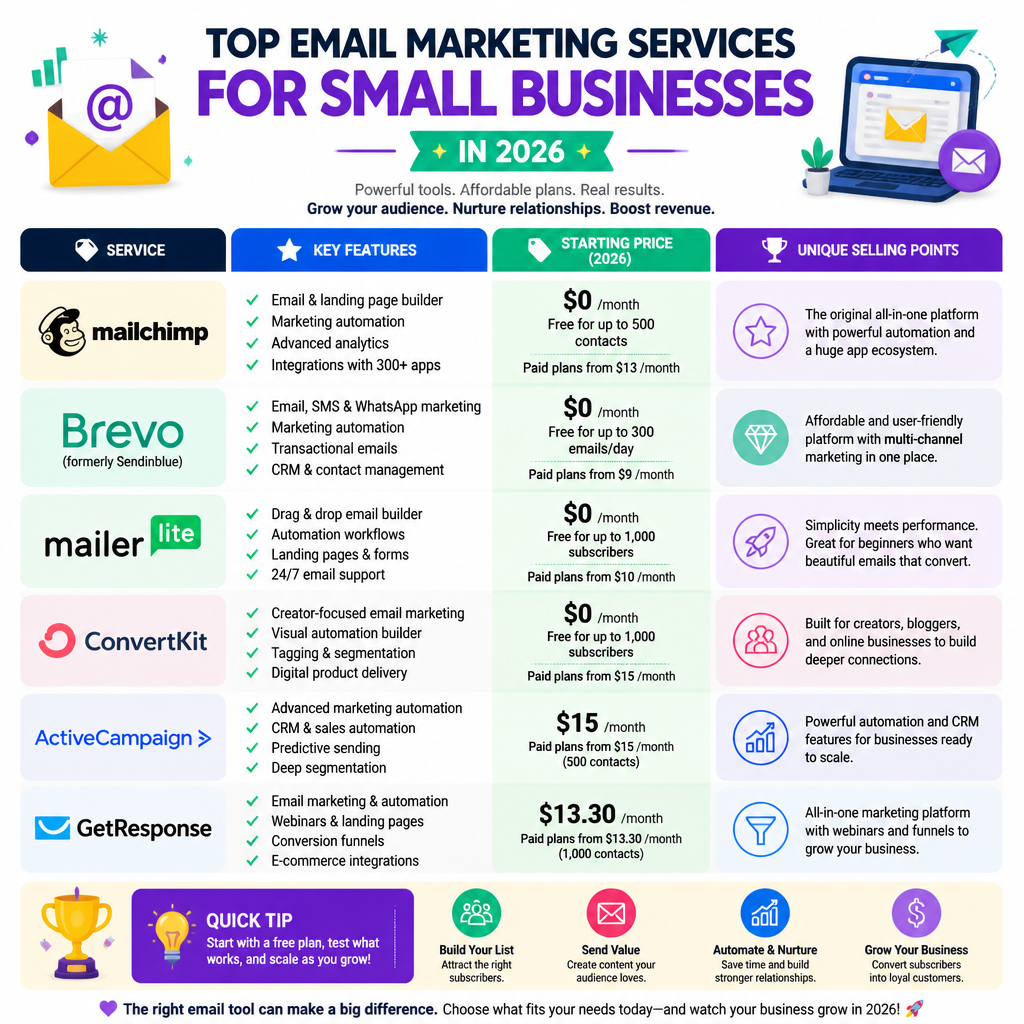
    Featured image for Top Email Marketing Services to Consider in 2026

    Top Email Marketing Services to Consider in 2026

    Choosing the right email marketing service is crucial for small businesses that want email to reliably drive engagement and sales. In 2026, a few platforms keep showing up because they’re usable, fairly priced, and strong where it counts.

    Email Marketing Services List

    1. Mailchimp
    Mailchimp stays popular because you can get from “no list” to “sent my first campaign” in an afternoon. The free plan covers the basics and limited monthly sends, so it’s a sensible sandbox while you figure out your cadence and voice.

    2. Brevo (formerly Sendinblue)
    Brevo’s big win is that it’s not only email—it layers in SMS and chat, which helps if your customers respond faster on their phones. The free plan is generous on sending limits, and the automation builder is solid for straightforward lead nurturing. I’ve used Brevo when a client needed “email + SMS cart nudges” without paying for two tools. Their own rundown on tool comparisons is here: Brevo Blog.

    3. MailerLite
    MailerLite is a clean pick if you want more control without the platform fighting you. You get a drag-and-drop editor, automations, and landing pages, plus a free plan up to 1,000 subscribers—great for a local service business that’s finally turning walk-ins into a list.

    4. Sender
    Sender is known for a generous free plan (up to 15,000 emails/month to 2,500 subscribers). That can matter if you send multiple touches per week and you’re scaling quickly. Just don’t confuse “more sends” with “better results”—if your segmentation is sloppy, you’ll simply annoy more people.

    Email Marketing Services for Small Business

    When I’m helping a small business choose, I look at ease of use first, then support, integrations, and only then “fancy” features. The wrong tool usually fails because nobody logs in after week two.

    5. Constant Contact
    Constant Contact is built for small businesses that want hand-holding, predictable workflows, and clear reporting. It doesn’t have a free plan, but the onboarding and support can save you hours if you’re not email-nerdy.

    6. HubSpot
    HubSpot’s email tools are a natural fit if you already live in their CRM, because then your marketing and sales data stay in one place. That setup makes automation and follow-ups way easier to maintain over time. If you want the broader numbers and benchmarks they cite, start here: HubSpot Marketing Statistics.

    7. ActiveCampaign
    ActiveCampaign is what I reach for when “a welcome series” turns into a real customer journey: tags, branching logic, lead scoring, the whole thing. It isn’t free, but if your pipeline depends on timing and personalization, you’ll feel the payoff.

    8. Omnisend
    Omnisend is aimed at eCommerce, so it’s strong on the triggers that matter—browse abandonment, cart abandonment, post-purchase flows. It also blends in SMS and social touches, which helps when email alone isn’t enough to close the loop.

    Best Free Email Marketing Services

    Free email marketing services can work surprisingly well—if you treat them as training wheels, not a forever plan. Start simple, measure clicks, then upgrade when automation and segmentation become real constraints.

    • Mailchimp: A free tier that supports essential features for basic email marketing.
    • Brevo: Offers a free plan that includes marketing automation, which simplifies user engagement.
    • MailerLite: Its free tier includes advanced features, catering to marketers who want more control without financial commitment.
    • Sender: The most generous free plan makes it easy to grow your subscriber list without breaking the bank.

    List of Email Marketing Platforms

    The following platforms are highly regarded in 2026 for their functionalities:
    – Mailchimp
    – Brevo (Sendinblue)
    – MailerLite
    – Sender
    – HubSpot
    – Constant Contact
    – ActiveCampaign
    – Omnisend

    Top 10 Email Marketing Platforms

    Based on recent evaluations, here are the top 10 email marketing platforms:

    1. Mailchimp
    2. Brevo
    3. MailerLite
    4. Sender
    5. HubSpot
    6. Constant Contact
    7. ActiveCampaign
    8. Omnisend
    9. EmailOctopus
    10. GetResponse

    Quick way to choose: pick two, run the same welcome email, then compare (1) time-to-build, (2) automation friction, and (3) reporting clarity after a week. I’ve watched owners waste days “perfecting templates” while forgetting deliverability basics.

    Choosing the right email marketing platform can vastly improve your outreach and help grow your customer base. By aligning your marketing needs with the right service, you can enhance engagement, boost sales, and build lasting customer relationships. For instance, using Nextly can streamline your app development if you’re integrating email solutions into a broader marketing strategy.

    FAQ

    • Q: What are the best email marketing services for small businesses?
      A: Mailchimp and Constant Contact are among the best options due to their affordability and user support.
    • Q: Are there free email marketing services available?
      A: Yes, platforms like Mailchimp and Sender offer free email marketing options with limited features.
    • Q: How do I choose the right email marketing service?
      A: Consider factors like ease of use, pricing, customer support, and specific features that meet your needs.
    • Q: Do email marketing services offer automation?
      A: Yes, many services including Mailchimp and Constant Contact, provide automation features.
    • Q: Can I switch email marketing services without losing my contacts?
      A: Most platforms provide options to export and import contacts seamlessly.
    • Q: What is the average cost of email marketing services?
      A: Costs can range from free to several hundred dollars per month depending on the features and scale.

    The 17 Best Free Email Marketing Services for 2026
    The 8 best free email marketing services in 2026
    10 Best Email Marketing Software & Tools for 2026
    Best Email Marketing Platforms in 2026