Discover the future of headless CMS with Next.js in 2026. Explore the best platforms and best practices for developers and business decision-makers.
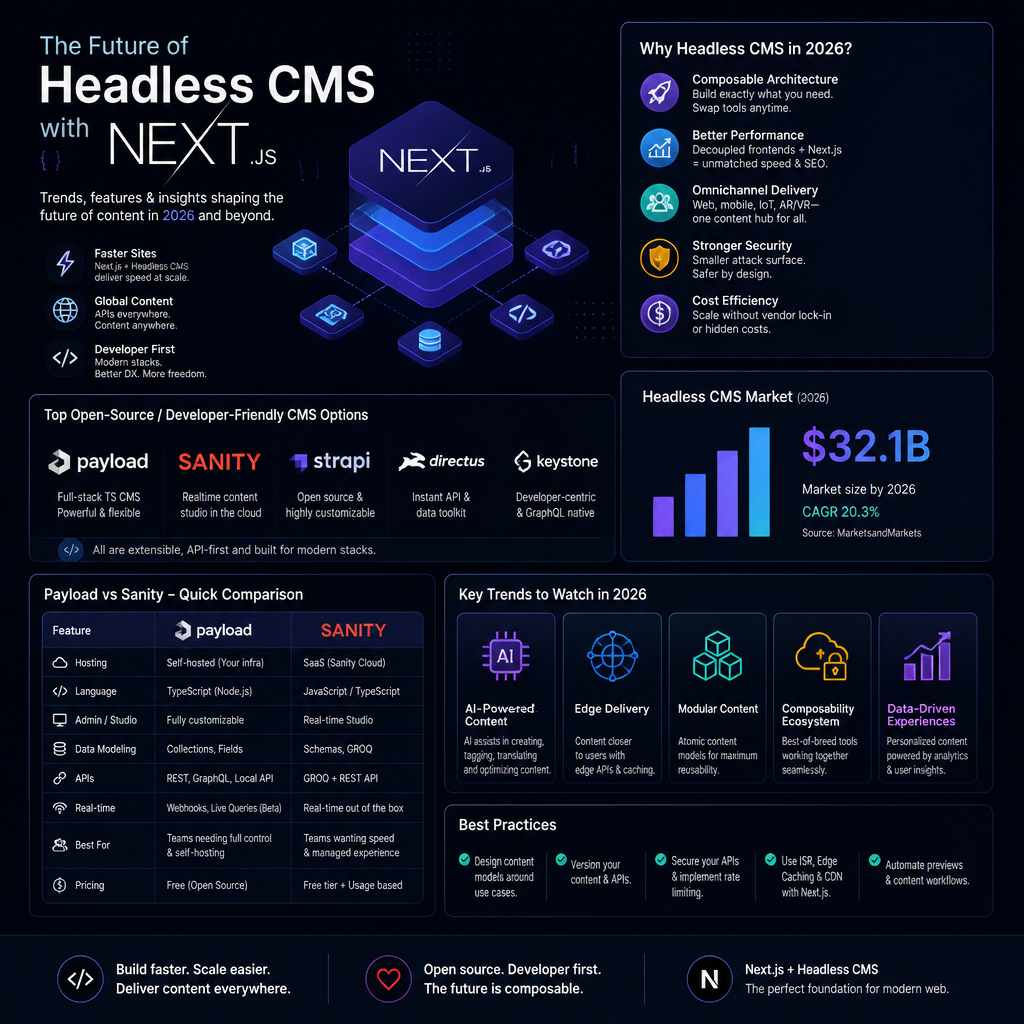
Open Source Headless CMS for Next.js
Open source headless CMS for Next.js is appealing for a simple reason: you can get escape velocity without signing your architecture away. You own the data model, you can run it locally, and if pricing or product direction changes, you’re not stuck rewriting your content layer under pressure.
That said, open source isn’t “free.” You pay in ops, upgrades, and the occasional Saturday debugging an auth callback. The win is control.
Two platforms that come up constantly in real Next.js builds are Payload and Strapi.
Payload CMS
Payload CMS is the open-source headless CMS I reach for when the team is code-heavy and wants the CMS to feel like part of the app—not a separate universe. It’s TypeScript-friendly, it’s deeply customizable, and it behaves well in a Next.js/Node ecosystem.
A detail that matters more than people think: Payload encourages a code-first workflow. That makes it easier to do the stuff you’ll inevitably need later—custom access rules, hooks, versioning workflows, and content relationships that aren’t just “title + rich text.”
According to a recent Techsy article, Payload is rated as the top choice for Next.js developers due to its seamless integration and powerful API capabilities. As of 2026, Payload allows for both local API development and cloud hosting options, making it incredibly versatile for various use cases.
Here’s a step-by-step approach I’ve used to keep a Payload + Next.js project sane:
- Model content around pages, not fields. Start with the routes your Next.js app needs (e.g.,
/blog/[slug],/docs/[...path]) and build collections to match. If you start with “fields marketing asked for,” you’ll end up with a content model that doesn’t map cleanly to rendering. - Add a “status” field early (draft/review/published) and treat it as a first-class filter in queries. People always bolt this on later, and it hurts.
- Plan preview from day one. Preview is where headless projects go to die. Decide how drafts should be fetched, who can see them, and how tokens/cookies will work across environments.
- Separate “authoring images” from “delivery images.” Editors upload huge images. Your Next.js layer needs responsive versions, caching headers, and predictable URLs. Decide whether Payload handles transformations or whether you offload to an image CDN.
A real example: I helped on a Next.js product marketing site where the team initially treated Payload like “WordPress but headless.” Every page became a single giant document with dozens of optional fields. Two months later, every new landing page request required a dev to add yet another conditional block.
We fixed it by shifting to modular blocks (hero, testimonial grid, pricing table, FAQ), locking down each block’s schema, and giving editors building blocks instead of a free-for-all. Net result: fewer regressions, faster content launches, and the marketing team stopped DM’ing engineers at 5pm on Fridays.
Common mistakes I see with Payload specifically:
- Over-customizing the admin UI immediately. Teams spend week one making the admin “pretty,” then discover they never implemented proper access control.
- Not pinning versions and migration strategy. You need a predictable upgrade cadence. If you don’t plan it, you’ll end up upgrading during an incident.
- Ignoring seed data. Without realistic seed content, your Next.js UI looks fine in Storybook but collapses when real editors enter real-world content.
Strapi
Strapi is usually the open-source pick when a team wants open source benefits but needs a more “CMS-like” editorial experience out of the box. It’s approachable for content managers, and it doesn’t demand that everyone on the team thinks in TypeScript types.
It also hits the baseline integration needs: Strapi supports REST and GraphQL APIs, providing flexibility in how data can be consumed.
Where Strapi tends to fit best in Next.js projects:
- Multi-language sites where editors need a familiar interface.
- Teams with a mix of skills—some dev-heavy, some content-heavy.
- Projects where you want the CMS to feel like a product your company “runs,” not a library you “embed.”
A practical Next.js integration path I’ve used:
- Pick REST or GraphQL and commit. You can support both, but you’ll double your testing and docs burden.
- Define a small set of API clients (one per content area), not one mega-client.
- Add caching at the edge or in Next.js fetch where it actually helps. Don’t cache everything blindly; cache “slow to change” content like navigation and footer, and handle “fast to change” content (like breaking announcements) with shorter TTLs or on-demand revalidation.
Common Strapi mistakes:
- Permissions misconfigurations. People open up public roles too broadly during development and forget to lock them down.
- Treating content types like database tables. Editors don’t think in joins. If they can’t find content quickly, they’ll create duplicates.
Future trends in open source CMS
Looking at trends for 2026, the demand for next.js CMS open source solutions is expected to rise. The driver isn’t ideology—it’s procurement and risk management. Companies are tired of vendor lock-in and pricing shifts that turn a “reasonable CMS bill” into a line item that gets scrutinized every quarter.
Also, Next.js teams increasingly want their CMS to be:
- Composable (plugs into auth, search, analytics without fighting you)
- Preview-friendly (draft content that renders in real UI)
- Deployable anywhere (local, VM, container, managed)
As highlighted by community discussions on platforms like Reddit, many developers are transitioning to open-source systems to capitalize on community-driven updates and improvements.
The tradeoff I’ll say out loud: open source is awesome until your org can’t staff it. If you don’t have someone who can own upgrades, backups, and security patching, SaaS can be the cheaper option—even if the sticker price looks higher.
Best Headless CMS for Next.js in 2026
Best headless CMS for Next.js in 2026 doesn’t mean “best on a grid.” It means best for your constraints: editorial workflow, preview needs, performance targets, governance, and how much platform work you’re willing to own.
When teams ask me for a recommendation, I ask three questions first:
- Do you need real-time collaboration and a content studio that editors love?
- Do you need enterprise governance (roles, environments, approvals, audit trails)?
- Are you optimizing for developer speed (ship features weekly) or organizational safety (ship carefully, with guardrails)?
With that lens, here are the platforms that show up as leaders.
Sanity CMS
Sanity is the CMS I’ve seen win when teams care about a strong editing experience and developers want a content layer that’s flexible without being chaotic.
It’s particularly recognized for its real-time collaboration features and a powerful query language that allows for intricate data models. As stated in the Sanity Next.js guide, this CMS is ideal for teams looking to build applications that require both speed and flexibility. Its emphasis on developer experience makes it a go-to for many Next.js projects.
A concrete way Sanity tends to play out in Next.js builds:
- You model content with enough structure that it’s queryable, but you’re not stuck with rigid “page templates.”
- You build a preview setup so editors can see drafts in the actual Next.js front end.
- You lean on Sanity’s strengths for structured content: complex relationships, references, and custom editorial tooling.
Persona anecdote: I worked with a small product team (2 devs, 1 designer, 2 marketers) shipping a docs + blog + product pages setup. They started with a simpler CMS, but docs became a mess—duplicate pages, inconsistent metadata, and no one trusted the “published” state.
We moved them to Sanity, but the real fix wasn’t the migration itself. The fix was designing the schema around how they work:
- Docs pages had required fields (title, slug, sidebar section, last reviewed date).
- Blog posts had a separate workflow (author, canonical URL rules, related products).
- Product pages had structured sections with validation (no empty CTAs, no missing OG image).
Once validations were in place, the “random broken pages” basically stopped. How I know: before the switch, we’d patch content-caused UI issues every sprint. Afterward, it was closer to once a month.
Common mistakes with Sanity:
- Overusing free-form rich text when the content should be structured. Your future self will hate you when you need to render “feature tables” consistently.
- Not defining canonical patterns for slugs and references. Editors will invent their own taxonomy if you don’t give them one.
- Skipping a query review. GROQ is powerful; it’s also easy to write overly broad queries that pull half your dataset for a page.
Contentful
Contentful stays relevant in 2026 because big orgs often want someone else to own the platform layer. You’re buying predictable uptime, enterprise controls, and a lot of “boring but necessary” features.
While primarily a SaaS solution, Contentful remains a viable option for enterprises needing comprehensive content management and governance features. It excels in environments where multiple teams need to collaborate efficiently. Its RESTful APIs integrate seamlessly with Next.js applications, providing a smooth user experience across various content types.
Where Contentful tends to be the right answer:
- Multiple teams publishing across brands/regions.
- A need for stricter permissions, environments, and approvals.
- Less appetite for self-hosting and maintaining a CMS.
The tradeoff: you’ll often spend more time designing your content model up front, and migrations can be more formal. In exchange, you get guardrails that matter when 50 people can publish.
Prismic
Prismic is a strong choice when you want editors moving fast and you like the “slices” mental model.
Another contender is Prismic, which is favored for its user-friendly interface and features like the Slice Machine that enables reusable components. Teams requiring a rapid development cycle often prefer Prismic as it allows for quick iterations without sacrificing content quality. Prismic’s blog notes that its visual editing tools make it easier for non-technical users to manage content without developer intervention.
A practical way I’ve seen Prismic succeed with Next.js:
- Define 10–20 slices that cover 90% of marketing needs (hero, logo wall, pricing, CTA band, FAQ, comparison table).
- For anything outside that set, don’t immediately add a new slice. First ask: is this a one-off campaign that can be handled by a variant of an existing slice?
- Add content guidelines inside the slice fields (character limits, image ratios, “don’t use all caps” notes). Editors actually read them when it’s in the UI.
Common mistake: teams create slices for every single page, turning slices into “page templates with extra steps.” You want a limited set of reusable blocks, not a museum of one-offs.
Headless CMS Best Practices with Next.js
Headless CMS best practices with Next.js are mostly about avoiding self-inflicted pain: build times, preview confusion, accidental content leaks, and slow pages because you’re fetching too much.
Efficient data fetching
Next.js gives you multiple rendering modes, and the “right” one is usually mixed.
Utilizing Next.js's mixed rendering capabilities—Static Site Generation (SSG), Server-Side Rendering (SSR), and Incremental Static Regeneration (ISR)—allows developers to optimize how they fetch and serve content. For instance, using ISR can keep content fresh without needing full site rebuilds, which is essential for content-heavy applications. Developers integrating Payload CMS can leverage this effectively to automate static page revalidation (DEV Community).
What I do in practice:
- SSG/ISR for marketing and docs where performance matters and content changes are predictable.
- SSR for highly personalized pages (dashboards, account pages), or where auth is involved.
- Client-side fetching sparingly, mostly for interactive widgets where SEO isn’t the point.
A step-by-step pattern for content-heavy sites:
- Use ISR for most content pages.
- Set revalidation based on business reality (e.g., docs revalidate every hour, marketing pages every 5 minutes during campaign weeks, otherwise every few hours).
- Add on-demand revalidation for “publish now” moments. Editors hate waiting for a timer.
- Cache global data (navigation, footer, site settings). Don’t refetch it 200 times per build.
Common mistakes:
- Rebuilding the whole site on every publish. This is the classic headless anti-pattern. It works until it doesn’t.
- Overfetching in page queries. If you only need title/slug/excerpt for a listing page, don’t pull full rich text and assets.
Content modeling
Proper content modeling is crucial for a headless CMS. Taking advantage of these platforms’ schema-driven content modeling capabilities can significantly streamline the development of complex applications.
My stance: content modeling is a product decision, not just a CMS setup task. If you get it wrong, you’ll feel it in every release.
A concrete workflow that tends to work:
- Start with three tiers of content: global settings, page-level documents, reusable modules.
- Decide what must be structured (pricing, specs, CTAs, FAQs) vs what can be rich text.
- Add validation rules early: required metadata, max lengths, allowed formats.
A mistake I’ve seen more than once: someone puts SEO fields (title/description/OG image) on some content types but not others. Six months later you’re debugging why certain pages share the wrong OG image on social.
Optimization for SEO
SEO remains a cornerstone of web visibility, and headless setups can either help or hurt depending on how disciplined you are.
This includes ensuring that all content is indexed correctly and leveraging Next.js features for generating sitemaps, metadata, and other SEO-friendly elements. The chosen CMS should support easy management of SEO attributes directly in the content editor.
What I’d do for a 2026 Next.js + headless build:
- Ensure every indexable page has: canonical URL, OG title/description/image, robots directives when needed.
- Store SEO fields in the CMS, but enforce guardrails (lengths, required OG image for key templates).
- Make redirects a first-class feature (editors will change slugs). Don’t rely on engineers to hardcode redirects for content updates.
Common mistake: teams ship headless without a redirect workflow. Then a marketer renames a slug, and you quietly bleed SEO until someone notices in analytics.
Performance monitoring
Finally, monitor performance metrics continually. It’s the only way to know if your CMS choices are helping or hurting.
Utilizing tools like Google Lighthouse or custom analytics dashboards can help track how the headless CMS impacts page load times and user engagement.
My practical checklist:
- Run Lighthouse in CI for a few key pages (home, top landing page, top blog post). Watch it over time.
- Track build times and revalidation times. If your builds creep from 4 minutes to 25, something’s off.
- Watch your largest content payloads (giant rich text blobs, unoptimized images, huge navigation trees).
A small war story: on a docs site, performance tanked after “just adding a sidebar.” Turns out the sidebar query pulled the full document for every page in the tree—including markdown bodies and image arrays. Fix was simple: query only IDs, titles, and slugs for navigation. But without monitoring, it looked like “Next.js got slow.” It didn’t. We did.
In conclusion, the future of headless CMS with Next.js looks promising as developers and organizations seek more flexibility and control over their content delivery systems. The choice of the right CMS can greatly affect project outcomes, making it essential to evaluate based on your specific requirements and objectives. As we move into 2026, platforms like Payload, Sanity, and Strapi are paving the way, offering innovative features that cater to both developers and marketers alike.
Leave a Reply