Discover how to personalize your email marketing campaigns in 2026 for improved engagement and customer loyalty. Learn effective techniques and strategies.
How to Personalize Your Emails for Better Engagement in 2026
Email marketing is evolving rapidly, and personalization has become a cornerstone of effective campaigns. In 2026, marketers face the challenge of making their emails stand out in crowded inboxes.
That said, “crowded inbox” isn’t an excuse to spray-and-pray. If your emails look and sound like everyone else’s, they’ll get treated like everyone else’s—skimmed, ignored, or unsubscribed.
Personalization is key to achieving high engagement rates, and understanding how to implement it can significantly boost your email marketing effectiveness. The trick is making it feel helpful rather than creepy, and repeatable rather than fragile.

Why Personalization Matters
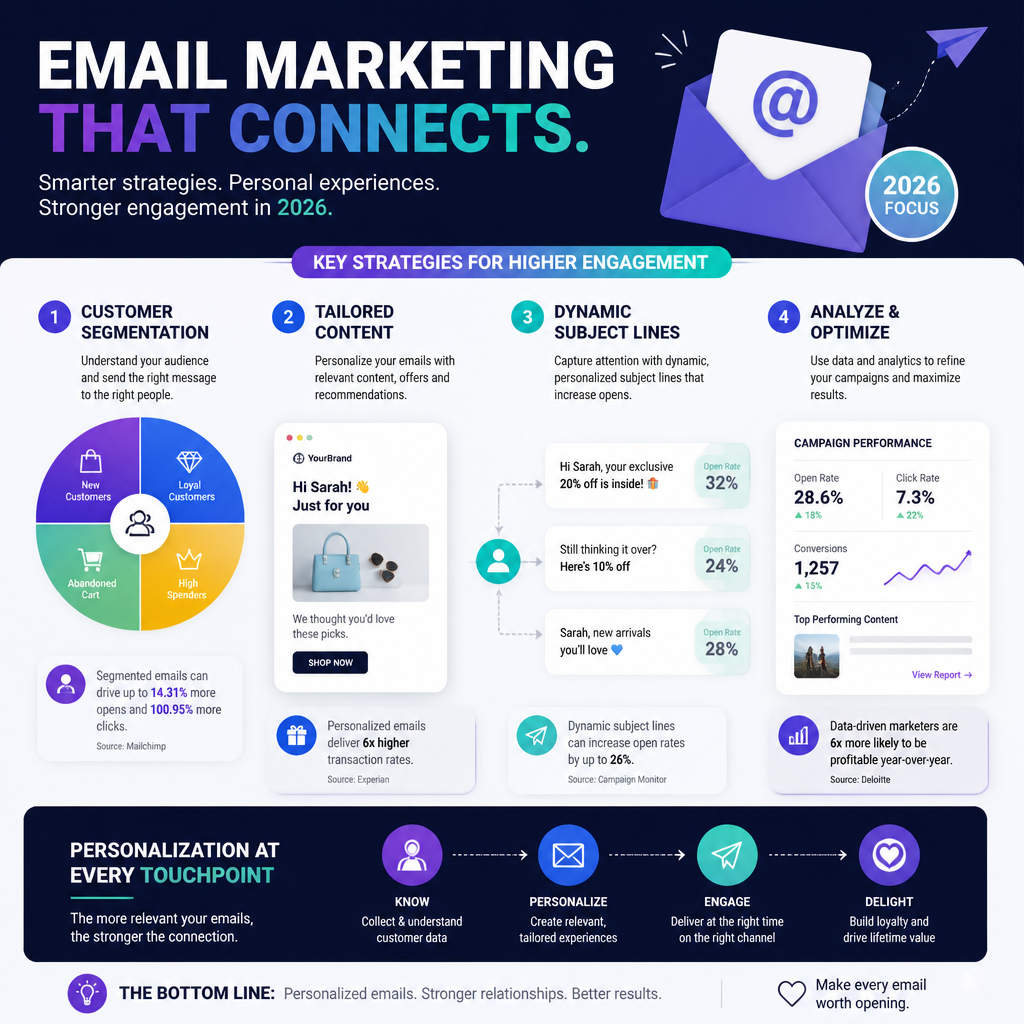
Personalized email marketing strategies are proven to enhance engagement and drive conversions. According to a study, personalized emails have an open rate that is 26% higher than generic emails (Campaign Monitor).
But the real reason personalization matters is simpler: it reduces “mental load.” People don’t want more content. They want the right content.
It’s about relevance, not tricks
If you only take one idea from this section, take this: personalization is just relevance you can scale.
So yes, names can help. But I’ve seen the opposite too—Hey , because the first name field is blank, or Hey {FNAME} because the merge tag broke. Those are unforced errors, and they train subscribers to distrust your email.
What actually moves the needle is matching the email to the subscriber’s intent:
- A new lead wants clarity and proof (what is this, why should I care).
- A first-time buyer wants guidance (how to use it, what to do next).
- A repeat buyer wants speed (reorder, refills, upgrades).
- A lapsed customer wants a reason to come back (newness, incentives, timing).
Because those intents are different, the “same” newsletter sent to all four groups usually underperforms.
A quick example I’ve watched play out
A couple years back, I worked with a small eCommerce brand that sold two very different product categories: everyday essentials and giftable premium items. Their weekly email blasted the full catalog to everyone.
We didn’t redesign anything at first. Instead, we split the list into three segments:
- Essentials-first buyers (80%+ of purchases in essentials)
- Gifts-first buyers
- Browsers (high clicks, low purchases)
Then we changed only two things: the hero product and the opening paragraph. Essentials got “restock” language and practical bundles. Gifts got “occasion” framing and tighter curation. Browsers got bestsellers plus a simple quiz-style CTA.
Even with the same sending schedule, engagement lifted fast because the content finally matched why people were there.
Common mistakes that kill trust
Personalization backfires when it’s sloppy or overly invasive.
- Using sensitive data for “wow”: referencing exact browsing behavior in the subject line can feel gross, even if it’s technically accurate.
- Over-segmenting too early: 18 micro-segments sounds smart until each one has 47 people and you can’t learn anything.
- Personalizing the wrong layer: swapping product blocks while keeping generic copy often reads like a thin veneer.
If you’re unsure, start “boring”: segment by lifecycle stage and purchase category. Those two alone can carry a lot of weight.
How to Personalize Your Emails for Better Engagement
This is the part where most teams jump straight to automation. I’d rather you earn it.
Start with segmentation and messaging, then add dynamic content, then add triggers. Each layer should make the previous one easier—not more chaotic.
Segment Your Audience Effectively
Segmentation is about dividing your email list into smaller, more targeted groups. You can segment based on various factors such as demographics, purchase history, and engagement level.
For instance, sending different messages to new subscribers compared to loyal customers can dramatically improve engagement rates.
A real-world example comes from iContact, where small businesses outsmarted corporate giants by employing targeted email segments that addressed specific customer needs (iContact). They tailored their messaging, resulting in higher open rates and conversions.
The segmentation ladder I actually use
If you’re stuck, run this ladder from top to bottom. Stop when you’re getting clearer results.
- Lifecycle: subscriber → lead → first-time customer → repeat → VIP → lapsed
- Engagement: active (clicked recently) vs. inactive (no opens/clicks in X days)
- Category affinity: what they browse/buy most
- Price sensitivity: full-price buyers vs. discount-driven
- Channel source: paid social vs. organic vs. referral (messaging differs)
Lifecycle segmentation is the cheapest win because your data is usually reliable (signup date, purchase count). Meanwhile, “interests” can be messier unless you track it well.
Common segmentation mistakes
- No backstop for tiny segments: always have a fallback group (e.g., “General: Active”) so you don’t strand people.
- Ignoring deliverability: if you keep mailing inactive subscribers forever, inbox placement can slide. Segmenting engagement helps you throttle.
- Not documenting rules: if the team can’t explain who’s in a segment, you’ll break it later.
Use Dynamic Content
Dynamic content enables you to customize the content of your emails based on the recipient’s data. This can include product recommendations, tailored offers, or relevant blog posts that match their interests.
For example, if a customer frequently buys poetry books, you can highlight new arrivals in that genre in your emails. Implementing dynamic content can lead to significant increases in engagement as it makes the email feel personally crafted for the recipient.
A practical dynamic content setup
When I implement dynamic blocks, I keep it tight:
- One “smart” block per email at first (hero OR product grid OR CTA)
- Two variants max to start (Variant A / Variant B)
- A default version that’s safe for everyone
Why? Because dynamic content can quietly break. If you launch five conditional blocks at once, you won’t know which one caused the weird dip in clicks.
Also, preview it like you mean it. I’ll usually create 6–10 test contacts that represent real states (VIP, lapsed, no-first-name, no-purchase) and run inbox previews before I trust the send.
Tailor Subject Lines and Preheaders
The subject line is the first thing your subscribers see, and a personalized subject line can significantly improve your open rates. Using data such as previous interactions or preferences can help you craft these.
For instance, instead of a generic subject like “New Arrivals,” you could say, “[Name], Your Favorite Authors Have New Books Out!” This kind of attention can drastically change how your emails perform.
My subject line rules (learned the hard way)
- Personalize with context, not flattery: “Back in stock: the size you wanted” beats “Hey Sarah!” most days.
- Write the preheader as sentence #2: don’t waste it on “View in browser.”
- Avoid brittle merge tags unless you’ve validated the data (and you have a default).
A small trick that helps: write 10 subject lines, then delete the five that sound like marketing. What’s left is usually closer to human.
Optimize Send Frequency
Finding the right time and frequency to send your emails is critical. Over-saturating your audience with emails can lead to unsubscribes, while too few can make your audience forget you.
Use analytics to find the sweet spot. You might discover that your audience responds better to weekend emails rather than weekdays or that certain times yield higher open rates.
Frequency isn’t one-size-fits-all
Here’s what I do instead of guessing:
- Pick a baseline (say, 1–2 sends/week).
- Split by engagement: active subscribers can handle more; inactive should get less.
- Watch complaints and unsubscribes alongside opens/clicks.
- Throttle promotions: if you run heavy discounts, build “quiet weeks” on purpose.
One thing people miss: frequency problems often come from content sameness, not volume. If every email is “20% off,” even one per week can feel like spam.
Implement Behavioral Triggered Emails
Behavioral triggers allow you to send emails based on specific actions a user takes, such as abandoning a cart or signing up for a newsletter.
For example, if a customer adds items to their cart but doesn’t complete the purchase, sending a reminder email can prompt them back to your site. This technique can boost email ROI and is particularly effective for eCommerce businesses.
A step-by-step trigger plan you can ship this month
If you’re starting from scratch, ship these in this order:
- Welcome series (2–4 emails)
- Email 1: set expectations + best content/product
- Email 2: social proof + FAQs
- Email 3: personalization ask (preferences) or starter guide
- Browse abandon (1–2 emails)
- “Still looking?” with category-based recommendations
- Cart abandon (2–3 emails)
- Reminder → objections (shipping/returns) → urgency (light)
- Post-purchase (2–5 emails)
- How to use → care tips → cross-sell that makes sense
- Winback (2–3 emails)
- New arrivals → incentive (optional) → last call
Keep the copy specific. “Complete your purchase” is generic; “Your cart’s ready—shipping is free over $50” is useful.
Mistakes I see constantly in triggers
- Sending a cart email to someone who already bought (bad event timing, slow sync)
- Discounting too fast so people learn to abandon carts on purpose
- Stacking triggers so a subscriber gets welcome + browse + promo on the same day
If your tool allows it, add a simple rule: “max 1 automated email per 24 hours” unless it’s transactional.
Analyze and Improve
The beauty of email marketing lies in the metrics. Make it a habit to analyze your email performance regularly.
Track metrics such as open rates, click-through rates, and conversions to understand what’s working and what’s not. Utilize this data to refine your strategies continually.
For instance, if you notice a drop in engagement after a specific change, be prepared to adjust your tactics accordingly.
What I measure (and what I ignore)
I care about:
- Clicks per delivered (not just CTR on opens)
- Revenue per recipient for promos
- Conversion rate from click (landing pages matter)
- Unsubscribes + spam complaints by segment
I’m careful with:
- Open rate as a “win” metric. It’s still directional, but it’s not the whole story.
And I always annotate the timeline. When results change, you want to know whether it was a subject line test, a list growth spike, a deliverability issue, or a new offer.
Starting with Email Marketing
For those new to email marketing, starting with a solid foundation is critical. Consider enrolling in an email marketing course that covers the basics of email marketing, including list building, content creation, and analytics.
But before you buy anything, build one working loop: collect emails → send something valuable → learn from the data → repeat. Tools and templates don’t rescue a shaky loop.
Your first 30 days (a real starter plan)
If I were mentoring a beginner, here’s the month plan I’d hand them:
Week 1: Get the boring stuff right
– Set up a sending domain (or at least authenticate properly in your platform).
– Create one clean list and one suppression list.
– Write down your “from name” and stick with it.
Week 2: Build your core emails
– One newsletter template (simple, scannable).
– A 2-email welcome series.
– One promo email layout you can reuse.
Week 3: Add one personalization lever
– Collect a preference (category, use case, or role).
– Segment based on that single preference.
Week 4: Run one test
– A/B test a subject line OR CTA.
– Pick a winner, then document it.
That’s enough to start compounding.
Utilizing Email Marketing Tools
With so many tools available, selecting the right one can enhance your email marketing efforts significantly.
If you’re shopping around, I’d start by scanning the best email marketing tools of 2026 and then narrowing based on what you actually need: segmentation depth, automation builder, reporting, and how painful (or painless) integrations are.
What I look for in a tool (so I don’t regret it later)
- Event tracking that’s trustworthy (purchase, browse, cart, form submit)
- Automation with guardrails (frequency caps, exclusions)
- Decent QA (previews by segment/state)
- Migration support if you’re moving from another platform
Common mistake: teams buy the tool with the fanciest automation builder, then never fix the data feeding it. Personalization doesn’t work if “product viewed” fires randomly.
Emphasizing Compliance and Best Practices
As you delve into email marketing, maintaining compliance with regulations like GDPR and CAN-SPAM is crucial.
Ensure that you’re obtaining consent from users before sending them emails and that you provide them with a clear option to unsubscribe.
Respecting your subscribers’ choices fosters trust and long-term relationships.
A practical compliance habit
I’m not a lawyer, so I won’t pretend to give legal advice. Still, operationally, here’s what keeps you out of trouble most of the time:
- Use double opt-in when list quality matters more than raw growth.
- Store signup source + timestamp.
- Keep your unsubscribe link visible, and process it fast.
If you ever get hit with a deliverability problem, having clean consent records makes the support conversation a lot less painful.
Career Insights in Email Marketing
With the rise of personalized marketing strategies, email marketing jobs are becoming increasingly relevant.
The demand is real, but the bar has changed. Companies don’t just want “someone who can send newsletters.” They want someone who can run lifecycle programs, debug tracking, and explain performance without hand-waving.
Email Marketing Salary Trends
Salaries in the email marketing field vary based on experience and location but are generally competitive. According to recent data, the average email marketing manager earns between $60,000 to $85,000 annually, with experienced professionals commanding higher rates.
For those considering a career in this field, developing skills in analytics, automation, and personalization can set you apart.
What tends to push you toward the top of that range
In my experience hiring and working alongside email folks, the people who get paid more usually do at least two of these well:
- Own revenue numbers (not just “engagement”)
- Build automations that don’t spam customers
- Work with data (events, UTM discipline, basic SQL or at least strong reporting)
- Understand deliverability enough to prevent fires
If you can walk into an interview and calmly explain why clicks fell—“we changed segmentation, deliverability dipped in Gmail, and the landing page slowed down”—you’re already ahead.
Preparing for Email Marketing Jobs
If you’re aiming for a role in email marketing, consider undertaking specific training or certifications.
There are numerous online courses available that focus on the nuances of email marketing, providing valuable insights that potential employers look for.
Additionally, hands-on experience through internships or freelance projects can enhance your employability.
A portfolio project that actually impresses
If you don’t have professional experience yet, build a small “fake brand” lifecycle program and document it:
- Define two customer personas.
- Write a 3-email welcome series for each.
- Mock up segmentation rules.
- Create one triggered flow (cart abandon or winback).
- Add a measurement plan (what you’d track and why).
Don’t just show pretty designs. Show decisions.
A quick anecdote (the kind that happens on real teams)
I once watched a junior marketer lose confidence because a manager kept saying, “Just personalize more.” No specifics.
We sat down, pulled up the account, and realized the “personalization” problem was basic: half the list had no purchase data because the checkout integration was failing. The fix wasn’t copywriting—it was debugging.
That’s the job now. You’ll write emails, sure, but you’ll also spend time making sure the inputs are real.
Conclusion
Personalization in email marketing is no longer optional; it’s a necessity.
But you don’t need to boil the ocean. If you only improve three things this quarter—segmentation by lifecycle, one dynamic block, and one trigger flow—you’ll usually feel it in engagement and revenue.
A simple next-step checklist
If you want a clean plan for the next 2–3 weeks, do this:
- Audit your data fields (first name, last purchase date, category, engagement).
- Create 3 core segments: new subscribers, active customers, lapsed.
- Write one email for each that answers a different “job to be done.”
- Add one automation (welcome series is the safest start).
- Measure clicks per delivered and unsubscribes by segment.
Then iterate. Don’t keep changing everything at once, because you won’t learn what caused what.
Common mistakes to avoid in 2026
- Chasing personalization gimmicks while ignoring list hygiene
- Letting promos dominate until every email feels transactional
- Forgetting the landing page (personalized email + generic landing page is a leaky bucket)
- Buying a new platform before you’ve fixed your strategy
If you’re evaluating tooling, check out Email Marketing Platforms Comparison 2026 and cross-reference it with what you actually plan to build.
Also, if you just want a shortlist to start from, browse Top Email Marketing Platforms 2026 and Top Email Marketing Platforms for 2026—then pick the one you’ll realistically use every week.
Personalization pays off when it’s consistent. Ship something small, make it work, and keep tightening the loop.
Leave a Reply