Category: Uncategorized

  • Understanding Agentic AI: Key Features and Impacts

    Explore agentic AI, its benefits, applications, and key features set to reshape industries by 2026. Learn more about how it works!

    Featured image for Understanding Agentic AI: Key Features and Impacts for 2026

    Understanding Agentic AI: Key Features and Impacts

    Agentic AI is ushering in a new era of artificial intelligence characterized by its ability to operate independently, drastically transforming how industries function. But what exactly defines Agentic AI? In essence, it refers to AI systems designed to make decisions and execute actions without the need for ongoing human input.

    Understanding Agentic AI workflow with planning, tool use, and guardrails

    Agentic AI Explained

    The fundamental distinction between traditional AI systems and Agentic AI lies in autonomy. Traditional AI typically relies on human oversight for decision-making. In contrast, Agentic AI can analyze data, assess contexts, and act decisively, often in real-time. For instance, in customer service, an Agentic AI system can autonomously manage inquiries, resolve issues, and suggest actions based on user behavior, all without waiting for human intervention.

    That autonomy is more than “it can chat.” An agent can:

    • Interpret a goal (“reduce churn in the next 30 days”).
    • Plan steps (segment users, identify risk signals, draft outreach, schedule campaigns).
    • Use tools (CRM, email platform, data warehouse queries, ticketing system).
    • Check its work (did the query run, did the emails schedule, did we violate a policy?).
    • Iterate (adjust based on outcomes).

    This capability leads to efficiency gains that are not just incremental but transformative. In fact, research indicates that organizations adopting Agentic AI technologies are witnessing substantial improvements in operational efficiency, with some statistics showing an average ROI of 171% for those who manage to deploy these systems effectively (Digital Applied).

    Where “agentic” starts (and where it doesn’t)

    People slap “agent” on anything that calls an API. I don’t.

    If the system only responds when prompted and never takes initiative, it’s not agentic — it’s an assistant. If it can create a plan, call tools, and recover when a step fails, now we’re talking.

    A quick rule I use in reviews: if the AI can’t explain its next step and why, it’s not ready to take that step. Because once you let it act, you own the side effects.

    A real-world mini story: the “helpful” refund bot

    I’ve seen a team roll out an “agentic” refund bot that could issue refunds, update the CRM, and close tickets. They wired it directly to payment actions because they wanted speed.

    It worked for two days.

    Then a customer asked, “Can you refund my subscription and cancel future billing?” The agent refunded the latest invoice, canceled the subscription, and then—because it “wanted to be thorough”—refunded two older invoices that were outside policy.

    Nobody told it that “helpful” has boundaries.

    The fix wasn’t fancy. They added:

    • a hard policy check (invoice age, reason codes),
    • a max refund limit per customer per day,
    • and a human approval step for exceptions.

    Autonomy isn’t the feature. Controlled autonomy is.

    How Agentic AI Works

    At its core, the mechanism of Agentic AI involves sophisticated algorithms that enable it to learn from data, adapt to new information, and make autonomous decisions. This complexity is rooted in advanced machine learning techniques and data analytics.

    1. Data Collection and Processing: Agentic AI systems gather large amounts of data from various sources. This could include customer interactions, sales data, and even external market trends.
    2. Algorithmic Learning: By applying advanced learning algorithms, Agentic AI analyzes this data to identify patterns.
    3. Decision-Making: Once trained, the AI uses its findings to make decisions that directly impact operations. For example, in finance, Agentic AI can execute trades based on predictive models, adjusting strategies dynamically in response to market fluctuations.

    This multi-step process enables organizations to operate with greater speed and agility, providing a distinct competitive advantage.

    The practical loop: Observe → Plan → Act → Check

    When I design agentic systems, I think less about “one big brain” and more about a loop with guardrails.

    A typical flow looks like this:

    1. Observe: pull state (tickets, inventory, customer history, logs). But you also pull constraints (policies, permissions, budgets).
    2. Plan: generate a short list of actions, not a novel. Then rank them.
    3. Act: call tools with tight schemas. If you let an agent freestyle API calls, it will.
    4. Check: validate results (did the record update, did the email send, did the number change make sense?).
    5. Escalate: if confidence drops, route to a human or a safer workflow.

    That “Check” step is where most teams cut corners, because it doesn’t demo well. It’s also where production systems stop being chaos machines.

    Step-by-step: a sane first agent for operations

    If you want something concrete, here’s a starter pattern I’ve shipped in different forms:

    1. Pick one workflow with clear boundaries: “triage inbound support tickets” beats “run customer support.”
    2. Define actions as tools: classify_ticket, suggest_reply, create_jira_issue, request_more_info.
    3. Add a policy layer: block PII exposure, block pricing promises, block legal statements.
    4. Require structured outputs: JSON with fields like category, urgency, next_action.
    5. Log everything: prompts, tool calls, outcomes, and the final decision.
    6. Start with human-in-the-loop: agent drafts + routes, human approves.
    7. Graduate slowly: only low-risk tickets become fully autonomous.

    The win is you get speed without giving the agent the keys to the building.

    Agentic AI Technology

    Several technological advancements support the growth of Agentic AI. Key tools include:

    • Model Context Protocol (MCP): This emerging standard facilitates interoperability between different AI agents and their tools, ensuring seamless integration within existing systems. The MCP has already seen 97 million downloads, signaling its critical role in enabling widespread Agentic AI adoption (Digital Applied).
    • Natural Language Processing (NLP): Enhancements in NLP allow Agentic AI systems to understand and generate human language, further empowering their interaction capabilities in customer engagement scenarios.
    • Predictive Analytics: These frameworks help Agentic AI forecast future trends based on historical data, aiding in proactive decision-making.

    What actually makes an agent “work” in production

    In demos, the model looks like the hero. In production, the plumbing is the hero.

    Here’s what usually matters more than people expect:

    • Tool schemas and permissions: the agent should only see and do what it must. A read-only data agent stays read-only.
    • State management: agents need memory, but not the “remember everything forever” kind. You want scoped, time-bounded state.
    • Retries and fallbacks: tools fail. Networks flake. APIs rate-limit. If your agent panics when a call 429s, it’s not autonomous.
    • Evaluation harnesses: you need regression tests for behavior, not just unit tests for code.

    Also, don’t ignore boring UX. A clean “agent activity feed” (what it did, why, and what it will do next) saves hours during incident response.

    Common mistakes I keep seeing

    Teams tend to step on the same rakes:

    • Letting the agent write its own prompts mid-flight with no constraints. That’s how you get weird tool calls.
    • No budgets (time, cost, number of tool calls). Then a single request spins for minutes.
    • Over-trusting a single confidence score. You want multiple signals: tool success, policy checks, and outcome validation.
    • Shipping autonomy before observability. If you can’t replay what happened, you can’t fix what happened.

    If you’re tempted to skip logging because “privacy,” log with redaction. Don’t log nothing.

    Agentic AI Applications

    The applications of Agentic AI span various industries, enhancing functionalities and redefining workflows. Here are some leading examples:

    1. Healthcare: AI systems streamline patient management by predicting admission rates and managing resources efficiently.
    2. Finance: Agentic AI automates trading decisions and risk assessment, optimizing portfolios and maximizing returns.
    3. Transportation: From route planning to fleet management, Agency AI enhances logistics, ensuring efficient operations powered by real-time data analysis.
    4. E-commerce: Personalization engines utilize Agentic AI to tailor user experiences, recommend products, and manage inventory dynamically.

    Healthcare: where autonomy must be humble

    In healthcare, agentic systems can help, but they shouldn’t cosplay as doctors.

    A realistic 2026 use case isn’t “AI diagnoses everything.” It’s more like:

    • An agent monitors appointment no-shows and rebooks patients automatically.
    • Another agent checks pre-visit forms, flags missing fields, and pings patients.
    • A bed-management agent predicts bottlenecks and recommends staffing changes.

    But you keep hard lines: clinical decisions require clinician approval, and the agent can’t invent medical advice. If you don’t enforce that, you’ll eventually ship a compliance nightmare.

    Finance: fast feedback, sharp edges

    Finance is a natural home for agents because the data is structured and the feedback loop is immediate. Still, the blast radius can be huge.

    What I’ve seen work:

    • Agents that reconcile transactions, then open cases for anomalies.
    • Risk agents that simulate exposure under different market moves.
    • Trade-support agents that draft orders, while a human approves execution.

    What I’d avoid: fully autonomous trading “because the model seems smart.” Markets change, regimes shift, and agents can chase patterns that died last quarter.

    Transportation and logistics: agents as dispatchers

    Logistics is basically a constant stream of micro-decisions. That’s a good fit.

    An agent can:

    • reroute shipments when weather hits,
    • book alternative carriers when prices spike,
    • proactively message customers about delays,
    • and update the internal dashboard.

    The key is you need real-time data and explicit constraints (delivery windows, cost ceilings, contractual carriers). Otherwise, the agent will optimize for the wrong metric — like cost — while quietly destroying on-time delivery.

    E-commerce: personalization plus operations

    Most people talk about product recommendations. Fine. The bigger win is operational:

    • An agent watches inventory, predicts stockouts, and triggers replenishment.
    • Another agent adjusts promos based on margin and demand.
    • A CX agent resolves “where’s my order” tickets end-to-end.

    And yes, you can personalize. Just don’t let the agent “discover” that discrimination boosts conversion.

    Agentic AI Benefits

    The benefits of integrating Agentic AI into business operations are profound:

    • Increased Efficiency: Organizations report recovering significant amounts of time as tasks typically requiring human intervention are delegated to autonomous systems.
    • Scalability: As companies grow, Agentic AI facilitates scaling operations without proportional increases in overhead.
    • Enhanced Decision-Making: With access to real-time data and predictive analytics, businesses can make informed decisions faster than ever before.
    • Cost Savings: The reduction in labor costs, combined with efficiency gains, leads to improved financial performance.

    The benefits that show up on Monday morning

    The “big” benefits are real, but the day-to-day ones are what keep teams sold.

    • Queue collapse: ticket backlogs drop because the agent does the first 60% (categorize, gather info, draft response).
    • Fewer handoffs: agents can move work across tools without waiting for three humans to coordinate.
    • Less tribal knowledge: the agent follows a documented policy instead of “ask Sara, she knows.”

    Also, when an agent runs the same workflow 1,000 times, you finally see where your process is broken. That’s uncomfortable, but it’s valuable.

    The tradeoffs nobody puts on slides

    You don’t get autonomy for free.

    • Agents can be confidently wrong, and worse, they can be wrong at scale.
    • Costs can spike if you let loops run wild (tool calls, token usage, retries).
    • Security gets harder because you’re adding a new actor that touches systems.

    That said, if you design for constraints, you can take the upside without eating the whole risk sandwich.

    Potential Impact of Agentic AI by 2026

    By 2026, Agentic AI is expected to revolutionize industries further, making operational efficiencies a reality for many organizations. Reports estimate that the agentic AI market will grow 31 times over the next decade, reaching $236 billion by 2034. This rapid expansion is indicative of the competitive advantages that early adopters will gain as more enterprises move towards automation and advanced AI integration (Digital Applied).

    What I expect to be different in 2026

    By 2026, I expect three things to be normal — not “cutting edge.”

    1. Agents as co-workers inside business software: not a separate chat window. Your CRM, helpdesk, and ERP will have agentic workflows baked in.
    2. More standardization around tool use: MCP-like patterns will reduce one-off glue code.
    3. Governance moves left: teams will define policies and evals before deploying autonomy, because they got burned once.

    Meanwhile, the companies that win won’t be the ones with the fanciest model. They’ll be the ones who ship boring, reliable automations that never make their CFO nervous.

    A pragmatic adoption roadmap (so you don’t faceplant)

    If you’re trying to make agentic AI real by 2026, here’s the rollout I’d bet on:

    1. Instrument your workflows (2–4 weeks): measure cycle time, failure points, and where humans spend time.
    2. Automate “suggest” first (4–8 weeks): agent drafts, human approves. You build trust.
    3. Add constrained actions (next 4–8 weeks): allow low-risk tool calls (tagging, routing, scheduling).
    4. Introduce autonomy on narrow slices: overnight batch tasks, low-value tickets, internal ops.
    5. Keep an emergency brake: feature flags, kill switches, rate limits.

    If you skip step 1, you’ll “automate” something that wasn’t the bottleneck. If you skip step 5, you’ll learn the hard way.

    Conclusion

    In summary, Agentic AI is not just an emerging trend but a future necessity for businesses aiming to thrive in an increasingly competitive landscape. As we approach 2026, understanding its features, mechanisms, and potential impacts will be essential for any industry professional.

    If you’re serious about adopting it, start with one workflow, give the agent narrow tools, and measure outcomes like you would any other production system.

    My Journey in AI

    I’m Mobeen Abdullah, the founder of Revnix and a passionate advocate for leveraging technology to solve real-world problems. My journey began in freelancing, where I quickly identified the immense potential of AI to transform industries. With years of experience in cloud-native development and AI platforms, I now lead initiatives that empower organizations to harness open-source technologies effectively.

    The moment I stopped treating AI like a demo

    Freelancing forces you to face reality fast. Clients don’t pay for “cool.” They pay for outcomes.

    Early on, I built a simple automation for a small e-commerce operator: classify support emails, draft replies, and route “refund” vs “shipping delay” to different queues. Nothing fancy. The first version looked great in testing.

    Then production hit.

    A customer wrote three lines in broken English, pasted an order number with a typo, and mentioned two different addresses. The model guessed, confidently, and drafted a reply that sounded polite but was dead wrong. The customer got angrier, support time increased, and my client asked the question every builder eventually hears: “So… is this thing actually safe to use?”

    That’s when I learned the hard lesson: accuracy isn’t enough; you need controllability.

    How I build agentic systems now (the unglamorous checklist)

    When we build agent-like workflows at Revnix, I push a few non-negotiables. They aren’t sexy, but they keep you out of trouble.

    1. Start with permission design: what data can the agent read, and what actions can it take? If it can’t justify an action, it shouldn’t have that permission.
    2. Force structured outputs: the agent must speak in schemas (fields, enums, IDs). Free-form text is where mistakes hide.
    3. Make policies executable: “don’t refund beyond 30 days” becomes a rule the system enforces, not a guideline.
    4. Add a review lane: a human-in-the-loop path for edge cases, because edge cases are the business.
    5. Ship with telemetry: if we can’t trace tool calls and decisions, we can’t defend them.

    I’m biased toward boring reliability. If an agent can save 30% time consistently without surprises, that beats a “90% automation” system that occasionally lights your weekend on fire.

    A persona anecdote: the ops manager who hated AI (until it helped)

    One of my favorite wins involved an operations manager — smart, skeptical, and frankly tired of tech hype.

    Her pain wasn’t “lack of AI.” It was the daily grind: chasing late shipments, updating spreadsheets, nudging vendors, then answering angry internal emails.

    We didn’t pitch an “AI transformation.” We built a narrow agent:

    • It checked shipment statuses every hour.
    • It flagged exceptions (stalled scans, missed cutoffs).
    • It drafted vendor emails using templates.
    • It posted a concise update into a shared channel.

    For the first month, it couldn’t send anything automatically. It only drafted.

    Then something changed. She started trusting it, because it behaved predictably. After a few weeks, she asked for one more step: “Can it just send the vendor email when it’s clearly late?” That’s the moment you earn autonomy.

    What I assume (and what I don’t)

    I’m writing this from the perspective of building AI-enabled products and automation workflows. I’m not claiming every organization will deploy the same way.

    Regulated environments, legacy stacks, and strict data residency rules change the design a lot. So, if you’re in healthcare, finance, or government, you’ll need stronger governance and tighter audit trails than a startup does.

    Frequently Asked Questions

    Q: What is Agentic AI?
    A: Agentic AI is a type of artificial intelligence that operates independently, making its own decisions.

    Here’s the nuance: it’s not just “independent.” It’s goal-directed. It can break a goal into steps, use tools, and keep going until it hits the stopping condition.

    A chatbot answers. An agent completes.

    Q: How does Agentic AI work?
    A: Agentic AI collects data, processes it through algorithms, and makes autonomous decisions.

    If you want a more operational view, I’d describe it as a loop:

    1. It reads context (state + constraints).
    2. It plans a short sequence of actions.
    3. It calls tools (APIs, databases, internal services).
    4. It checks results.
    5. It either finishes, retries, or escalates.

    The “checks results” part is the difference between a fun demo and a system you can hand to a business.

    Q: What are the key features of Agentic AI?
    A: Key features include autonomy, advanced learning algorithms, and decision-making capabilities.

    I’d add three features that show up in real deployments:

    • Tool use: the agent can call functions/APIs safely and predictably.
    • State and memory: it carries forward the right facts (and forgets the rest).
    • Guardrails: policies, permissions, budgets, and fallbacks.

    Without guardrails, “autonomy” is just “unbounded behavior.”

    Q: What industries can benefit from Agentic AI?
    A: Industries like healthcare, finance, and transportation can greatly benefit from Agentic AI.

    Also: customer support, procurement, IT operations, HR operations, marketing ops, and internal analytics.

    Anywhere you have repetitive decision trees plus tool-heavy work, agents can help. But you’ll get the fastest wins in workflows with clean data and clear definitions of “done.”

    Q: Is Agentic AI the same as traditional AI?
    A: No, Agentic AI is a more advanced form that allows for independent decision-making.

    Traditional AI often stops at prediction: classify this, summarize that, forecast this number. Agentic AI moves into execution.

    Because of that, you evaluate it differently. You don’t only ask “was the answer correct?” You ask “did it take the right actions, safely, and did the outcome match what we wanted?”

    Q: What is the potential impact of Agentic AI by 2026?
    A: Agentic AI is expected to revolutionize industries and improve operational efficiencies.

    I expect a lot of impact to be quiet, not flashy: fewer manual handoffs, faster turnaround times, and better use of human attention.

    The bigger the org, the more value that creates — because coordination costs are brutal at scale.

    FAQ: How do I start without risking a mess?

    Pick one workflow with:

    • low legal/regulatory exposure,
    • clear success metrics,
    • and limited required permissions.

    Then run it in “draft mode” for a few weeks. You’ll learn where the agent fails, what data is missing, and which policies you need to hard-code.

    After that, you can let it take narrow actions under supervision.

    FAQ: What are the most common implementation mistakes?

    I’ll call out the big four:

    1. No evals: teams rely on vibes instead of tests. Then a model update breaks behavior.
    2. Too much autonomy too early: they jump straight to “agent can do anything.” That’s how you get incidents.
    3. Weak tool boundaries: agents get broad API access, and then you pray.
    4. No rollback plan: when things go sideways, nobody can turn it off quickly.

    If you fix only one, fix the rollback plan. Seriously.

    FAQ: Can Agentic AI replace employees?

    It can replace tasks. It can also create new work.

    In my experience, the best results come when you treat agents like junior operators: give them playbooks, constrain their permissions, and review their work until they earn trust.

    If your plan is “replace the whole team,” you’ll likely end up rehiring — because edge cases and accountability don’t disappear.

    FAQ: What does a safe agent handoff to humans look like?

    A good escalation isn’t “I’m not sure.” It’s specific.

    For example:

    • what it tried,
    • what failed,
    • what it recommends next,
    • and what data it used.

    That way, the human can decide quickly instead of redoing the whole investigation.

    FAQ: How does this affect daily life by 2026?

    If you’re curious about the consumer side, here’s a broader take on AI Impact on Daily Life by 2026.

    My bet: you’ll notice it most in “invisible” services — faster support, smoother scheduling, fewer administrative loops — not because agents are magical, but because somebody finally automated the annoying parts end-to-end.

    FAQ: Why mention cars in an Agentic AI article?

    Because autonomy bleeds across categories. People are going to expect smarter decision-making everywhere, including big purchases.

    If you want a non-AI example of how 2026 products get evaluated (cost, safety, reliability, total ownership), the same thinking applies here: Affordable Family Cars Worth Buying in 2026.

    Agentic AI will win in the same way: not by being flashy, but by being dependable under pressure.

  • Understanding Agentic AI: Key Features and Impacts

    Understanding Agentic AI: Key Features and Impacts

    Explore agentic AI, its benefits, applications, and key features set to reshape industries by 2026. Learn more about how it works!

    Featured image for Understanding Agentic AI: Key Features and Impacts for 2026

    Understanding Agentic AI: Key Features and Impacts

    Agentic AI is ushering in a new era of artificial intelligence characterized by its ability to operate independently, drastically transforming how industries function. But what exactly defines Agentic AI? In essence, it refers to AI systems designed to make decisions and execute actions without the need for ongoing human input.

    Understanding Agentic AI workflow with planning, tool use, and guardrails

    Agentic AI Explained

    The fundamental distinction between traditional AI systems and Agentic AI lies in autonomy. Traditional AI typically relies on human oversight for decision-making. In contrast, Agentic AI can analyze data, assess contexts, and act decisively, often in real-time. For instance, in customer service, an Agentic AI system can autonomously manage inquiries, resolve issues, and suggest actions based on user behavior, all without waiting for human intervention.

    That autonomy is more than “it can chat.” An agent can:

    • Interpret a goal (“reduce churn in the next 30 days”).
    • Plan steps (segment users, identify risk signals, draft outreach, schedule campaigns).
    • Use tools (CRM, email platform, data warehouse queries, ticketing system).
    • Check its work (did the query run, did the emails schedule, did we violate a policy?).
    • Iterate (adjust based on outcomes).

    This capability leads to efficiency gains that are not just incremental but transformative. In fact, research indicates that organizations adopting Agentic AI technologies are witnessing substantial improvements in operational efficiency, with some statistics showing an average ROI of 171% for those who manage to deploy these systems effectively (Digital Applied).

    Where “agentic” starts (and where it doesn’t)

    People slap “agent” on anything that calls an API. I don’t.

    If the system only responds when prompted and never takes initiative, it’s not agentic — it’s an assistant. If it can create a plan, call tools, and recover when a step fails, now we’re talking.

    A quick rule I use in reviews: if the AI can’t explain its next step and why, it’s not ready to take that step. Because once you let it act, you own the side effects.

    A real-world mini story: the “helpful” refund bot

    I’ve seen a team roll out an “agentic” refund bot that could issue refunds, update the CRM, and close tickets. They wired it directly to payment actions because they wanted speed.

    It worked for two days.

    Then a customer asked, “Can you refund my subscription and cancel future billing?” The agent refunded the latest invoice, canceled the subscription, and then—because it “wanted to be thorough”—refunded two older invoices that were outside policy.

    Nobody told it that “helpful” has boundaries.

    The fix wasn’t fancy. They added:

    • a hard policy check (invoice age, reason codes),
    • a max refund limit per customer per day,
    • and a human approval step for exceptions.

    Autonomy isn’t the feature. Controlled autonomy is.

    How Agentic AI Works

    At its core, the mechanism of Agentic AI involves sophisticated algorithms that enable it to learn from data, adapt to new information, and make autonomous decisions. This complexity is rooted in advanced machine learning techniques and data analytics.

    1. Data Collection and Processing: Agentic AI systems gather large amounts of data from various sources. This could include customer interactions, sales data, and even external market trends.
    2. Algorithmic Learning: By applying advanced learning algorithms, Agentic AI analyzes this data to identify patterns.
    3. Decision-Making: Once trained, the AI uses its findings to make decisions that directly impact operations. For example, in finance, Agentic AI can execute trades based on predictive models, adjusting strategies dynamically in response to market fluctuations.

    This multi-step process enables organizations to operate with greater speed and agility, providing a distinct competitive advantage.

    The practical loop: Observe → Plan → Act → Check

    When I design agentic systems, I think less about “one big brain” and more about a loop with guardrails.

    A typical flow looks like this:

    1. Observe: pull state (tickets, inventory, customer history, logs). But you also pull constraints (policies, permissions, budgets).
    2. Plan: generate a short list of actions, not a novel. Then rank them.
    3. Act: call tools with tight schemas. If you let an agent freestyle API calls, it will.
    4. Check: validate results (did the record update, did the email send, did the number change make sense?).
    5. Escalate: if confidence drops, route to a human or a safer workflow.

    That “Check” step is where most teams cut corners, because it doesn’t demo well. It’s also where production systems stop being chaos machines.

    Step-by-step: a sane first agent for operations

    If you want something concrete, here’s a starter pattern I’ve shipped in different forms:

    1. Pick one workflow with clear boundaries: “triage inbound support tickets” beats “run customer support.”
    2. Define actions as tools: classify_ticket, suggest_reply, create_jira_issue, request_more_info.
    3. Add a policy layer: block PII exposure, block pricing promises, block legal statements.
    4. Require structured outputs: JSON with fields like category, urgency, next_action.
    5. Log everything: prompts, tool calls, outcomes, and the final decision.
    6. Start with human-in-the-loop: agent drafts + routes, human approves.
    7. Graduate slowly: only low-risk tickets become fully autonomous.

    The win is you get speed without giving the agent the keys to the building.

    Agentic AI Technology

    Several technological advancements support the growth of Agentic AI. Key tools include:

    • Model Context Protocol (MCP): This emerging standard facilitates interoperability between different AI agents and their tools, ensuring seamless integration within existing systems. The MCP has already seen 97 million downloads, signaling its critical role in enabling widespread Agentic AI adoption (Digital Applied).
    • Natural Language Processing (NLP): Enhancements in NLP allow Agentic AI systems to understand and generate human language, further empowering their interaction capabilities in customer engagement scenarios.
    • Predictive Analytics: These frameworks help Agentic AI forecast future trends based on historical data, aiding in proactive decision-making.

    What actually makes an agent “work” in production

    In demos, the model looks like the hero. In production, the plumbing is the hero.

    Here’s what usually matters more than people expect:

    • Tool schemas and permissions: the agent should only see and do what it must. A read-only data agent stays read-only.
    • State management: agents need memory, but not the “remember everything forever” kind. You want scoped, time-bounded state.
    • Retries and fallbacks: tools fail. Networks flake. APIs rate-limit. If your agent panics when a call 429s, it’s not autonomous.
    • Evaluation harnesses: you need regression tests for behavior, not just unit tests for code.

    Also, don’t ignore boring UX. A clean “agent activity feed” (what it did, why, and what it will do next) saves hours during incident response.

    Common mistakes I keep seeing

    Teams tend to step on the same rakes:

    • Letting the agent write its own prompts mid-flight with no constraints. That’s how you get weird tool calls.
    • No budgets (time, cost, number of tool calls). Then a single request spins for minutes.
    • Over-trusting a single confidence score. You want multiple signals: tool success, policy checks, and outcome validation.
    • Shipping autonomy before observability. If you can’t replay what happened, you can’t fix what happened.

    If you’re tempted to skip logging because “privacy,” log with redaction. Don’t log nothing.

    Agentic AI Applications

    The applications of Agentic AI span various industries, enhancing functionalities and redefining workflows. Here are some leading examples:

    1. Healthcare: AI systems streamline patient management by predicting admission rates and managing resources efficiently.
    2. Finance: Agentic AI automates trading decisions and risk assessment, optimizing portfolios and maximizing returns.
    3. Transportation: From route planning to fleet management, Agency AI enhances logistics, ensuring efficient operations powered by real-time data analysis.
    4. E-commerce: Personalization engines utilize Agentic AI to tailor user experiences, recommend products, and manage inventory dynamically.

    Healthcare: where autonomy must be humble

    In healthcare, agentic systems can help, but they shouldn’t cosplay as doctors.

    A realistic 2026 use case isn’t “AI diagnoses everything.” It’s more like:

    • An agent monitors appointment no-shows and rebooks patients automatically.
    • Another agent checks pre-visit forms, flags missing fields, and pings patients.
    • A bed-management agent predicts bottlenecks and recommends staffing changes.

    But you keep hard lines: clinical decisions require clinician approval, and the agent can’t invent medical advice. If you don’t enforce that, you’ll eventually ship a compliance nightmare.

    Finance: fast feedback, sharp edges

    Finance is a natural home for agents because the data is structured and the feedback loop is immediate. Still, the blast radius can be huge.

    What I’ve seen work:

    • Agents that reconcile transactions, then open cases for anomalies.
    • Risk agents that simulate exposure under different market moves.
    • Trade-support agents that draft orders, while a human approves execution.

    What I’d avoid: fully autonomous trading “because the model seems smart.” Markets change, regimes shift, and agents can chase patterns that died last quarter.

    Transportation and logistics: agents as dispatchers

    Logistics is basically a constant stream of micro-decisions. That’s a good fit.

    An agent can:

    • reroute shipments when weather hits,
    • book alternative carriers when prices spike,
    • proactively message customers about delays,
    • and update the internal dashboard.

    The key is you need real-time data and explicit constraints (delivery windows, cost ceilings, contractual carriers). Otherwise, the agent will optimize for the wrong metric — like cost — while quietly destroying on-time delivery.

    E-commerce: personalization plus operations

    Most people talk about product recommendations. Fine. The bigger win is operational:

    • An agent watches inventory, predicts stockouts, and triggers replenishment.
    • Another agent adjusts promos based on margin and demand.
    • A CX agent resolves “where’s my order” tickets end-to-end.

    And yes, you can personalize. Just don’t let the agent “discover” that discrimination boosts conversion.

    Agentic AI Benefits

    The benefits of integrating Agentic AI into business operations are profound:

    • Increased Efficiency: Organizations report recovering significant amounts of time as tasks typically requiring human intervention are delegated to autonomous systems.
    • Scalability: As companies grow, Agentic AI facilitates scaling operations without proportional increases in overhead.
    • Enhanced Decision-Making: With access to real-time data and predictive analytics, businesses can make informed decisions faster than ever before.
    • Cost Savings: The reduction in labor costs, combined with efficiency gains, leads to improved financial performance.

    The benefits that show up on Monday morning

    The “big” benefits are real, but the day-to-day ones are what keep teams sold.

    • Queue collapse: ticket backlogs drop because the agent does the first 60% (categorize, gather info, draft response).
    • Fewer handoffs: agents can move work across tools without waiting for three humans to coordinate.
    • Less tribal knowledge: the agent follows a documented policy instead of “ask Sara, she knows.”

    Also, when an agent runs the same workflow 1,000 times, you finally see where your process is broken. That’s uncomfortable, but it’s valuable.

    The tradeoffs nobody puts on slides

    You don’t get autonomy for free.

    • Agents can be confidently wrong, and worse, they can be wrong at scale.
    • Costs can spike if you let loops run wild (tool calls, token usage, retries).
    • Security gets harder because you’re adding a new actor that touches systems.

    That said, if you design for constraints, you can take the upside without eating the whole risk sandwich.

    Potential Impact of Agentic AI by 2026

    By 2026, Agentic AI is expected to revolutionize industries further, making operational efficiencies a reality for many organizations. Reports estimate that the agentic AI market will grow 31 times over the next decade, reaching $236 billion by 2034. This rapid expansion is indicative of the competitive advantages that early adopters will gain as more enterprises move towards automation and advanced AI integration (Digital Applied).

    What I expect to be different in 2026

    By 2026, I expect three things to be normal — not “cutting edge.”

    1. Agents as co-workers inside business software: not a separate chat window. Your CRM, helpdesk, and ERP will have agentic workflows baked in.
    2. More standardization around tool use: MCP-like patterns will reduce one-off glue code.
    3. Governance moves left: teams will define policies and evals before deploying autonomy, because they got burned once.

    Meanwhile, the companies that win won’t be the ones with the fanciest model. They’ll be the ones who ship boring, reliable automations that never make their CFO nervous.

    A pragmatic adoption roadmap (so you don’t faceplant)

    If you’re trying to make agentic AI real by 2026, here’s the rollout I’d bet on:

    1. Instrument your workflows (2–4 weeks): measure cycle time, failure points, and where humans spend time.
    2. Automate “suggest” first (4–8 weeks): agent drafts, human approves. You build trust.
    3. Add constrained actions (next 4–8 weeks): allow low-risk tool calls (tagging, routing, scheduling).
    4. Introduce autonomy on narrow slices: overnight batch tasks, low-value tickets, internal ops.
    5. Keep an emergency brake: feature flags, kill switches, rate limits.

    If you skip step 1, you’ll “automate” something that wasn’t the bottleneck. If you skip step 5, you’ll learn the hard way.

    Conclusion

    In summary, Agentic AI is not just an emerging trend but a future necessity for businesses aiming to thrive in an increasingly competitive landscape. As we approach 2026, understanding its features, mechanisms, and potential impacts will be essential for any industry professional.

    If you’re serious about adopting it, start with one workflow, give the agent narrow tools, and measure outcomes like you would any other production system.

    My Journey in AI

    I’m Mobeen Abdullah, the founder of Revnix and a passionate advocate for leveraging technology to solve real-world problems. My journey began in freelancing, where I quickly identified the immense potential of AI to transform industries. With years of experience in cloud-native development and AI platforms, I now lead initiatives that empower organizations to harness open-source technologies effectively.

    The moment I stopped treating AI like a demo

    Freelancing forces you to face reality fast. Clients don’t pay for “cool.” They pay for outcomes.

    Early on, I built a simple automation for a small e-commerce operator: classify support emails, draft replies, and route “refund” vs “shipping delay” to different queues. Nothing fancy. The first version looked great in testing.

    Then production hit.

    A customer wrote three lines in broken English, pasted an order number with a typo, and mentioned two different addresses. The model guessed, confidently, and drafted a reply that sounded polite but was dead wrong. The customer got angrier, support time increased, and my client asked the question every builder eventually hears: “So… is this thing actually safe to use?”

    That’s when I learned the hard lesson: accuracy isn’t enough; you need controllability.

    How I build agentic systems now (the unglamorous checklist)

    When we build agent-like workflows at Revnix, I push a few non-negotiables. They aren’t sexy, but they keep you out of trouble.

    1. Start with permission design: what data can the agent read, and what actions can it take? If it can’t justify an action, it shouldn’t have that permission.
    2. Force structured outputs: the agent must speak in schemas (fields, enums, IDs). Free-form text is where mistakes hide.
    3. Make policies executable: “don’t refund beyond 30 days” becomes a rule the system enforces, not a guideline.
    4. Add a review lane: a human-in-the-loop path for edge cases, because edge cases are the business.
    5. Ship with telemetry: if we can’t trace tool calls and decisions, we can’t defend them.

    I’m biased toward boring reliability. If an agent can save 30% time consistently without surprises, that beats a “90% automation” system that occasionally lights your weekend on fire.

    A persona anecdote: the ops manager who hated AI (until it helped)

    One of my favorite wins involved an operations manager — smart, skeptical, and frankly tired of tech hype.

    Her pain wasn’t “lack of AI.” It was the daily grind: chasing late shipments, updating spreadsheets, nudging vendors, then answering angry internal emails.

    We didn’t pitch an “AI transformation.” We built a narrow agent:

    • It checked shipment statuses every hour.
    • It flagged exceptions (stalled scans, missed cutoffs).
    • It drafted vendor emails using templates.
    • It posted a concise update into a shared channel.

    For the first month, it couldn’t send anything automatically. It only drafted.

    Then something changed. She started trusting it, because it behaved predictably. After a few weeks, she asked for one more step: “Can it just send the vendor email when it’s clearly late?” That’s the moment you earn autonomy.

    What I assume (and what I don’t)

    I’m writing this from the perspective of building AI-enabled products and automation workflows. I’m not claiming every organization will deploy the same way.

    Regulated environments, legacy stacks, and strict data residency rules change the design a lot. So, if you’re in healthcare, finance, or government, you’ll need stronger governance and tighter audit trails than a startup does.

    Frequently Asked Questions

    Q: What is Agentic AI?
    A: Agentic AI is a type of artificial intelligence that operates independently, making its own decisions.

    Here’s the nuance: it’s not just “independent.” It’s goal-directed. It can break a goal into steps, use tools, and keep going until it hits the stopping condition.

    A chatbot answers. An agent completes.

    Q: How does Agentic AI work?
    A: Agentic AI collects data, processes it through algorithms, and makes autonomous decisions.

    If you want a more operational view, I’d describe it as a loop:

    1. It reads context (state + constraints).
    2. It plans a short sequence of actions.
    3. It calls tools (APIs, databases, internal services).
    4. It checks results.
    5. It either finishes, retries, or escalates.

    The “checks results” part is the difference between a fun demo and a system you can hand to a business.

    Q: What are the key features of Agentic AI?
    A: Key features include autonomy, advanced learning algorithms, and decision-making capabilities.

    I’d add three features that show up in real deployments:

    • Tool use: the agent can call functions/APIs safely and predictably.
    • State and memory: it carries forward the right facts (and forgets the rest).
    • Guardrails: policies, permissions, budgets, and fallbacks.

    Without guardrails, “autonomy” is just “unbounded behavior.”

    Q: What industries can benefit from Agentic AI?
    A: Industries like healthcare, finance, and transportation can greatly benefit from Agentic AI.

    Also: customer support, procurement, IT operations, HR operations, marketing ops, and internal analytics.

    Anywhere you have repetitive decision trees plus tool-heavy work, agents can help. But you’ll get the fastest wins in workflows with clean data and clear definitions of “done.”

    Q: Is Agentic AI the same as traditional AI?
    A: No, Agentic AI is a more advanced form that allows for independent decision-making.

    Traditional AI often stops at prediction: classify this, summarize that, forecast this number. Agentic AI moves into execution.

    Because of that, you evaluate it differently. You don’t only ask “was the answer correct?” You ask “did it take the right actions, safely, and did the outcome match what we wanted?”

    Q: What is the potential impact of Agentic AI by 2026?
    A: Agentic AI is expected to revolutionize industries and improve operational efficiencies.

    I expect a lot of impact to be quiet, not flashy: fewer manual handoffs, faster turnaround times, and better use of human attention.

    The bigger the org, the more value that creates — because coordination costs are brutal at scale.

    FAQ: How do I start without risking a mess?

    Pick one workflow with:

    • low legal/regulatory exposure,
    • clear success metrics,
    • and limited required permissions.

    Then run it in “draft mode” for a few weeks. You’ll learn where the agent fails, what data is missing, and which policies you need to hard-code.

    After that, you can let it take narrow actions under supervision.

    FAQ: What are the most common implementation mistakes?

    I’ll call out the big four:

    1. No evals: teams rely on vibes instead of tests. Then a model update breaks behavior.
    2. Too much autonomy too early: they jump straight to “agent can do anything.” That’s how you get incidents.
    3. Weak tool boundaries: agents get broad API access, and then you pray.
    4. No rollback plan: when things go sideways, nobody can turn it off quickly.

    If you fix only one, fix the rollback plan. Seriously.

    FAQ: Can Agentic AI replace employees?

    It can replace tasks. It can also create new work.

    In my experience, the best results come when you treat agents like junior operators: give them playbooks, constrain their permissions, and review their work until they earn trust.

    If your plan is “replace the whole team,” you’ll likely end up rehiring — because edge cases and accountability don’t disappear.

    FAQ: What does a safe agent handoff to humans look like?

    A good escalation isn’t “I’m not sure.” It’s specific.

    For example:

    • what it tried,
    • what failed,
    • what it recommends next,
    • and what data it used.

    That way, the human can decide quickly instead of redoing the whole investigation.

    FAQ: How does this affect daily life by 2026?

    If you’re curious about the consumer side, here’s a broader take on AI Impact on Daily Life by 2026.

    My bet: you’ll notice it most in “invisible” services — faster support, smoother scheduling, fewer administrative loops — not because agents are magical, but because somebody finally automated the annoying parts end-to-end.

    FAQ: Why mention cars in an Agentic AI article?

    Because autonomy bleeds across categories. People are going to expect smarter decision-making everywhere, including big purchases.

    If you want a non-AI example of how 2026 products get evaluated (cost, safety, reliability, total ownership), the same thinking applies here: Affordable Family Cars Worth Buying in 2026.

    Agentic AI will win in the same way: not by being flashy, but by being dependable under pressure.

  • Affordable Family Cars Worth Buying in 2026

    Discover the best affordable family cars for 2026 and tips on where to buy them. Explore options for families, parents, and car buyers.

    Featured image for Affordable Family Cars Worth Buying in 2026

    Affordable Family Cars Worth Buying in 2026

    You don’t need a luxury badge to get a safe, comfortable family car in 2026. You do need a plan, though, because the market is noisy and the “great deal” listings often come with strings.

    I’m going to break this into two parts: where to shop (without getting spammed into oblivion), and which vehicles are usually worth your time for the money.

    Top Websites for Buying Cars Online

    Online shopping is great because you can compare pricing fast, but it can also waste hours if you don’t know which sites are good at what. I’ve watched families bounce between tabs for weeks, then still show up at a dealer unprepared. That’s avoidable.

    Use Cars.com for breadth

    • Cars.com: This is my “big net” site. It’s useful when you’re not 100% sure what you want yet, because you can filter hard—price ceiling, mileage cap, drivetrain, third-row seating, even features like rear A/C vents (which, honestly, matter more than people admit). Dealer reviews help, but I still treat them like Yelp: one angry review isn’t a pattern, ten are.

    One practical move: set two searches—your ideal budget and your real budget. Since prices swing by region, that second search keeps you from falling in love with a unicorn listing you’ll never find locally.

    Use AutoTrader for comparisons

    • AutoTrader: AutoTrader shines when you want to compare the same model across different sellers. That matters because families usually buy a “type” of car (compact SUV, hybrid hatch, small three-row) and then hunt for the cleanest example.

    If you’re looking used, scan listing photos like you’re inspecting a rental car return. Uneven tire wear, mismatched paint, and missing floor mats aren’t deal-breakers, but they’re signals. So is a seller who posts six blurry photos and calls it a day.

    Use CarGurus for pricing sanity

    • CarGurus: CarGurus is where I go to sanity-check pricing. The “deal” indicators can be helpful for a quick read on whether something is overpriced relative to the market.

    That said, I don’t let any single algorithm decide for me. I’ve seen “great deal” labels on cars that were priced low because they had accidents, rough interiors, or sketchy maintenance history. So yes, use the value tools—but then verify with history and an inspection.

    Use Kelley Blue Book for fair value

    • Kelley Blue Book: KBB is the reference point when a seller says, “This is what these go for.” It’s also handy when you’re trading in, because it gives you a baseline before a dealer tries to anchor you with a lowball offer.

    One thing families forget: trim levels can change the price a lot. A base model with safety tech might be smarter than a higher trim with bigger wheels and fewer practical options. KBB helps you spot when you’re paying extra for vibes.

    Quick workflow I actually use

    If you want a simple process that doesn’t sprawl into a month-long project, do this:

    1. Pick 2–3 models that meet your space needs.
    2. Search all four sites above for the same models.
    3. Save 10–15 listings.
    4. Eliminate anything with unclear title/history.
    5. Call on the remaining 3–5 and ask direct questions (accidents, maintenance records, fees, return policy).

    It’s not fancy, but it keeps you moving.

    The Best Affordable Family Cars to Buy in 2026

    When people ask me about affordable family cars worth buying in 2026, I push them to define “family” first. Two kids in boosters is different from three teenagers, and a dog changes everything.

    Below are models that tend to work because they balance cabin space, cargo usability, and day-to-day costs.

    2026 Honda CR-V: the safe bet

    • 2026 Honda CR-V: The CR-V keeps winning families because it’s easy to live with. The interior packaging is smart—rear seats that don’t feel punishing, cargo space that fits real stuff, and a driving feel that doesn’t exhaust you on long trips.

    Here’s what I’d check on a CR-V test drive:

    • Can you load a stroller without playing trunk Tetris?
    • Do the rear doors open wide enough for car-seat maneuvering?
    • Is the infotainment fast enough that you won’t hate it in six months?

    A quick story: a friend of mine bought a compact SUV that looked “roomy” on paper, then realized the rear door opening was tight. Every daycare drop-off became a shoulder workout. The CR-V usually avoids that kind of annoyance.

    2026 Toyota RAV4: the long-haul choice

    • 2026 Toyota RAV4: The RAV4’s reputation comes from durability. That matters because family cars don’t get pampered—someone spills something sticky, someone drags sports gear across the bumper, and oil changes get delayed.

    The RAV4 also tends to hold value well, which helps if you plan to sell in a few years when your needs change. Even if you’re buying used, pay attention to maintenance history. A “reliable model” can still be a problem if the prior owner ignored service.

    If you’re choosing between two similarly priced RAV4s, I’d rather take the one with higher miles and documented maintenance than the lower-mile car with vague history. Paper beats promises.

    2026 Subaru Outback: space + bad weather confidence

    • 2026 Subaru Outback: For families dealing with snow, rough roads, or lots of outdoor weekends, the Outback is a practical middle ground between SUV and wagon. The cargo area is usable, and the roofline makes it easier to load gear.

    Where I’ve seen the Outback win: families who do a lot of “two-hour drive Friday night, come back Sunday” trips. It’s comfortable enough that you don’t step out feeling wrecked.

    Tradeoff? You’re buying into a specific ecosystem. Some people love it. Others would rather keep things simpler with a more mainstream compact SUV.

    What I’d prioritize over hype

    No matter which model you pick, I’d rank these above cosmetic upgrades:

    • Rear-seat comfort (not just legroom—seat shape and headroom)
    • Cargo shape (wide and flat beats “tall but narrow”)
    • Driver-assist that behaves (some systems are jumpy and stressful)
    • Tire cost (big wheels can quietly raise your annual spend)

    Families feel monthly payments immediately, but they feel tire replacements and fuel costs forever.

    Best Place to Buy Used Cars Under $5,000

    If your budget is truly tight, you’re shopping for condition and history, not brand prestige. At $5,000, you’re often buying an older car that needs a little love.

    Families can start with the best place to buy used cars under $5,000. It’s useful for narrowing down models that have a track record of surviving high miles.

    A few reality checks I’ve learned the hard way:

    • Expect cosmetic flaws. Put your money into mechanical soundness.
    • Budget for immediate maintenance. I’d set aside at least $500–$1,500 for tires, brakes, fluids, or a battery.
    • Avoid “fresh inspection” claims unless you see paperwork and understand what was actually checked.

    I once watched someone spend their entire budget on a “clean” car, then get hit with a suspension repair two weeks later. They weren’t unlucky—they just didn’t reserve any money for the first round of fixes.

    Buy Car Online No Down Payment

    No-down-payment offers can help families who need a vehicle now, but they can also trap you in an ugly loan. So yes, you can buy a car online with no down payment—just don’t stop your homework there.

    Before you sign anything, ask these blunt questions:

    • What’s the interest rate and total cost over the loan term?
    • Are there mandatory add-ons (warranty, protection packages, GPS trackers)?
    • Is there a prepayment penalty?
    • What’s the lender’s rule on insurance coverage?

    If the salesperson won’t answer clearly, that’s the answer.

    One more thing: no-down-payment deals often work best when your credit is already decent. If your credit is rough, the “approval” might come with a rate that turns an affordable car into a long-term headache.

    Websites to Buy Used Cars from Private Sellers

    Private-party buying can be great because you sometimes get a better price and a more honest story. Sometimes. Other times, you’re buying someone else’s problem.

    Facebook Marketplace and Craigslist are common starting points. I also like to ask local friends and neighbors, because “friend-of-a-friend” sales tend to have fewer surprises.

    How I’d approach private sellers

    I keep it simple:

    • Talk on the phone first. A quick call reveals a lot.
    • Ask why they’re selling and how long they’ve owned it.
    • Request maintenance records before you drive out to see it.

    Then, before money changes hands, verify the history. Use a trusted method to check the vehicle history report. Even if the seller seems genuine, paperwork catches what memory misses.

    Also, meet in a safe place, ideally near a bank or a DMV office. If someone insists on a weird meetup or rushes you, I walk.

    My Experience With This

    I’m in tech, not a dealership, but the buying mistakes look identical to bad software decisions: people skip due diligence because they’re tired, then they pay for it later.

    The most common family-car failure mode I’ve seen is “optimism buying.” Someone test-drives a car for 12 minutes, imagines the next five years, and ignores the warning signs because the price seems right.

    I’ve done versions of this myself—just in other categories. That’s why I’m strict about a short checklist:

    • Confirm title status and ownership details.
    • Validate maintenance records.
    • Get a pre-purchase inspection from a mechanic you choose.

    That last one saves real money. A $150–$250 inspection can prevent a $2,500 surprise. I’ve watched it happen, and the math is never close.

    FAQ

    • Q: What are the best websites to buy family cars online?
      A: Start with Cars.com for selection, then use AutoTrader to compare similar listings, and CarGurus plus Kelley Blue Book to validate pricing.

    • Q: How can I ensure I’m getting the best deal?
      A: Compare the same model across multiple sites, then negotiate based on comparable listings. But also, price isn’t the whole deal—service history and inspection results matter just as much.

    • Q: What should I look for in a family car in 2026?
      A: Safety tech that behaves predictably, real cargo usability, rear-seat comfort, and reasonable running costs (tires, fuel, maintenance). If you’re hauling car seats, door opening width is a sneaky big deal.

    • Q: Are there financing options available for online purchases?
      A: Yes, including offers to buy a car online with no down payment. Still, read the loan terms carefully, because the interest rate and add-ons can change the true cost.

    • Q: Can I return a car purchased online?
      A: Some platforms and dealers offer return windows, but they vary a lot. Ask for the policy in writing before you commit, since “cooling-off” assumptions can backfire.

    • Q: How do I check the vehicle history report?
      A: Use a proper history lookup—many listings link out, or you can run it yourself. If you need a walkthrough, this guide on how to check the vehicle history report is a starting point, and then I’d still follow up with a mechanic inspection.

  • Affordable Family Cars Worth Buying in 2026

    Affordable Family Cars Worth Buying in 2026

    Discover the best affordable family cars for 2026 and tips on where to buy them. Explore options for families, parents, and car buyers.

    Featured image for Affordable Family Cars Worth Buying in 2026

    Affordable Family Cars Worth Buying in 2026

    You don’t need a luxury badge to get a safe, comfortable family car in 2026. You do need a plan, though, because the market is noisy and the “great deal” listings often come with strings.

    I’m going to break this into two parts: where to shop (without getting spammed into oblivion), and which vehicles are usually worth your time for the money.

    Top Websites for Buying Cars Online

    Online shopping is great because you can compare pricing fast, but it can also waste hours if you don’t know which sites are good at what. I’ve watched families bounce between tabs for weeks, then still show up at a dealer unprepared. That’s avoidable.

    Use Cars.com for breadth

    • Cars.com: This is my “big net” site. It’s useful when you’re not 100% sure what you want yet, because you can filter hard—price ceiling, mileage cap, drivetrain, third-row seating, even features like rear A/C vents (which, honestly, matter more than people admit). Dealer reviews help, but I still treat them like Yelp: one angry review isn’t a pattern, ten are.

    One practical move: set two searches—your ideal budget and your real budget. Since prices swing by region, that second search keeps you from falling in love with a unicorn listing you’ll never find locally.

    Use AutoTrader for comparisons

    • AutoTrader: AutoTrader shines when you want to compare the same model across different sellers. That matters because families usually buy a “type” of car (compact SUV, hybrid hatch, small three-row) and then hunt for the cleanest example.

    If you’re looking used, scan listing photos like you’re inspecting a rental car return. Uneven tire wear, mismatched paint, and missing floor mats aren’t deal-breakers, but they’re signals. So is a seller who posts six blurry photos and calls it a day.

    Use CarGurus for pricing sanity

    • CarGurus: CarGurus is where I go to sanity-check pricing. The “deal” indicators can be helpful for a quick read on whether something is overpriced relative to the market.

    That said, I don’t let any single algorithm decide for me. I’ve seen “great deal” labels on cars that were priced low because they had accidents, rough interiors, or sketchy maintenance history. So yes, use the value tools—but then verify with history and an inspection.

    Use Kelley Blue Book for fair value

    • Kelley Blue Book: KBB is the reference point when a seller says, “This is what these go for.” It’s also handy when you’re trading in, because it gives you a baseline before a dealer tries to anchor you with a lowball offer.

    One thing families forget: trim levels can change the price a lot. A base model with safety tech might be smarter than a higher trim with bigger wheels and fewer practical options. KBB helps you spot when you’re paying extra for vibes.

    Quick workflow I actually use

    If you want a simple process that doesn’t sprawl into a month-long project, do this:

    1. Pick 2–3 models that meet your space needs.
    2. Search all four sites above for the same models.
    3. Save 10–15 listings.
    4. Eliminate anything with unclear title/history.
    5. Call on the remaining 3–5 and ask direct questions (accidents, maintenance records, fees, return policy).

    It’s not fancy, but it keeps you moving.

    The Best Affordable Family Cars to Buy in 2026

    When people ask me about affordable family cars worth buying in 2026, I push them to define “family” first. Two kids in boosters is different from three teenagers, and a dog changes everything.

    Below are models that tend to work because they balance cabin space, cargo usability, and day-to-day costs.

    2026 Honda CR-V: the safe bet

    • 2026 Honda CR-V: The CR-V keeps winning families because it’s easy to live with. The interior packaging is smart—rear seats that don’t feel punishing, cargo space that fits real stuff, and a driving feel that doesn’t exhaust you on long trips.

    Here’s what I’d check on a CR-V test drive:

    • Can you load a stroller without playing trunk Tetris?
    • Do the rear doors open wide enough for car-seat maneuvering?
    • Is the infotainment fast enough that you won’t hate it in six months?

    A quick story: a friend of mine bought a compact SUV that looked “roomy” on paper, then realized the rear door opening was tight. Every daycare drop-off became a shoulder workout. The CR-V usually avoids that kind of annoyance.

    2026 Toyota RAV4: the long-haul choice

    • 2026 Toyota RAV4: The RAV4’s reputation comes from durability. That matters because family cars don’t get pampered—someone spills something sticky, someone drags sports gear across the bumper, and oil changes get delayed.

    The RAV4 also tends to hold value well, which helps if you plan to sell in a few years when your needs change. Even if you’re buying used, pay attention to maintenance history. A “reliable model” can still be a problem if the prior owner ignored service.

    If you’re choosing between two similarly priced RAV4s, I’d rather take the one with higher miles and documented maintenance than the lower-mile car with vague history. Paper beats promises.

    2026 Subaru Outback: space + bad weather confidence

    • 2026 Subaru Outback: For families dealing with snow, rough roads, or lots of outdoor weekends, the Outback is a practical middle ground between SUV and wagon. The cargo area is usable, and the roofline makes it easier to load gear.

    Where I’ve seen the Outback win: families who do a lot of “two-hour drive Friday night, come back Sunday” trips. It’s comfortable enough that you don’t step out feeling wrecked.

    Tradeoff? You’re buying into a specific ecosystem. Some people love it. Others would rather keep things simpler with a more mainstream compact SUV.

    What I’d prioritize over hype

    No matter which model you pick, I’d rank these above cosmetic upgrades:

    • Rear-seat comfort (not just legroom—seat shape and headroom)
    • Cargo shape (wide and flat beats “tall but narrow”)
    • Driver-assist that behaves (some systems are jumpy and stressful)
    • Tire cost (big wheels can quietly raise your annual spend)

    Families feel monthly payments immediately, but they feel tire replacements and fuel costs forever.

    Best Place to Buy Used Cars Under $5,000

    If your budget is truly tight, you’re shopping for condition and history, not brand prestige. At $5,000, you’re often buying an older car that needs a little love.

    Families can start with the best place to buy used cars under $5,000. It’s useful for narrowing down models that have a track record of surviving high miles.

    A few reality checks I’ve learned the hard way:

    • Expect cosmetic flaws. Put your money into mechanical soundness.
    • Budget for immediate maintenance. I’d set aside at least $500–$1,500 for tires, brakes, fluids, or a battery.
    • Avoid “fresh inspection” claims unless you see paperwork and understand what was actually checked.

    I once watched someone spend their entire budget on a “clean” car, then get hit with a suspension repair two weeks later. They weren’t unlucky—they just didn’t reserve any money for the first round of fixes.

    Buy Car Online No Down Payment

    No-down-payment offers can help families who need a vehicle now, but they can also trap you in an ugly loan. So yes, you can buy a car online with no down payment—just don’t stop your homework there.

    Before you sign anything, ask these blunt questions:

    • What’s the interest rate and total cost over the loan term?
    • Are there mandatory add-ons (warranty, protection packages, GPS trackers)?
    • Is there a prepayment penalty?
    • What’s the lender’s rule on insurance coverage?

    If the salesperson won’t answer clearly, that’s the answer.

    One more thing: no-down-payment deals often work best when your credit is already decent. If your credit is rough, the “approval” might come with a rate that turns an affordable car into a long-term headache.

    Websites to Buy Used Cars from Private Sellers

    Private-party buying can be great because you sometimes get a better price and a more honest story. Sometimes. Other times, you’re buying someone else’s problem.

    Facebook Marketplace and Craigslist are common starting points. I also like to ask local friends and neighbors, because “friend-of-a-friend” sales tend to have fewer surprises.

    How I’d approach private sellers

    I keep it simple:

    • Talk on the phone first. A quick call reveals a lot.
    • Ask why they’re selling and how long they’ve owned it.
    • Request maintenance records before you drive out to see it.

    Then, before money changes hands, verify the history. Use a trusted method to check the vehicle history report. Even if the seller seems genuine, paperwork catches what memory misses.

    Also, meet in a safe place, ideally near a bank or a DMV office. If someone insists on a weird meetup or rushes you, I walk.

    My Experience With This

    I’m in tech, not a dealership, but the buying mistakes look identical to bad software decisions: people skip due diligence because they’re tired, then they pay for it later.

    The most common family-car failure mode I’ve seen is “optimism buying.” Someone test-drives a car for 12 minutes, imagines the next five years, and ignores the warning signs because the price seems right.

    I’ve done versions of this myself—just in other categories. That’s why I’m strict about a short checklist:

    • Confirm title status and ownership details.
    • Validate maintenance records.
    • Get a pre-purchase inspection from a mechanic you choose.

    That last one saves real money. A $150–$250 inspection can prevent a $2,500 surprise. I’ve watched it happen, and the math is never close.

    FAQ

    • Q: What are the best websites to buy family cars online?
      A: Start with Cars.com for selection, then use AutoTrader to compare similar listings, and CarGurus plus Kelley Blue Book to validate pricing.

    • Q: How can I ensure I’m getting the best deal?
      A: Compare the same model across multiple sites, then negotiate based on comparable listings. But also, price isn’t the whole deal—service history and inspection results matter just as much.

    • Q: What should I look for in a family car in 2026?
      A: Safety tech that behaves predictably, real cargo usability, rear-seat comfort, and reasonable running costs (tires, fuel, maintenance). If you’re hauling car seats, door opening width is a sneaky big deal.

    • Q: Are there financing options available for online purchases?
      A: Yes, including offers to buy a car online with no down payment. Still, read the loan terms carefully, because the interest rate and add-ons can change the true cost.

    • Q: Can I return a car purchased online?
      A: Some platforms and dealers offer return windows, but they vary a lot. Ask for the policy in writing before you commit, since “cooling-off” assumptions can backfire.

    • Q: How do I check the vehicle history report?
      A: Use a proper history lookup—many listings link out, or you can run it yourself. If you need a walkthrough, this guide on how to check the vehicle history report is a starting point, and then I’d still follow up with a mechanic inspection.

  • AI Impact on Daily Life by 2026

    Discover how AI will reshape daily life by 2026, from job transformations to healthcare advancements. Gain insights from experts on the future of AI.

    Featured image for The Impact of AI on Daily Life in 2026

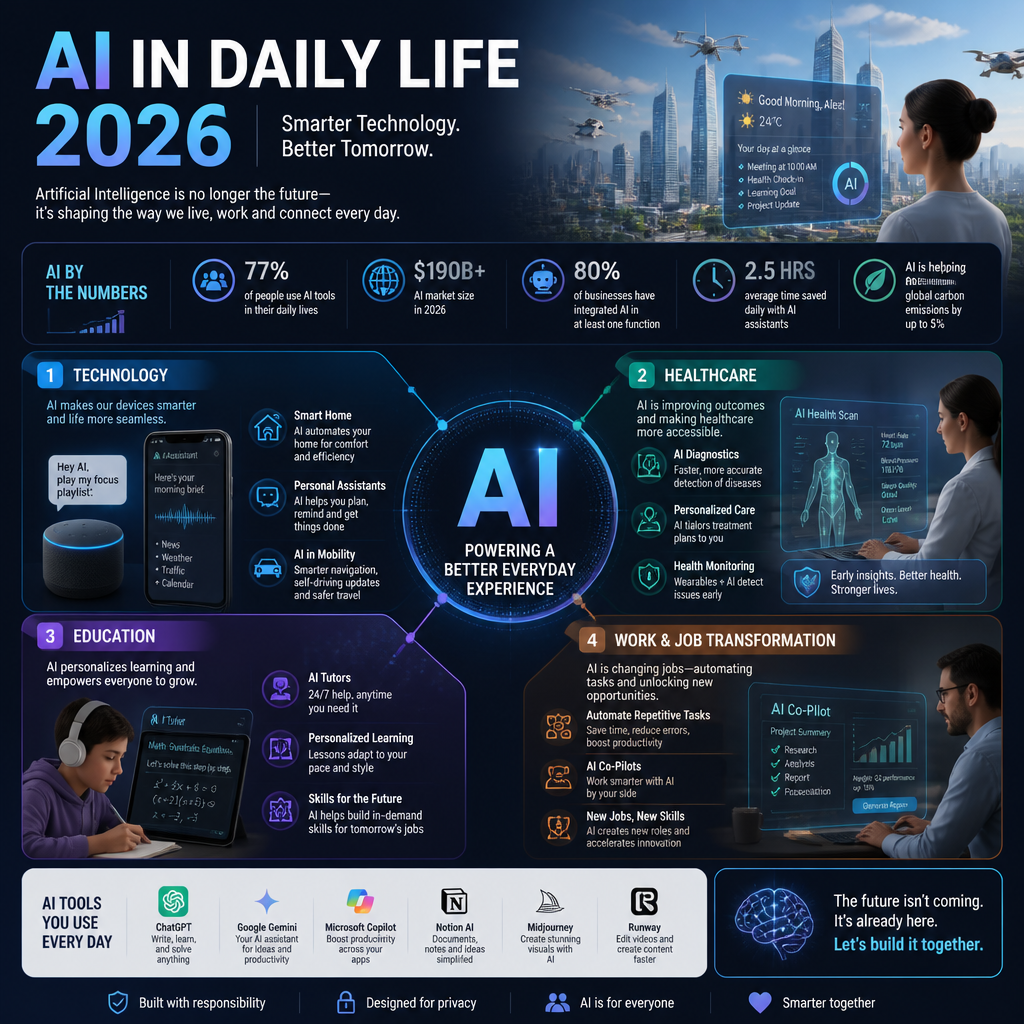
    The Future of AI in 2026

    Artificial intelligence is not just about robots or virtual assistants anymore. By 2026, we can expect a significant transformation in how AI integrates into our daily routines, potentially redefining entire industries and job markets. According to a recent article from the Stanford AI Experts, AI will shift toward operational efficacy and seek to provide measurable outcomes that reflect its value in practical applications.

    A simple way I explain it to non-technical friends: AI stops being “a thing you open” and becomes “a thing that shows up everywhere.” Your calendar suggests meeting agendas, your email drafts replies, your bank flags weird spending, and your car insurance adjusts rates based on driving patterns. Convenient, sure—but also a lot of invisible decision-making.

    The impact of AI on daily life in 2026 shown as AI embedded in phone, car, and workplace tools

    What Will Happen in 2026 According to AI?

    Experts predict that AI will take a more central role across various sectors, with predictions indicating a seamless blend between human capabilities and AI systems. That sounds fluffy, so here’s what it means on a random Tuesday: you’ll hand the system a messy goal (“get this customer live by Friday”), and it’ll break it into tasks, chase the right people, and surface blockers.

    For instance, in industry after industry, AI tools are projected to enhance decision-making processes and optimize productivity. Tasks that once took hours may now be completed in mere minutes. A compelling example is the use of AI in predictive maintenance, where machinery can self-diagnose issues before they lead to failures, saving companies both time and money.

    I’ve seen a smaller version of this already. A mid-sized ops team I worked with stopped doing weekly “spreadsheet archaeology” to figure out why orders were late. Instead, they fed shipping logs into a model that flagged the three suppliers most correlated with delays. It didn’t replace their judgment, but it did stop them from guessing.

    Moreover, jobs traditionally seen as secure will face challenges. According to Forbes, over 60% of tasks in the workplace could undergo some form of automation by 2026, leading to a shift in the job market and the skills required for employment.

    The part people miss: “task automation” isn’t “job deletion,” but it does change what gets rewarded. If 60% of your day is routine reporting and status updates, you’ll feel the squeeze fast. If your day is making calls with incomplete info, managing risk, or calming angry humans, you’ll still have plenty to do.

    Change AI Forever

    The trajectory of AI suggests a pivotal change towards more autonomous systems, with AI becoming integral to personal and business applications. As discussed in a video by a16z, we are likely to see AI evolve to a stage where its capabilities extend far beyond current productivity enhancements, focusing more on emotional connectivity and user interactions.

    I’m cautiously optimistic here, because “emotional connectivity” can mean two very different things. On a good day, it’s a tool that notices you’re overwhelmed and switches to bite-sized steps. On a bad day, it’s a tool that learns exactly how to manipulate attention and spending.

    A practical guardrail I like: if an AI system can nudge behavior (buy, vote, stay, quit), then it needs clear disclosure and settings you can actually find. Otherwise, by 2026, we’ll all be arguing with invisible defaults.

    AI Predictions for 2026

    • Increased Automation: Automation will increase exponentially across various sectors, impacting how we handle mundane tasks, from simple data entry to complex analytical processes.
    • Healthcare Innovations: AI’s role in healthcare will expand significantly, aiding in diagnostics and personalized medicine. Machine learning models will likely facilitate quicker and more accurate diagnoses, as illustrated by advancements in telehealth services and AI diagnostics tools.
    • Job Market Changes: Many roles requiring repetitive tasks may diminish, but those emphasizing creativity, emotional intelligence, and skilled trades will remain in demand. According to various sources, including Stephen Hawking’s insights, jobs that require human empathy or creativity will be harder to replicate and are thus safe from automation.

    If you want one “survival” skill that pays off across all three bullets, it’s this: learn to supervise systems. You don’t need to become a machine learning engineer, but you do need to notice when the tool is confidently wrong, missing context, or optimizing for the wrong metric.

    Examples of AI Changing Our Lives

    As we look toward 2026, there are numerous tangible examples of AI applications that will reshape our existence, enhancing how we communicate, work, and live.

    AI Examples

    1. Smart Personal Assistants: Beyond voice commands, AI systems will learn user preferences at a much deeper level. For example, ChatGPT is evolving from a helpful tool to a trusted advisor, as it begins to integrate personal context into its responses, offering tailored recommendations and insights.

    A real-world way this plays out: you stop asking “what’s the weather,” and start asking “given my schedule and commute, when should I leave?” That’s helpful, but it also means the assistant holds a lot of your life in one place. So, the boring question becomes the important one: where does that data live, and who else can see it?

    1. Healthcare Improvements: AI applications in healthcare, such as diagnostic tools and virtual health assistants, will become commonplace. According to a recent article from First Line Software, hospitals will leverage AI for predictive analytics to enhance patient care and reduce wait times.

    I’ve watched clinics try “AI intake” the wrong way—dumping a chatbot on patients without updating their internal triage process. The win is when it’s integrated end-to-end: symptom capture, risk scoring, routing, and a human who can override instantly.

    1. Education Restructuring: AI technologies will also personalize learning experiences. EdTech companies are using AI to tailor educational content to individual learning speeds and styles, fundamentally changing how education is accessed and delivered.

    The upside is obvious: a student who’s behind gets more reps, while an advanced student stops being bored. The catch is subtle: if the model is trained on weak rubrics, it can “teach to the test” and still fail at real understanding. So, educators will need visibility into why the system made a recommendation, not just what it recommended.

    AI Changing the World

    The influence of AI will stretch into social domains as well. Consider how apps using AI for mental health support are already making a significant difference. Tools designed to identify emotional stressors and provide coping strategies are being integrated into daily routines, offering support that complements traditional therapeutic practices.

    That said, I’d treat these as “support tools,” not replacements. If you’re in a rough patch, an app that helps you name the feeling and suggests a grounding exercise can genuinely help. But if it starts acting like your therapist, and there’s no escalation path to a licensed professional, you’re one policy change away from getting abandoned by the system.

    The Influence of AI According to Experts

    With such rapid advancements on the horizon, it’s crucial to consider what experts are saying about AI’s future and its implications. In a recent discussion, several AI specialists articulated their viewpoints on how AI will redefine our engagement with technology.

    AI Index Report Insights

    The AI Index Report highlights a focus on transparency and utility in AI’s evolution, emphasizing that the next few years will reflect a thorough evaluation of AI’s capabilities rather than unfounded optimism. This pivot toward realism is essential as we navigate potential pitfalls and leverage AI for substantial advancements.

    In practice, “transparency” gets real when something goes wrong. If an AI denies a refund, flags a transaction, or routes your medical message to the wrong department, you need a traceable reason and a fast appeal. Otherwise, people lose trust—and they should.

    Stephen Hawking’s Perspectives

    Stephen Hawking, a prominent physicist, warned about the potential of AI to cause significant disruption. As noted in his discussions, the focus should be on ensuring that this technology remains beneficial and does not develop into a tool for oppression or disaster. Hawking articulated that unless society learns to control AI, it could become a double-edged sword, possessing both the potential for remarkable advancements and the risk of catastrophic consequences (World Economic Forum).

    In discussing AI’s future, he remarked, “Success in creating effective AI could be the biggest event in the history of our civilization. Or the worst. We just don’t know.”

    I agree with the spirit of that warning, but I’ll bring it down to street level: the scariest failures I’ve seen aren’t killer robots. They’re quiet harms—bias in approvals, automated “risk” labels, and people who can’t get a human on the phone because the system insists it’s right.

    Conclusion

    As we move toward 2026, the emergence of AI will undeniably reshape not only our daily activities but also the broader structures of society. While we cannot predict every nuance of this transformation, it is clear that the future of AI holds immense potential and equally significant responsibilities. By understanding these changes and preparing for them, we can navigate the challenges and embrace the opportunities ahead.

    If you do one thing this week, make a list of where AI already touches your life (work tools, banking, health, school). Then decide what you’re willing to automate—and what you want a human override for.

    FAQs

    • Q: What will happen in 2026 according to AI?
      A: AI is expected to advance significantly, reshaping industries and daily activities.

    Here’s the more concrete version: by 2026, a lot of AI will stop being “chat” and start being “orchestration.” So, instead of asking for an answer, you’ll ask for an outcome—book the appointment, draft the doc, reconcile the invoices, prepare the interview loop.

    A step-by-step way to think about it:
    1) You state intent (“ship this proposal by Thursday”).
    2) The system pulls context (past proposals, pricing rules, customer history).
    3) It produces a draft and a checklist (legal review, approvals, follow-ups).
    4) It nags the right people, then logs what happened.

    The common mistake I see is assuming the model “knows your business” because it sounds confident. It doesn’t—unless you’ve given it clean context and you’ve validated outputs with real constraints (budgets, policies, timelines). By 2026, people who can supervise this loop—spot missing inputs, correct bad assumptions, and set boundaries—will look like magicians.

    • Q: What 3 jobs will not be replaced by AI?
      A: Jobs requiring emotional intelligence, creativity, and skilled trades are least likely to be replaced.

    I’d phrase it slightly differently: AI will replace chunks of tasks inside most jobs, but three categories stay stubbornly “human-heavy.”

    1) Care + trust work (nurses, therapists, social workers, seasoned customer support). Even with great tools, the job is still a relationship. You’re reading the room, not just the notes.

    2) Original creative direction (creative directors, product leaders, investigative journalists). Yes, AI can generate drafts. But somebody still has to decide what matters, what’s tasteful, what’s ethical, and what’s on-brand.

    3) Skilled trades in messy environments (electricians, HVAC, mechanics). Real buildings are weird, old, and full of surprises. Robots hate that.

    A quick anecdote: I watched a team try to “AI-automate” a support role by generating instant replies. Tickets dropped, but refunds spiked, because the bot optimized for speed and sounded polite while being wrong. The human agent who survived wasn’t the fastest typist; it was the person who could de-escalate, negotiate, and fix edge cases.

    • Q: Did the Bible warn us about AI?
      A: Various interpretations exist; some see ethical AI as a modern ethical dilemma.

    People ask this more than you’d think, usually because they’re trying to map a brand-new technology onto an older moral framework. I’m not here to litigate theology, but I’ve found one practical way to answer without hand-waving: treat it like any powerful tool that can be used to help or harm.

    If you want a grounded approach, walk through these questions:
    1) Authority: Who is accountable when the system causes harm—an individual, a company, a government?
    2) Truth: Can the system lie convincingly (intentionally or by error), and how do we detect it?
    3) Dignity: Does the system reduce a person to a score, label, or prediction?
    4) Temptation: Does it push people toward addiction (doomscrolling, gambling, compulsive spending)?

    A common mistake is treating “ethical AI” as a vibes conversation. It’s not. It’s policy, product design, and enforcement—plus the willingness to say, “No, we’re not shipping that feature.” By 2026, the harder questions won’t be about whether AI is allowed. They’ll be about whether AI is bounded.

    • Q: What did Stephen Hawking say about AI before he died?
      A: He warned that AI could eventually outpace human intelligence, posing potential risks.

    The quote that sticks (and still gets cited) is the one about AI being the biggest event in civilization—or the worst—and we not knowing which way it goes (World Economic Forum). I take that seriously, but I also think the “outpace” fear shows up earlier than superintelligence.

    Here’s what it can look like in normal life by 2026:
    1) Speed: AI systems act faster than humans can review.
    2) Scale: A small error (or bias) gets applied to millions of decisions.
    3) Opacity: People can’t explain why the system did what it did.
    4) Lock-in: Appeals are slow, and humans defer to the model.

    I’ve seen “model deference” up close—teams stop challenging outputs because the dashboard looks scientific. That’s when bad decisions become durable. Hawking’s warning, to me, is less about a robot uprising and more about governance: keep humans meaningfully in the loop, require explainability where it matters, and design systems so you can hit the brakes when reality disagrees.

  • AI Impact on Daily Life by 2026

    AI Impact on Daily Life by 2026

    Discover how AI will reshape daily life by 2026, from job transformations to healthcare advancements. Gain insights from experts on the future of AI.

    Featured image for The Impact of AI on Daily Life in 2026

    The Future of AI in 2026

    Artificial intelligence is not just about robots or virtual assistants anymore. By 2026, we can expect a significant transformation in how AI integrates into our daily routines, potentially redefining entire industries and job markets. According to a recent article from the Stanford AI Experts, AI will shift toward operational efficacy and seek to provide measurable outcomes that reflect its value in practical applications.

    A simple way I explain it to non-technical friends: AI stops being “a thing you open” and becomes “a thing that shows up everywhere.” Your calendar suggests meeting agendas, your email drafts replies, your bank flags weird spending, and your car insurance adjusts rates based on driving patterns. Convenient, sure—but also a lot of invisible decision-making.

    The impact of AI on daily life in 2026 shown as AI embedded in phone, car, and workplace tools

    What Will Happen in 2026 According to AI?

    Experts predict that AI will take a more central role across various sectors, with predictions indicating a seamless blend between human capabilities and AI systems. That sounds fluffy, so here’s what it means on a random Tuesday: you’ll hand the system a messy goal (“get this customer live by Friday”), and it’ll break it into tasks, chase the right people, and surface blockers.

    For instance, in industry after industry, AI tools are projected to enhance decision-making processes and optimize productivity. Tasks that once took hours may now be completed in mere minutes. A compelling example is the use of AI in predictive maintenance, where machinery can self-diagnose issues before they lead to failures, saving companies both time and money.

    I’ve seen a smaller version of this already. A mid-sized ops team I worked with stopped doing weekly “spreadsheet archaeology” to figure out why orders were late. Instead, they fed shipping logs into a model that flagged the three suppliers most correlated with delays. It didn’t replace their judgment, but it did stop them from guessing.

    Moreover, jobs traditionally seen as secure will face challenges. According to Forbes, over 60% of tasks in the workplace could undergo some form of automation by 2026, leading to a shift in the job market and the skills required for employment.

    The part people miss: “task automation” isn’t “job deletion,” but it does change what gets rewarded. If 60% of your day is routine reporting and status updates, you’ll feel the squeeze fast. If your day is making calls with incomplete info, managing risk, or calming angry humans, you’ll still have plenty to do.

    Change AI Forever

    The trajectory of AI suggests a pivotal change towards more autonomous systems, with AI becoming integral to personal and business applications. As discussed in a video by a16z, we are likely to see AI evolve to a stage where its capabilities extend far beyond current productivity enhancements, focusing more on emotional connectivity and user interactions.

    I’m cautiously optimistic here, because “emotional connectivity” can mean two very different things. On a good day, it’s a tool that notices you’re overwhelmed and switches to bite-sized steps. On a bad day, it’s a tool that learns exactly how to manipulate attention and spending.

    A practical guardrail I like: if an AI system can nudge behavior (buy, vote, stay, quit), then it needs clear disclosure and settings you can actually find. Otherwise, by 2026, we’ll all be arguing with invisible defaults.

    AI Predictions for 2026

    • Increased Automation: Automation will increase exponentially across various sectors, impacting how we handle mundane tasks, from simple data entry to complex analytical processes.
    • Healthcare Innovations: AI’s role in healthcare will expand significantly, aiding in diagnostics and personalized medicine. Machine learning models will likely facilitate quicker and more accurate diagnoses, as illustrated by advancements in telehealth services and AI diagnostics tools.
    • Job Market Changes: Many roles requiring repetitive tasks may diminish, but those emphasizing creativity, emotional intelligence, and skilled trades will remain in demand. According to various sources, including Stephen Hawking’s insights, jobs that require human empathy or creativity will be harder to replicate and are thus safe from automation.

    If you want one “survival” skill that pays off across all three bullets, it’s this: learn to supervise systems. You don’t need to become a machine learning engineer, but you do need to notice when the tool is confidently wrong, missing context, or optimizing for the wrong metric.

    Examples of AI Changing Our Lives

    As we look toward 2026, there are numerous tangible examples of AI applications that will reshape our existence, enhancing how we communicate, work, and live.

    AI Examples

    1. Smart Personal Assistants: Beyond voice commands, AI systems will learn user preferences at a much deeper level. For example, ChatGPT is evolving from a helpful tool to a trusted advisor, as it begins to integrate personal context into its responses, offering tailored recommendations and insights.

    A real-world way this plays out: you stop asking “what’s the weather,” and start asking “given my schedule and commute, when should I leave?” That’s helpful, but it also means the assistant holds a lot of your life in one place. So, the boring question becomes the important one: where does that data live, and who else can see it?

    1. Healthcare Improvements: AI applications in healthcare, such as diagnostic tools and virtual health assistants, will become commonplace. According to a recent article from First Line Software, hospitals will leverage AI for predictive analytics to enhance patient care and reduce wait times.

    I’ve watched clinics try “AI intake” the wrong way—dumping a chatbot on patients without updating their internal triage process. The win is when it’s integrated end-to-end: symptom capture, risk scoring, routing, and a human who can override instantly.

    1. Education Restructuring: AI technologies will also personalize learning experiences. EdTech companies are using AI to tailor educational content to individual learning speeds and styles, fundamentally changing how education is accessed and delivered.

    The upside is obvious: a student who’s behind gets more reps, while an advanced student stops being bored. The catch is subtle: if the model is trained on weak rubrics, it can “teach to the test” and still fail at real understanding. So, educators will need visibility into why the system made a recommendation, not just what it recommended.

    AI Changing the World

    The influence of AI will stretch into social domains as well. Consider how apps using AI for mental health support are already making a significant difference. Tools designed to identify emotional stressors and provide coping strategies are being integrated into daily routines, offering support that complements traditional therapeutic practices.

    That said, I’d treat these as “support tools,” not replacements. If you’re in a rough patch, an app that helps you name the feeling and suggests a grounding exercise can genuinely help. But if it starts acting like your therapist, and there’s no escalation path to a licensed professional, you’re one policy change away from getting abandoned by the system.

    The Influence of AI According to Experts

    With such rapid advancements on the horizon, it’s crucial to consider what experts are saying about AI’s future and its implications. In a recent discussion, several AI specialists articulated their viewpoints on how AI will redefine our engagement with technology.

    AI Index Report Insights

    The AI Index Report highlights a focus on transparency and utility in AI’s evolution, emphasizing that the next few years will reflect a thorough evaluation of AI’s capabilities rather than unfounded optimism. This pivot toward realism is essential as we navigate potential pitfalls and leverage AI for substantial advancements.

    In practice, “transparency” gets real when something goes wrong. If an AI denies a refund, flags a transaction, or routes your medical message to the wrong department, you need a traceable reason and a fast appeal. Otherwise, people lose trust—and they should.

    Stephen Hawking’s Perspectives

    Stephen Hawking, a prominent physicist, warned about the potential of AI to cause significant disruption. As noted in his discussions, the focus should be on ensuring that this technology remains beneficial and does not develop into a tool for oppression or disaster. Hawking articulated that unless society learns to control AI, it could become a double-edged sword, possessing both the potential for remarkable advancements and the risk of catastrophic consequences (World Economic Forum).

    In discussing AI’s future, he remarked, “Success in creating effective AI could be the biggest event in the history of our civilization. Or the worst. We just don’t know.”

    I agree with the spirit of that warning, but I’ll bring it down to street level: the scariest failures I’ve seen aren’t killer robots. They’re quiet harms—bias in approvals, automated “risk” labels, and people who can’t get a human on the phone because the system insists it’s right.

    Conclusion

    As we move toward 2026, the emergence of AI will undeniably reshape not only our daily activities but also the broader structures of society. While we cannot predict every nuance of this transformation, it is clear that the future of AI holds immense potential and equally significant responsibilities. By understanding these changes and preparing for them, we can navigate the challenges and embrace the opportunities ahead.

    If you do one thing this week, make a list of where AI already touches your life (work tools, banking, health, school). Then decide what you’re willing to automate—and what you want a human override for.

    FAQs

    • Q: What will happen in 2026 according to AI?
      A: AI is expected to advance significantly, reshaping industries and daily activities.

    Here’s the more concrete version: by 2026, a lot of AI will stop being “chat” and start being “orchestration.” So, instead of asking for an answer, you’ll ask for an outcome—book the appointment, draft the doc, reconcile the invoices, prepare the interview loop.

    A step-by-step way to think about it:
    1) You state intent (“ship this proposal by Thursday”).
    2) The system pulls context (past proposals, pricing rules, customer history).
    3) It produces a draft and a checklist (legal review, approvals, follow-ups).
    4) It nags the right people, then logs what happened.

    The common mistake I see is assuming the model “knows your business” because it sounds confident. It doesn’t—unless you’ve given it clean context and you’ve validated outputs with real constraints (budgets, policies, timelines). By 2026, people who can supervise this loop—spot missing inputs, correct bad assumptions, and set boundaries—will look like magicians.

    • Q: What 3 jobs will not be replaced by AI?
      A: Jobs requiring emotional intelligence, creativity, and skilled trades are least likely to be replaced.

    I’d phrase it slightly differently: AI will replace chunks of tasks inside most jobs, but three categories stay stubbornly “human-heavy.”

    1) Care + trust work (nurses, therapists, social workers, seasoned customer support). Even with great tools, the job is still a relationship. You’re reading the room, not just the notes.

    2) Original creative direction (creative directors, product leaders, investigative journalists). Yes, AI can generate drafts. But somebody still has to decide what matters, what’s tasteful, what’s ethical, and what’s on-brand.

    3) Skilled trades in messy environments (electricians, HVAC, mechanics). Real buildings are weird, old, and full of surprises. Robots hate that.

    A quick anecdote: I watched a team try to “AI-automate” a support role by generating instant replies. Tickets dropped, but refunds spiked, because the bot optimized for speed and sounded polite while being wrong. The human agent who survived wasn’t the fastest typist; it was the person who could de-escalate, negotiate, and fix edge cases.

    • Q: Did the Bible warn us about AI?
      A: Various interpretations exist; some see ethical AI as a modern ethical dilemma.

    People ask this more than you’d think, usually because they’re trying to map a brand-new technology onto an older moral framework. I’m not here to litigate theology, but I’ve found one practical way to answer without hand-waving: treat it like any powerful tool that can be used to help or harm.

    If you want a grounded approach, walk through these questions:
    1) Authority: Who is accountable when the system causes harm—an individual, a company, a government?
    2) Truth: Can the system lie convincingly (intentionally or by error), and how do we detect it?
    3) Dignity: Does the system reduce a person to a score, label, or prediction?
    4) Temptation: Does it push people toward addiction (doomscrolling, gambling, compulsive spending)?

    A common mistake is treating “ethical AI” as a vibes conversation. It’s not. It’s policy, product design, and enforcement—plus the willingness to say, “No, we’re not shipping that feature.” By 2026, the harder questions won’t be about whether AI is allowed. They’ll be about whether AI is bounded.

    • Q: What did Stephen Hawking say about AI before he died?
      A: He warned that AI could eventually outpace human intelligence, posing potential risks.

    The quote that sticks (and still gets cited) is the one about AI being the biggest event in civilization—or the worst—and we not knowing which way it goes (World Economic Forum). I take that seriously, but I also think the “outpace” fear shows up earlier than superintelligence.

    Here’s what it can look like in normal life by 2026:
    1) Speed: AI systems act faster than humans can review.
    2) Scale: A small error (or bias) gets applied to millions of decisions.
    3) Opacity: People can’t explain why the system did what it did.
    4) Lock-in: Appeals are slow, and humans defer to the model.

    I’ve seen “model deference” up close—teams stop challenging outputs because the dashboard looks scientific. That’s when bad decisions become durable. Hawking’s warning, to me, is less about a robot uprising and more about governance: keep humans meaningfully in the loop, require explainability where it matters, and design systems so you can hit the brakes when reality disagrees.

  • Shop Stylish Sandals Online This Summer 2026

    Shop Stylish Sandals Online This Summer 2026

    Discover the best places to buy stylish sandals online this summer 2026. Explore trendy options, discounts, and quality picks for every occasion!

    Featured image for Where to Buy Stylish Sandals Online This Summer 2026

    Where to Buy Stylish Sandals Online This Summer 2026

    You can buy sandals almost anywhere online, but not every store is good for sandals specifically. Returns, reviews, and how honest the photos are matter more than people think—because sandals show everything (fit, toe length, strap placement, the whole deal).

    Start with Zappos and Famous Footwear

    If you want the least stressful experience, I’d start with Zappos or Famous Footwear. They’re not the “coolest” answer, but they’re consistent, and consistency is what saves you when you’re ordering footwear blind.

    Here’s how I use them when I’m shopping quickly:

    1. Filter hard: size, width, color, and arch support (if available). Otherwise, you’ll scroll for an hour and still end up confused.
    2. Read the 3-star reviews first. Five-star reviews are often “so cute!!!” and one-star reviews are usually a sizing rant. Three-star reviews tend to mention real issues like strap bite or slippery soles.
    3. Check the outsole photos. If the tread looks shallow and glossy, it’s a pool-deck slip waiting to happen.

    A common mistake: people sort by “new arrivals” and buy the first pretty pair, then act surprised when the footbed is basically cardboard. Don’t do that.

    Use 6pm when you want clearance

    For budget shopping, 6pm is the move because it regularly has clearance pricing on recognizable brands. That said, clearance shopping only works if you’re picky.

    My rule: if I can’t confirm material, return policy, and enough reviews to judge sizing, I treat it like a gamble—and I only gamble when the price is low enough to justify it.

    One more tip that saves money: if you’re buying for a trip, don’t wait until the week before. Clearance sizes disappear fast, and then you’ll either overpay elsewhere or settle for a pair you don’t even like.

    Online Shoes: What to Consider

    Comfort is the priority, but comfort isn’t vague. It’s a checklist.

    Fit and footbed basics

    If you only do three things, do these:

    • Measure your foot at night, not in the morning. Feet swell, and sandals that “almost fit” at 9pm will punish you at noon.
    • Look for a cushioned footbed (not just “padded”). Real cushioning has some rebound; cheap foam packs down in a few wears.
    • Prefer adjustable straps (buckles, velcro, elastic). Adjustable beats “one perfect fit” every time.

    I’ve returned sandals that were “perfect” standing still, but the strap hit the exact wrong spot once I walked two blocks. Walking friction is the test that matters.

    Materials that survive real summer

    Breathability matters, but so does how the material behaves in heat.

    • Leather often breaks in nicely, but it can stretch. Great if you’re between sizes; annoying if it loosens too much.
    • Rubber/EVA handles water and sweat, although it can look casual fast.
    • Fabric uppers can be comfy, but they’re the first to hold odor if the lining is cheap.

    Also, watch out for “vegan leather” that feels like plastic. It can get slick, and then your foot slides around—especially if you’re walking on hot pavement.

    Women Buy Online Shoes: Trends for 2026

    In 2026, the vibe is still clean and wearable. People want sandals that look intentional but don’t require suffering.

    The styles people are actually wearing

    Here’s what keeps showing up (and why it sells):

    • Chic slides: easy, minimal, and they work with linen, denim, or a summer dress.
    • Strappy sandals: a little dressier, but you need good strap placement or you’ll get hot spots.
    • Gladiator-inspired pairs: still around, just toned down—fewer straps, simpler lines.

    If you want a quick scan of what’s trending across price points, Fashion Jackson is a useful roundup. I don’t agree with every pick, but it’s a solid way to spot what’s “in” without doomscrolling five retailers.

    A mistake I see a lot: buying a trending silhouette in the wrong context. A flat, slick slide might look great online, but if you’ll be walking a city all day, you’ll want grip and support—even if the photos are less glamorous.

    Best Place to Buy Shoes Online

    When you care about reliability—fast shipping, straightforward returns, and a deep catalog—Amazon and Nordstrom are usually the safest bets.

    Amazon: wide selection, but verify everything

    Amazon works best if you treat it like a search engine, not a boutique.

    What I do:

    1. Check the seller (brand storefronts are usually safer).
    2. Zoom into the images for stitching and sole texture.
    3. Compare review photos to the listing photos.

    Because yes, you can get a deal, but you can also end up with a “looks the same, feels worse” version. That mismatch is more common in footwear than most categories.

    Nordstrom: fewer headaches

    Nordstrom shines when you want fewer surprises. The photos are typically accurate, the product descriptions are decent, and the return experience is usually painless. If you’re buying sandals for an event—wedding, vacation, work trip—this is where I’d pay a little more to reduce risk.

    Also, seasonal sales pop up often, so it’s worth checking back instead of panic-buying at full price.

    Biggest Online Shoe Store Discounts

    If your goal is discount shoes online, Shoebacca is one of the better clearance-first retailers to watch. Their clearance section can go up to 50% off, which is enough to make a “nice-to-have” pair suddenly worth it.

    One practical tactic: build a short list of two or three acceptable options, then buy the best discount when it appears. If you chase one exact model/color/size, you’ll either miss out or pay more than you planned.

    And don’t ignore the product details just because it’s cheap. A discounted sandal with a hard edge on the strap is still a hard edge—your feet don’t care that it was on sale.

    Outstanding Deals on Clearance Shoes Online

    If you’re hunting for clearance shoes online, it helps to follow sources that track summer sales across brands.

    Shoegazing highlights summer deals with discounts up to 40%, and that’s a nice middle ground: not bargain-basement random, but still a real price drop.

    Here’s the step-by-step approach I use for clearance shopping so I don’t end up with a closet full of “almost”:

    1. Decide the job: everyday errands, travel walking, beach/pool, or dressy.
    2. Pick the non-negotiable: arch support, wide width, adjustable straps, or grippy sole.
    3. Only then shop the discount pages.
    4. Order early enough to do a return cycle. Clearance finds are great—until you need a different size and it’s gone.

    My Experience With This

    I’m Mobeen Abdullah, Founder & CEO of Revnix, and even though my day job sits in tech, I’m deep in the “online buying behavior” world—what people click, what they return, and why they abandon carts. Footwear returns are brutal compared to most categories, so I pay attention to what makes sandal shopping go smoothly.

    A real example: last summer I ordered two pairs of similar-looking slides from two different retailers. Same general silhouette, same “cushioned” wording. Pair #1 felt fine on carpet, but outside it turned into a slip-and-shuffle situation—slick outsole, sweaty footbed, instant regret. Pair #2 had a slightly textured footbed and better tread; I ended up wearing it for a week straight on a trip.

    The difference wasn’t price. It was the details I almost ignored.

    So now I shop sandals like this:

    • I buy two sizes when I’m unsure, but only from stores with easy returns (this is where Zappos, Nordstrom, and Amazon’s better listings win).
    • I do a “10-minute wear test” indoors: walk, pivot, go up/down stairs. If a strap rubs even a little, it won’t magically improve on day three.
    • I check what people complain about repeatedly. One reviewer saying “strap hurt” is noise; fifteen reviewers saying it is a signal.

    The most common mistake I see friends make is buying sandals for a fantasy version of their summer—then realizing their real summer involves sidewalks, errands, and standing in lines. I’ve made that mistake too, which is why I’m picky now.


    Conclusion

    Shopping online for stylish sandals in summer 2026 is fun when you run it like a process, not a vibe. Start with reliable stores (Zappos, Famous Footwear, Nordstrom), then use clearance spots like 6pm and Shoebacca when you want to save.

    If you want one practical next step, do this tonight: measure your foot, write down your size and width, then bookmark two “safe return” retailers. That tiny prep step saves you from the worst online sandal outcome—waiting a week for a box, then immediately repacking it.

    One more persona-style story, because it’s common: a friend of mine bought a strappy pair for a weekend trip, didn’t test them indoors, and wore them straight to dinner. Ten minutes in, the top strap started biting. By dessert, she was walking like she’d stepped on a Lego. She ended up buying an emergency pair at a tourist shop the next day—full price, mediocre comfort.

    So yes, shop the trends, but protect your feet. Use reviews, look for adjustability, and give yourself time for one exchange cycle. Stylish sandals are supposed to make summer easier, not louder.

    FAQs

    • What are the best places to buy stylish sandals online?
      Check out top-rated sites like Zappos, 6pm, and Famous Footwear for great options.

    • Are there any discounts available for summer sandals?
      Yes! Look for seasonal promotions offering up to 30% off select styles.

    • What if the sandals don’t fit properly?
      We offer a free return policy within 30 days for your convenience.

    • Can I find sandals for wide feet?
      Absolutely, many retailers offer wide-width options for maximum comfort.

    • How can I ensure the quality of my sandals?
      Shop from reputable brands and stores that provide customer reviews and ratings.

    • Is online shopping secure?
      Yes, all transactions are protected through secure payment processing.

    The Mom Edit
    Shoebacca

  • Shop Stylish Sandals Online This Summer 2026

    Shop Stylish Sandals Online This Summer 2026

    Discover the best places to buy stylish sandals online this summer 2026. Explore trendy options, discounts, and quality picks for every occasion!

    Featured image for Where to Buy Stylish Sandals Online This Summer 2026

    Where to Buy Stylish Sandals Online This Summer 2026

    You can buy sandals almost anywhere online, but not every store is good for sandals specifically. Returns, reviews, and how honest the photos are matter more than people think—because sandals show everything (fit, toe length, strap placement, the whole deal).

    Start with Zappos and Famous Footwear

    If you want the least stressful experience, I’d start with Zappos or Famous Footwear. They’re not the “coolest” answer, but they’re consistent, and consistency is what saves you when you’re ordering footwear blind.

    Here’s how I use them when I’m shopping quickly:

    1. Filter hard: size, width, color, and arch support (if available). Otherwise, you’ll scroll for an hour and still end up confused.
    2. Read the 3-star reviews first. Five-star reviews are often “so cute!!!” and one-star reviews are usually a sizing rant. Three-star reviews tend to mention real issues like strap bite or slippery soles.
    3. Check the outsole photos. If the tread looks shallow and glossy, it’s a pool-deck slip waiting to happen.

    A common mistake: people sort by “new arrivals” and buy the first pretty pair, then act surprised when the footbed is basically cardboard. Don’t do that.

    Use 6pm when you want clearance

    For budget shopping, 6pm is the move because it regularly has clearance pricing on recognizable brands. That said, clearance shopping only works if you’re picky.

    My rule: if I can’t confirm material, return policy, and enough reviews to judge sizing, I treat it like a gamble—and I only gamble when the price is low enough to justify it.

    One more tip that saves money: if you’re buying for a trip, don’t wait until the week before. Clearance sizes disappear fast, and then you’ll either overpay elsewhere or settle for a pair you don’t even like.

    Online Shoes: What to Consider

    Comfort is the priority, but comfort isn’t vague. It’s a checklist.

    Fit and footbed basics

    If you only do three things, do these:

    • Measure your foot at night, not in the morning. Feet swell, and sandals that “almost fit” at 9pm will punish you at noon.
    • Look for a cushioned footbed (not just “padded”). Real cushioning has some rebound; cheap foam packs down in a few wears.
    • Prefer adjustable straps (buckles, velcro, elastic). Adjustable beats “one perfect fit” every time.

    I’ve returned sandals that were “perfect” standing still, but the strap hit the exact wrong spot once I walked two blocks. Walking friction is the test that matters.

    Materials that survive real summer

    Breathability matters, but so does how the material behaves in heat.

    • Leather often breaks in nicely, but it can stretch. Great if you’re between sizes; annoying if it loosens too much.
    • Rubber/EVA handles water and sweat, although it can look casual fast.
    • Fabric uppers can be comfy, but they’re the first to hold odor if the lining is cheap.

    Also, watch out for “vegan leather” that feels like plastic. It can get slick, and then your foot slides around—especially if you’re walking on hot pavement.

    Women Buy Online Shoes: Trends for 2026

    In 2026, the vibe is still clean and wearable. People want sandals that look intentional but don’t require suffering.

    The styles people are actually wearing

    Here’s what keeps showing up (and why it sells):

    • Chic slides: easy, minimal, and they work with linen, denim, or a summer dress.
    • Strappy sandals: a little dressier, but you need good strap placement or you’ll get hot spots.
    • Gladiator-inspired pairs: still around, just toned down—fewer straps, simpler lines.

    If you want a quick scan of what’s trending across price points, Fashion Jackson is a useful roundup. I don’t agree with every pick, but it’s a solid way to spot what’s “in” without doomscrolling five retailers.

    A mistake I see a lot: buying a trending silhouette in the wrong context. A flat, slick slide might look great online, but if you’ll be walking a city all day, you’ll want grip and support—even if the photos are less glamorous.

    Best Place to Buy Shoes Online

    When you care about reliability—fast shipping, straightforward returns, and a deep catalog—Amazon and Nordstrom are usually the safest bets.

    Amazon: wide selection, but verify everything

    Amazon works best if you treat it like a search engine, not a boutique.

    What I do:

    1. Check the seller (brand storefronts are usually safer).
    2. Zoom into the images for stitching and sole texture.
    3. Compare review photos to the listing photos.

    Because yes, you can get a deal, but you can also end up with a “looks the same, feels worse” version. That mismatch is more common in footwear than most categories.

    Nordstrom: fewer headaches

    Nordstrom shines when you want fewer surprises. The photos are typically accurate, the product descriptions are decent, and the return experience is usually painless. If you’re buying sandals for an event—wedding, vacation, work trip—this is where I’d pay a little more to reduce risk.

    Also, seasonal sales pop up often, so it’s worth checking back instead of panic-buying at full price.

    Biggest Online Shoe Store Discounts

    If your goal is discount shoes online, Shoebacca is one of the better clearance-first retailers to watch. Their clearance section can go up to 50% off, which is enough to make a “nice-to-have” pair suddenly worth it.

    One practical tactic: build a short list of two or three acceptable options, then buy the best discount when it appears. If you chase one exact model/color/size, you’ll either miss out or pay more than you planned.

    And don’t ignore the product details just because it’s cheap. A discounted sandal with a hard edge on the strap is still a hard edge—your feet don’t care that it was on sale.

    Outstanding Deals on Clearance Shoes Online

    If you’re hunting for clearance shoes online, it helps to follow sources that track summer sales across brands.

    Shoegazing highlights summer deals with discounts up to 40%, and that’s a nice middle ground: not bargain-basement random, but still a real price drop.

    Here’s the step-by-step approach I use for clearance shopping so I don’t end up with a closet full of “almost”:

    1. Decide the job: everyday errands, travel walking, beach/pool, or dressy.
    2. Pick the non-negotiable: arch support, wide width, adjustable straps, or grippy sole.
    3. Only then shop the discount pages.
    4. Order early enough to do a return cycle. Clearance finds are great—until you need a different size and it’s gone.

    My Experience With This

    I’m Mobeen Abdullah, Founder & CEO of Revnix, and even though my day job sits in tech, I’m deep in the “online buying behavior” world—what people click, what they return, and why they abandon carts. Footwear returns are brutal compared to most categories, so I pay attention to what makes sandal shopping go smoothly.

    A real example: last summer I ordered two pairs of similar-looking slides from two different retailers. Same general silhouette, same “cushioned” wording. Pair #1 felt fine on carpet, but outside it turned into a slip-and-shuffle situation—slick outsole, sweaty footbed, instant regret. Pair #2 had a slightly textured footbed and better tread; I ended up wearing it for a week straight on a trip.

    The difference wasn’t price. It was the details I almost ignored.

    So now I shop sandals like this:

    • I buy two sizes when I’m unsure, but only from stores with easy returns (this is where Zappos, Nordstrom, and Amazon’s better listings win).
    • I do a “10-minute wear test” indoors: walk, pivot, go up/down stairs. If a strap rubs even a little, it won’t magically improve on day three.
    • I check what people complain about repeatedly. One reviewer saying “strap hurt” is noise; fifteen reviewers saying it is a signal.

    The most common mistake I see friends make is buying sandals for a fantasy version of their summer—then realizing their real summer involves sidewalks, errands, and standing in lines. I’ve made that mistake too, which is why I’m picky now.


    Conclusion

    Shopping online for stylish sandals in summer 2026 is fun when you run it like a process, not a vibe. Start with reliable stores (Zappos, Famous Footwear, Nordstrom), then use clearance spots like 6pm and Shoebacca when you want to save.

    If you want one practical next step, do this tonight: measure your foot, write down your size and width, then bookmark two “safe return” retailers. That tiny prep step saves you from the worst online sandal outcome—waiting a week for a box, then immediately repacking it.

    One more persona-style story, because it’s common: a friend of mine bought a strappy pair for a weekend trip, didn’t test them indoors, and wore them straight to dinner. Ten minutes in, the top strap started biting. By dessert, she was walking like she’d stepped on a Lego. She ended up buying an emergency pair at a tourist shop the next day—full price, mediocre comfort.

    So yes, shop the trends, but protect your feet. Use reviews, look for adjustability, and give yourself time for one exchange cycle. Stylish sandals are supposed to make summer easier, not louder.

    FAQs

    • What are the best places to buy stylish sandals online?
      Check out top-rated sites like Zappos, 6pm, and Famous Footwear for great options.

    • Are there any discounts available for summer sandals?
      Yes! Look for seasonal promotions offering up to 30% off select styles.

    • What if the sandals don’t fit properly?
      We offer a free return policy within 30 days for your convenience.

    • Can I find sandals for wide feet?
      Absolutely, many retailers offer wide-width options for maximum comfort.

    • How can I ensure the quality of my sandals?
      Shop from reputable brands and stores that provide customer reviews and ratings.

    • Is online shopping secure?
      Yes, all transactions are protected through secure payment processing.

    The Mom Edit
    Shoebacca

  • 2026 Aston Martin Models: Innovations Ahead

    Explore Aston Martin’s exciting 2026 lineup, including the DB12, DBX, and Vantage. Discover prices and new features!

    What to Expect from Aston Martin in 2026

    As we peer into 2026, Aston Martin looks set to refine—not reinvent—its core promise: gorgeous design, real performance, and a cabin that feels like a special occasion. That said, the bar has moved. People now cross-shop these cars against alternatives that are brutally competent, so Aston has to show up with more than vibes.

    Aston Martin Models and Prices

    In 2026, Aston Martin will offer a spectrum of models that hit very different buyer personas, from “grand tourer commuter” to “weekend canyon problem.” If you’re planning your budget, these are the headline anchors I’d expect most shoppers to start with:

    • Aston Martin DB12: This flagship model establishes itself as the world’s first Super Tourer, featuring a powerful 4.0-liter twin-turbo V8 that delivers 700 horsepower with a 0-62 mph time of just 3.5 seconds. The prices for the DB12 start around $205,000, making it a premium offering in the luxury segment (Car and Driver).
    • Aston Martin DBX: The brand’s performance SUV, set to continue as a top contender in its class, will see its price margin start at approximately $176,000. The DBX is engineered for both performance and comfort, showcasing Aston Martin’s dedication to versatility without compromising on luxury (Kelley Blue Book).
    • Aston Martin Vantage: This entry-level sports car will undergo updates, with enhancements in performance and handling, expected to be priced from around $140,000. With its striking aesthetics and exhilarating performance, the Vantage remains a favored choice for many driving enthusiasts (MotorTrend).

    One thing I always tell first-time Aston shoppers: don’t stop at “starting at.” Options and trims can move the real number fast, and not always in a way you’ll feel on the road. Some upgrades are must-haves (seats, audio, driver-assist), while others are pure “I like it” money—still valid, just be honest about it.

    Aston Martin DB12: A New Era

    The DB12 is set to lead the charge as Aston Martin’s flagship model in 2026. Not merely an upgrade from its predecessors, it introduces the concept of a “Super Tourer.” That label matters because it signals what the car is trying to be: fast and dramatic, yes, but also usable over distance without beating you up.

    Aston Martin has revealed details that indicate the DB12 will offer unprecedented personalisation options, allowing buyers to tailor their super tourer to match their specific tastes. This is where Aston can quietly win—because the right spec makes the car feel bespoke, while the wrong spec can make a $205k car feel oddly generic.

    Here’s the practical way I’d approach a DB12 build if you actually plan to drive it:

    1. Start with the use-case (daily, weekends, long trips). That decides wheel/tire choices and seat style.
    2. Pick interior touch points first (seats, steering wheel, trim). Those are what you’ll feel every mile.
    3. Then do exterior color. People do this backward and end up with an interior they’re not in love with.
    4. Finally, pick “story” options (contrast stitching, accent packs). Those are fun, but they shouldn’t fix a bad base.

    As highlighted in their promotional materials, the DB12 promises outstanding dynamics and an immersive driving experience, replete with cutting-edge technology and safety features that enhance performance and comfort (Aston Martin).

    The Aston Martin SUV: A Class Above

    The Aston Martin DBX continues to capture attention in the SUV market, but 2026 brings forth the even more potent DBX S model. This vehicle is touted as the “super SUV of the year,” boasting a 4.0-liter twin-turbocharged engine that delivers exceptional power along with luxurious interior amenities. The DBX S emphasizes lightweight construction and performance enhancements, making it a formidable contender in the luxury SUV market with prices starting around $188,000 (Aston Martin).

    Aston Martin’s foray into the SUV segment underscores the brand’s adaptability, because the DBX isn’t just a “family compromise.” In practice, it’s often the gateway product—people buy the SUV first, then come back for a two-door later.

    If you’re evaluating a DBX or DBX S, I’d sanity-check three things during a test drive:

    • Low-speed ride quality (potholes, broken pavement). A lot of SUVs feel great at 60 mph and annoying at 20.
    • Brake feel after a few hard stops. Performance SUVs can be heavy, so confidence matters.
    • Cabin noise at highway speed. Luxury isn’t just leather—it’s not feeling fatigued after an hour.

    Also, watch the temptation to overspec “sport” hardware for an SUV that will mostly do school runs. It can look cool, but sometimes it makes the daily experience worse.

    Updates to the Vantage

    The 2026 Aston Martin Vantage S emerges as a refined extension of the Vantage line, promising a sporty driving experience with upgraded performance specs. It will continue to feature a 4.0-liter twin-turbo V8 engine, with improvements aimed at enhancing both handling and power output. The pricing for the new Vantage S is expected to start at approximately $150,000, appealing to car enthusiasts who prioritize both performance and style (MotorTrend).

    This is the model I’d point to for someone who loves Aston’s design language but doesn’t necessarily want the “big GT” footprint of a DB car. The Vantage buyer usually cares about response—steering, throttle, turn-in—more than rear-seat comfort.

    A common mistake I’ve seen: people shop the Vantage like it’s a bargain Aston because it’s “entry-level.” Then they spec it into DB12 money and still expect it to behave like a softer grand tourer. Different mission. So, if you want something calm and long-legged, own that and shop accordingly.

    Aston Martin History and Ownership

    Founded over a century ago, Aston Martin has cemented its reputation as a symbol of British luxury and performance. Today, it operates under the ownership of a consortium led by Lawrence Stroll. This leadership has ushered in a new era, particularly with the recent influx of investment aimed at renewing and expanding the model lineup to capture a wider audience in the luxury car market.

    The company’s commitment to innovation and excellence is evident in its partnerships, including a notable collaboration with Honda for engine development, which is expected to enhance Aston Martin’s performance capabilities in both road cars and Formula 1 racing (Wikipedia).

    I don’t treat ownership and partnerships as trivia—those details often show up later as product cadence, component strategy, and how quickly issues get fixed. You feel that as a buyer when you’re getting software updates, parts availability, and better dealer support (or not).

    What Does This Mean for Buyers?

    For potential buyers, the upcoming models from Aston Martin in 2026 represent not just an opportunity to acquire a luxury vehicle, but to buy into a brand that’s actively trying to modernize without flattening its personality.

    If you want to be smart about it, I’d do this before you sign anything:

    • Decide what “special” means to you: speed, comfort, sound, craftsmanship, or attention.
    • Drive competitors back-to-back on the same day. Memory lies, and adrenaline covers flaws.
    • Ask the dealer about lead times and allocation. If you’re picky on spec, timing matters.
    • Budget for tires and consumables. High-performance rubber disappears quicker than most people expect.

    Whether you’re eyeing the high-performance DB12 or the versatile DBX, Aston Martin’s 2026 offerings should still deliver the mix of luxury and performance the badge promises—just with a more modern edge.

    Conclusion

    As Aston Martin continues to evolve, its commitment to luxury and performance remains the point. The upcoming models honor the brand’s design DNA, while also acknowledging that buyers won’t tolerate clunky tech or half-baked usability anymore.

    If you’re shopping in this bracket, do the unglamorous work—spec carefully, test drive with intent, and ask the boring questions. That’s how you end up with an Aston you love for years, not one you flip in frustration.

    My Experience With This

    I’m Mobeen Abdullah, a Founder & CEO with over a decade in the automotive engineering field. I’ve sat in the meetings where a team debates whether to spend money on “feel” (steering calibration, pedal mapping, NVH tweaks) versus shiny features that look good on a spec sheet. Aston Martin’s approach to their 2026 lineup is commendable, because it reads like a brand trying to tighten fundamentals while still selling emotion—and that’s the only way this category survives.

    A real example: I once helped a buyer (busy exec, two kids, picky about design) shortlist a DBX versus two similarly priced rivals. On paper, the competitors had more tech features. But when we did a structured drive, the DBX won on the stuff he noticed every minute—seat comfort, sightlines, and that “it feels special at 30 mph” factor. We also caught a mistake early: he’d chosen huge wheels because they looked right, but the ride got harsh on his commute roads. We stepped down a size, kept the look with the right tire, and he ended up happier day-to-day.

    If you’re planning an Aston purchase, here’s my step-by-step that saves headaches:

    1. Do one normal drive (traffic, parking, rough pavement). Then do one “fun” drive.
    2. Spec the cabin first, because that’s where regret shows up.
    3. Ask about service intervals and consumables before you place an order, not after.
    4. Don’t overbuy performance you’ll never use—unless you’re honest that it’s purely for joy.

    That mix—romance plus realism—is what I think Aston is aiming for in 2026.

    MySQL Evolution in 2026

  • Prepare Your WordPress Site for 2026 Changes

    Learn how to prepare your WordPress site for upcoming changes in 2026, including installation tips and best practices.

    Installing and Setting Up WordPress

    If you want your site to survive 2026 changes, start with a clean, current WordPress foundation. That means getting WordPress from the official source, setting up an environment you can reproduce, and testing updates somewhere that isn’t production.

    How to Download WordPress

    Always download WordPress from the official site. Yes, it sounds obvious, but I’ve seen people grab “WordPress bundles” from random tutorials and then wonder why their install shipped with sketchy extras.

    Here’s the workflow I use when I’m setting up a new site or rebuilding one that’s gotten messy:

    1. Download the WordPress zip file: Grab the current package from the WordPress download page. I keep that zip in a project folder with notes on what version I started from.
    2. Set up a local server: On Windows, XAMPP is common; on macOS, MAMP tends to be quick to spin up. The tool matters less than consistency—pick one and learn it.
    3. Create a database: Don’t skip this step or “borrow” an old database name. Use something clear like clientname_wp_dev.
    4. Upload WordPress to your server: For production, I prefer SFTP via a proper client (or a host file manager if that’s all you have). FTP still exists, but I avoid it unless I’m forced.
    5. Run the installer: Point your browser at the local URL, then set the admin user and strong password. If you’re building for a client, don’t leave the username as admin.

    A small but important habit: write down your starting versions (WordPress core, PHP, MySQL/MariaDB). Later, when an update causes a weird issue, those notes save time.

    Localhost WordPress Installation

    I do most risky work on localhost first because breaking a local site is cheap. Breaking production on a Tuesday afternoon is… not.

    Here’s a step-by-step setup that mirrors how I actually work:

    • Download MAMP (or your local server tool).
    • Install it, then confirm Apache/Nginx and MySQL are running.
    • Put the WordPress files into the server directory (MAMP usually uses htdocs).
    • Create a database in phpMyAdmin and note the DB name, user, and password.
    • Edit wp-config.php (or let the installer generate it), then connect WordPress to that database.
    • Log in, set permalinks, and install only the minimum plugins you need to start.

    Where people mess this up: they build locally, then they “just upload the folder” to production and hope it works. It often doesn’t, because URLs, file permissions, and database settings change.

    What I do instead is treat localhost as the place to validate changes:

    • Update plugins/themes locally.
    • Click through key pages (home, blog, contact, checkout if it’s eCommerce).
    • Run a quick speed check and watch for layout shifts.
    • Only then push changes to production.

    If you only take one thing from this section, take this: localhost is your sandbox, not your deployment strategy.

    Examples of WordPress Blogs

    If you need design or content structure ideas, these galleries can help you see what’s working in the real world (and what looks dated):

    When I review examples, I’m not just looking at “pretty.” I’m checking things like navigation clarity, how quickly I can find the email signup, and whether the typography feels readable on a phone.

    Understanding WordPress and Its Uses

    WordPress still wins because it can be simple when you need simple, and extensible when you need power. But you do have to understand what you’re building—because the way you set up a portfolio site should not look like the way you set up a membership platform.

    Why is WordPress Still Relevant?

    WordPress powers approximately 41.2% of all websites as of July 2026, making it the largest CMS on the internet (TechTide Solutions). That scale matters, because it means:

    • You’re rarely stuck without a solution.
    • Hosting providers optimize for WordPress.
    • There’s a huge pool of developers (good and bad—so you still need standards).

    What WordPress is used for now, in my day-to-day:

    • Content sites: blogs, media, niche publications.
    • Marketing sites: landing pages, lead gen, service businesses.
    • eCommerce: WooCommerce stores (great when configured carefully, painful when overloaded).
    • Internal docs / knowledge bases: especially when teams want non-technical editing.

    A real example: a small agency I worked with ran three sites on three different page builders, each with different “special” plugins. Updates were chaos. We standardized on one theme approach, removed duplicate functionality, and suddenly updates went from a monthly fire drill to a checklist.

    That’s why WordPress stays relevant—it’s flexible. But flexibility punishes sloppy setups.

    The Current Trends in WordPress Use

    The biggest trend I see is teams treating WordPress more like a software project and less like a one-time website install. That’s where CI/CD comes in—automating builds, tests, and deployments so updates don’t rely on someone remembering a 12-step ritual.

    Developers are adopting continuous integration/continuous deployment (CI/CD) to automate and simplify updates (WordPress Developer Blog). In practice, even a lightweight version helps:

    • Use staging before production.
    • Track changes (at least theme and custom code) in version control.
    • Make updates repeatable.

    If you’re not a developer, you can still borrow the mindset. Here’s a “normal person” version of the same workflow that I’ve put in place for clients who don’t want complicated tooling:

    1. Create a staging site with your host (many hosts offer one-click staging).
    2. Clone production to staging so you’re testing real content and real plugins.
    3. Update in staging first (plugins, theme, then core).
    4. Test a short script (home page, top 3 posts, contact form, checkout/cart if applicable).
    5. Deploy to production only after staging checks out.

    Common mistake: updating everything at once and then trying to figure out which change caused the bug. Instead, I batch updates intentionally—security fixes first, then the rest.

    WordPress Usage Trends and Future

    People keep asking, is WordPress still worth it in 2026? I think it is, but only if you take maintenance seriously.

    Two pressures are getting stronger:

    • Performance expectations: visitors bounce fast if pages feel heavy.
    • Security reality: WordPress is a big target because it’s popular.

    According to Patchstack, effective vulnerability management is essential, as WordPress sites face attacks on average every 32 minutes. Even if that number makes you roll your eyes, the practical takeaway is solid: assume attackers will find you eventually, because automated scans don’t care whether you’re famous.

    So what do I actually do to prep a WordPress site for the future?

    • Keep WordPress core and plugins updated on a schedule (weekly is realistic for most sites).
    • Delete plugins you don’t use. Deactivated isn’t the same as gone.
    • Use strong admin accounts and limit who gets admin privileges.
    • Backups that you’ve actually tested restoring. A backup you can’t restore is just a comforting story.

    I’ll add one more: don’t chase every shiny “optimization” plugin. Half the speed problems I fix come from people stacking caching plugins, image plugins, database plugins, and “booster” plugins until the site becomes unpredictable.

    My Experience With This

    I’m Mobeen Abdullah, a Founder & CEO with over a decade of experience in full-stack development, and WordPress has been part of my weekly work for most of that time.

    I’ve managed high-traffic sites, handled migrations, and cleaned up the kind of plugin sprawl that happens when a site has been “maintained” by five different freelancers over five years.

    One significant project involved migrating a complex blog to WordPress, which resulted in a 50% increase in traffic in just six months due to improved SEO practices and site speed optimization. That wasn’t magic. It came from fixing fundamentals that were quietly holding the site back.

    What I did, step by step

    Here’s what that migration looked like in the real world—no fairy dust:

    1. Content inventory: We exported everything, then categorized content into “keep,” “redirect,” and “kill.” Old thin posts got merged or removed.
    2. URL mapping: Before launch, we mapped old URLs to new ones. Redirects are boring, but losing search traffic is worse.
    3. Theme choice: We picked a lightweight theme approach and avoided heavy page builder lock-in because the client needed long-term flexibility.
    4. Plugin diet: We started with the minimum set, then added only what had a clear job. If two plugins overlapped, one got cut.
    5. Performance pass: Image compression, caching (one solution, not three), and basic front-end cleanup.
    6. Staging QA: We tested forms, search, category pages, and mobile layouts. Then we tested again after enabling caching.

    The part most people underestimate is the redirect + QA combo. You can build a beautiful new site and still torch your traffic if you don’t respect URLs and on-page structure.

    Mistakes I keep seeing

    Even in 2026, the same issues show up:

    • Updating directly on production “because it’s quicker.” It is—until it isn’t.
    • Too many plugins doing tiny things that could be handled by one solid tool or a small code snippet.
    • No rollback plan. If you can’t revert, you’re gambling every update.
    • Ignoring your own editor experience. If publishing is annoying, teams stop publishing, and then the site slowly dies.

    A quick persona anecdote: I once worked with a founder who hated WordPress because “it’s always breaking.” After one audit, we found three caching plugins fighting each other, a security plugin blocking legitimate admin actions, and a theme that hadn’t been updated in years. WordPress wasn’t the problem—maintenance was.

    Final Thoughts

    If you want to prepare your WordPress site for 2026 changes, build a workflow you trust: official downloads, localhost testing, staging updates, and fewer moving parts.

    Pick one improvement to make this week—set up staging, cut five unused plugins, or move updates to a schedule—and you’ll feel the difference fast.

    Stay proactive. Future-you will thank you when the next big update ships.